 Frostyh

Overview
Give every player a sparring partner that fights back, any time, no second player needed
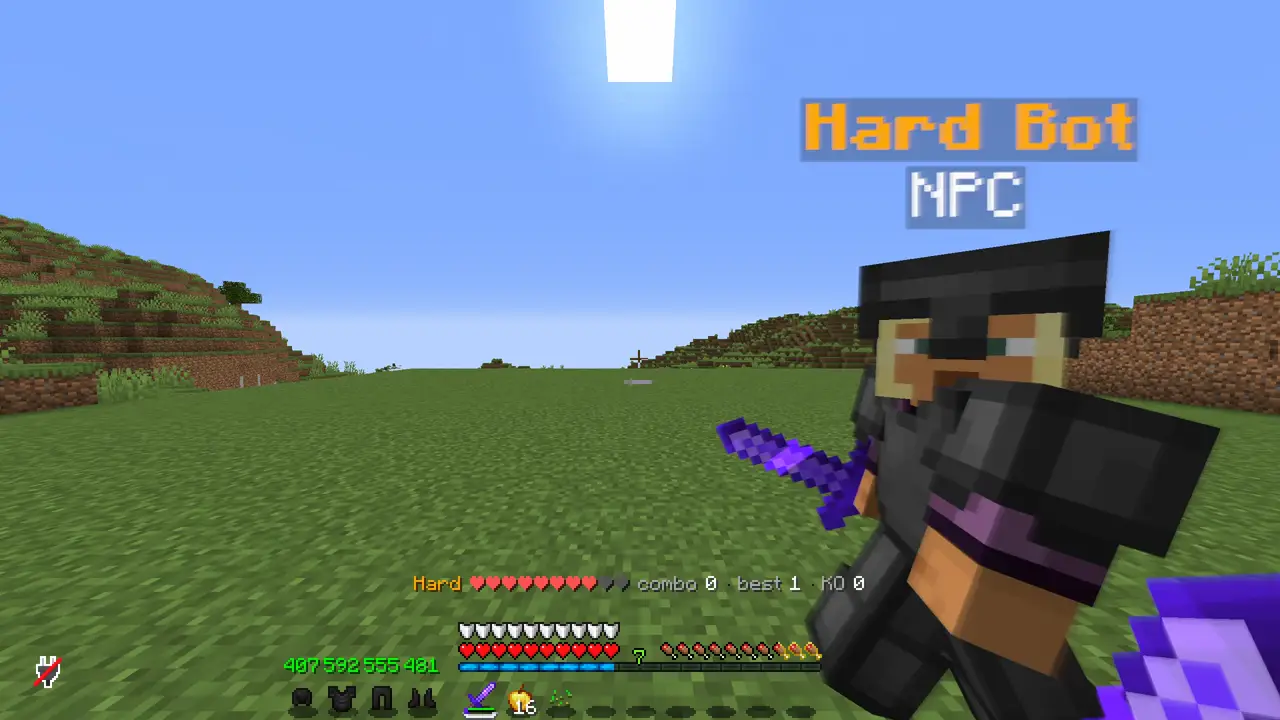
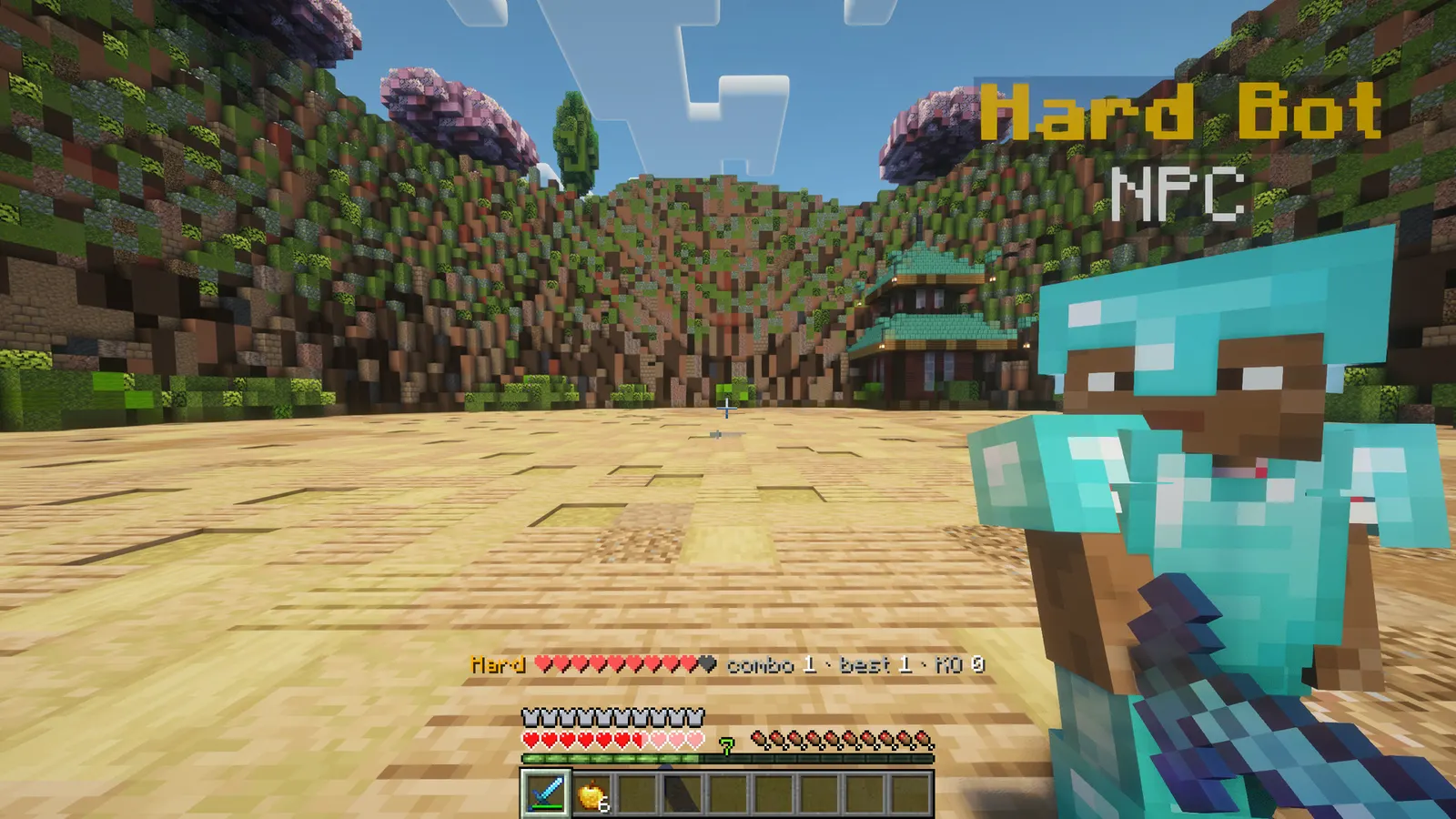
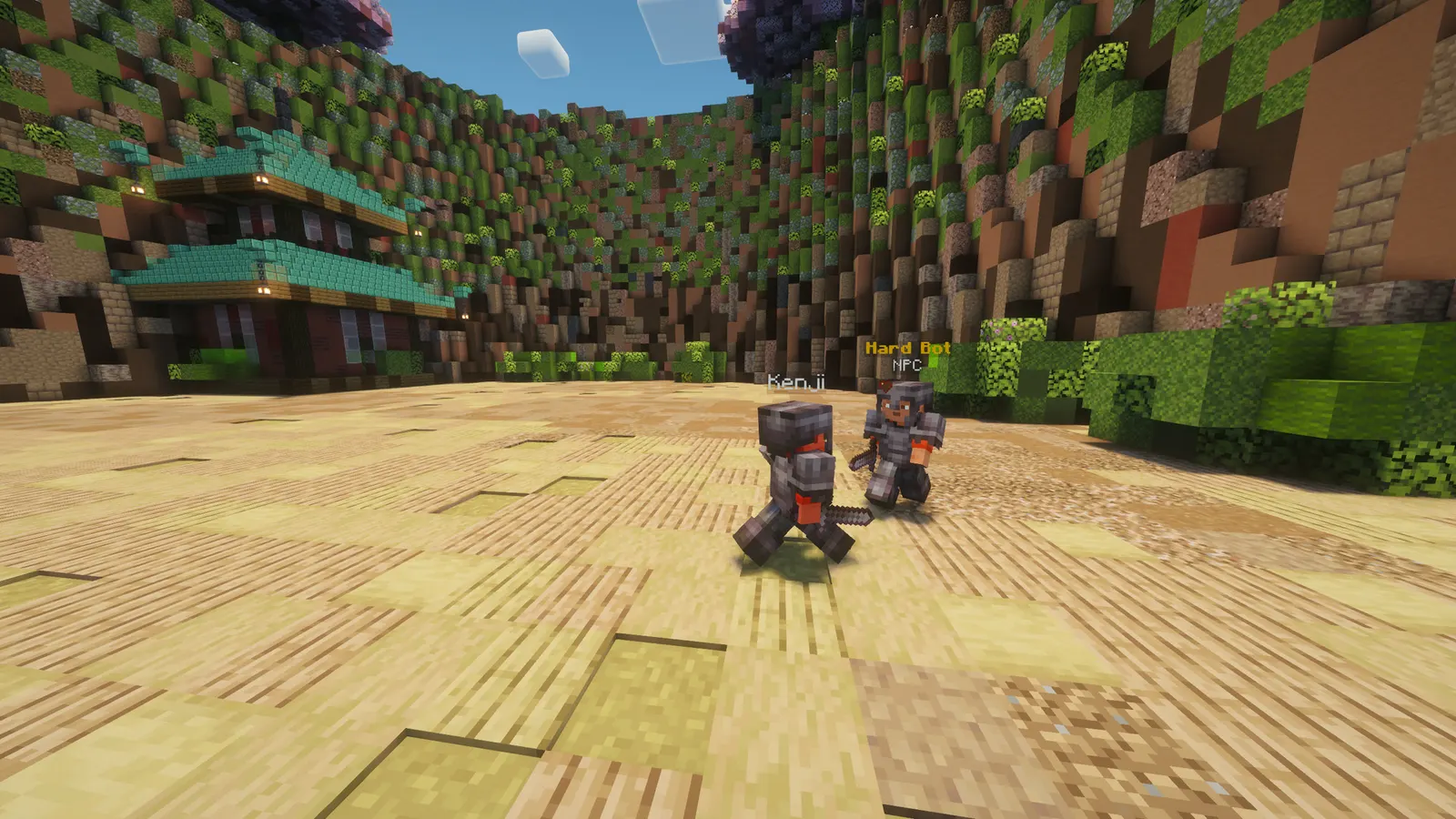
Players type /bot spawn and a bot with a real skin walks up and starts fighting. It sprints, strafes, jumps, takes knockback, gets combo'd and gets back up. Four difficulties out of the box, every number in the config, no NPC library needed.
Works on duel servers as a warm-up, on FFA and KitPvP servers as a practice arena, and on SMPs as a way to test gear and PvP without hurting anyone.
In short
- Players practise alone: /bot spawn and the fight starts
- Fights like a player: sprints, strafes, takes combos and gets back up
- Fair fights: the bot copies the player's armour and weapon
- Light on the server: built on Paper's mannequin entity, no NPC library
- Four difficulties out of the box, every number in the config
- Latest version
- 1.2.0
- Runs on
- Paper or Purpur 1.21.11 (or newer 1.21.x), Java 21
- BuiltByBit
- ArenaBots on BuiltByBit
What changed in 1.2.0
- All-time records: every player's best combo and knockouts are now kept in plugins/ArenaBots/stats.yml and survive restarts. Beating your own best combo shows "New personal best!" once per session, and the session summary adds your all-time numbers.
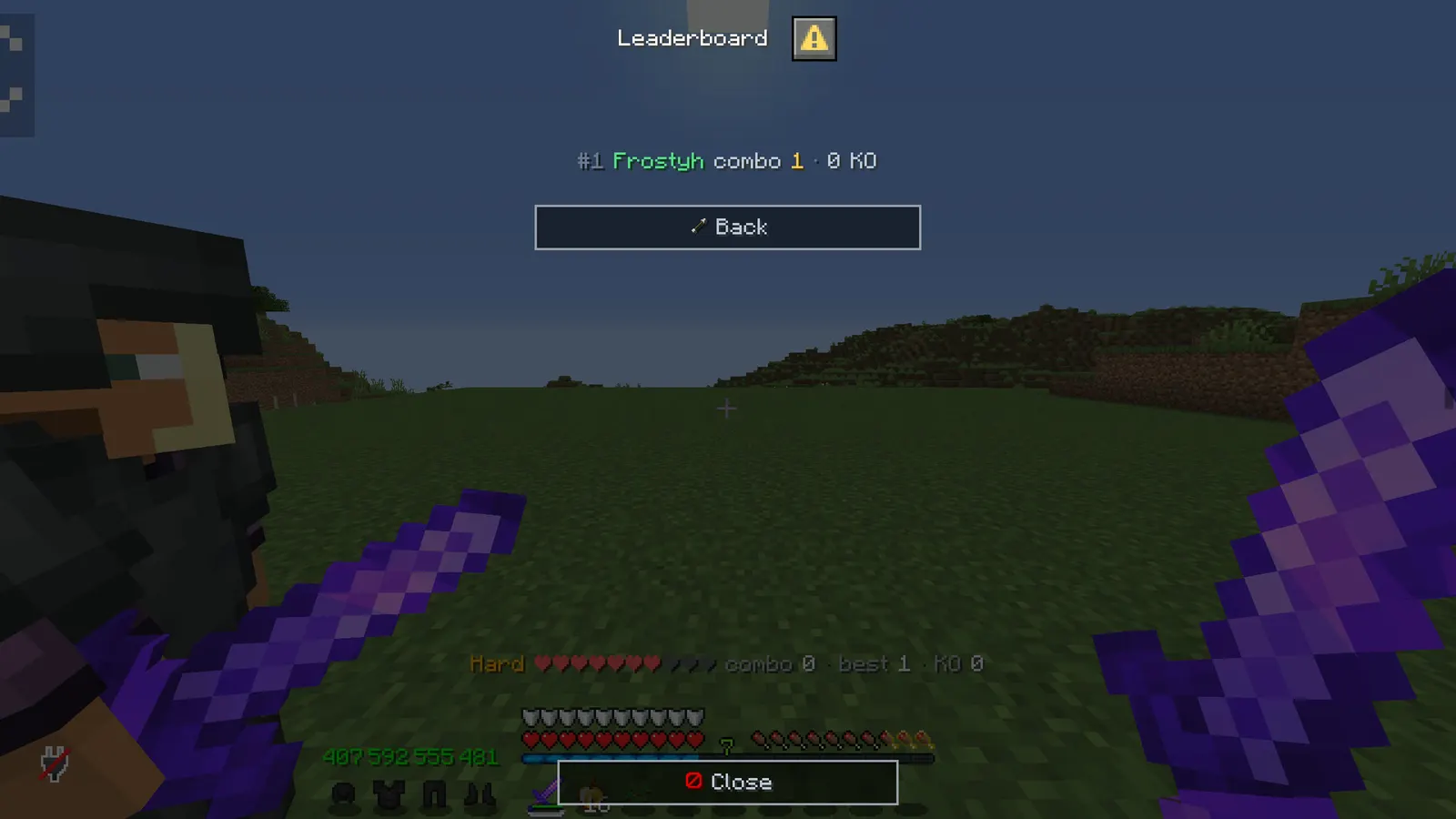
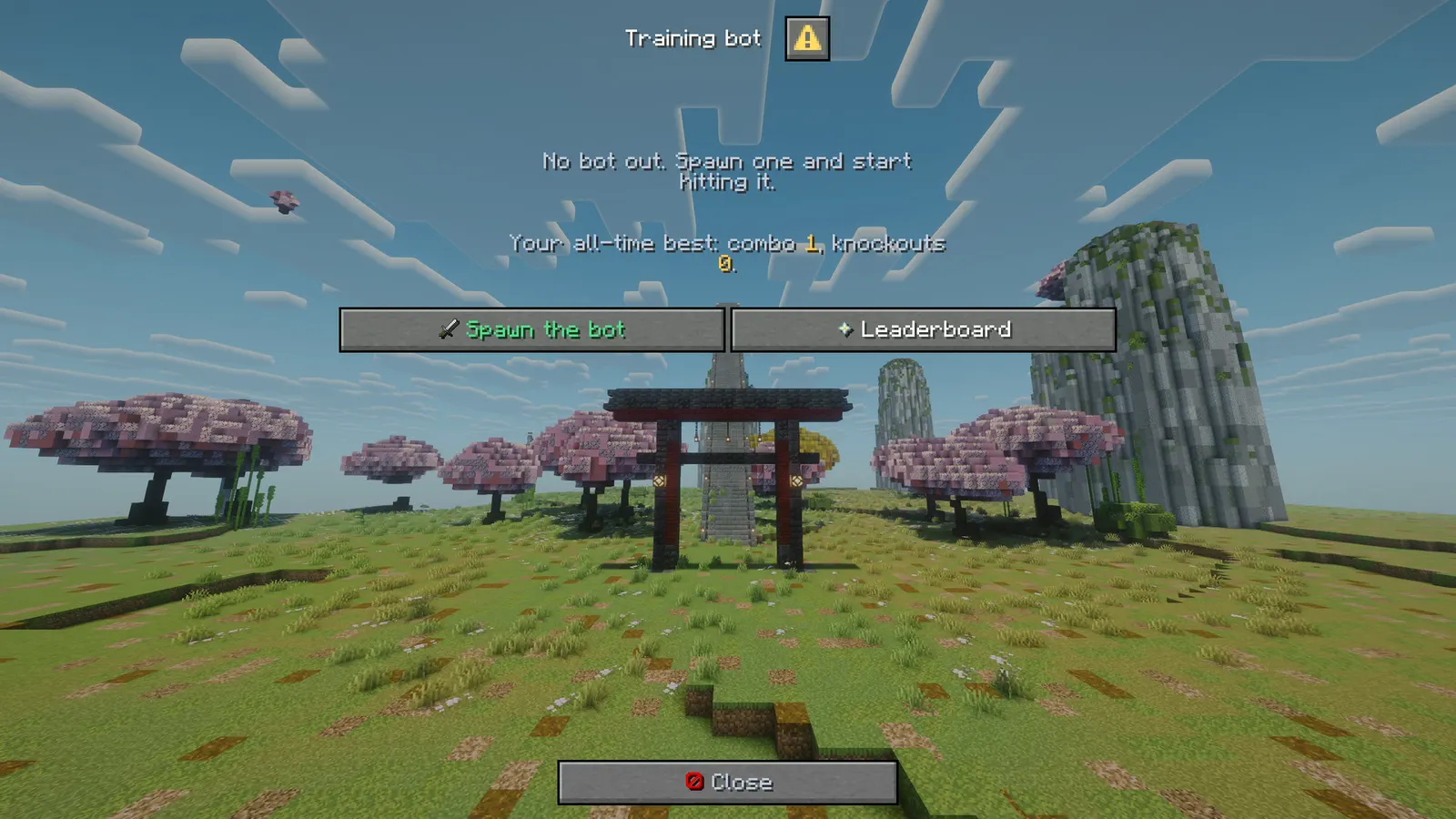
- New command /bot top: the leaderboard of best combos. Players see it as a dialog screen (also reachable from the "Leaderboard" button in /bot), the console and menu: false get chat lines. Uses arenabots.use.
- New admin command /bot resetstats <player> removes one player's records (arenabots.admin).
- PlaceholderAPI support (optional): %arenabots_has_bot%, %arenabots_difficulty%, %arenabots_combo%, %arenabots_session_best%, %arenabots_session_knockouts%, %arenabots_best_combo%, %arenabots_knockouts%, %arenabots_rank%, %arenabots_bots%, and %arenabots_top_<n>_name%, %arenabots_top_<n>_combo%, %arenabots_top_<n>_knockouts% for leaderboard holograms and scoreboards.
- Tab completion now suggests online player names for /bot skin and /bot spawn, and hides the admin subcommands from players without arenabots.admin.
- New config keys: records (true) and top-size (10). They work without touching your config.yml.
- Your existing config.yml keeps its old help line, so /bot top is not listed there until you add it or regenerate the file.
Features
01What makes it different
- Built on Paper's own mannequin entity: no Citizens or other NPC library to install and keep updated
- Every behaviour is a number in the config (speed, strafe, reach, reaction time, knockback recovery), so the difficulties are yours to tune
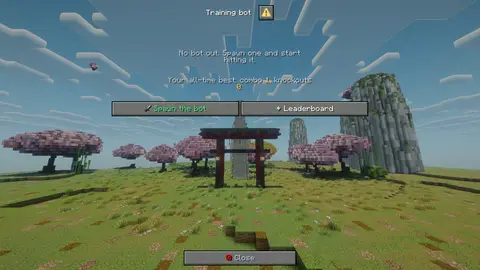
- The bot screen is a dialog window, not a chest, so the hotbar stays where it is between rounds
02What you get
- New in v1.3.0: All-time records: best combo and knockouts survive restarts, with a "New personal best!" when a player beats their own
- New in v1.3.0: Leaderboard: /bot top shows the best combos as a dialog screen, also from the Leaderboard button in /bot
- New in v1.3.0: PlaceholderAPI (optional): session, all-time and top-10 placeholders for scoreboards and leaderboard holograms
- One bot per player, spawned where they stand, removed with one command or when they leave
- Real player skins: the bot wears the owner's skin, or any name you give it (/bot skin Notch)
- Copies the player's armour and weapon so the fight is fair, or fights unarmed
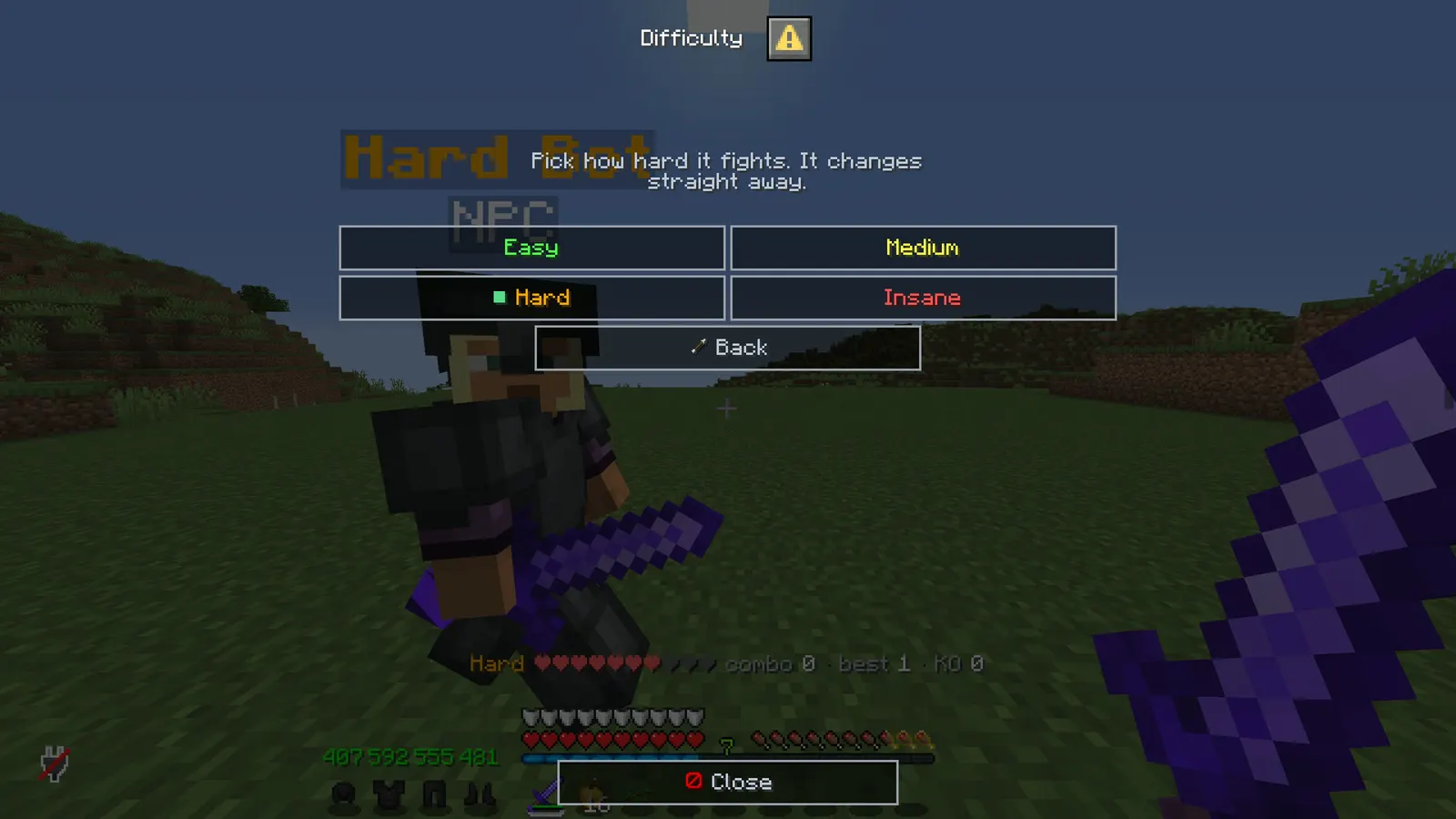
- Four difficulties shipped (Easy, Medium, Hard, Insane); add your own by copying a block in the config
- Every behaviour is a number: speed, strafe, distance it keeps, swing interval, accuracy, reach, jump chance, reaction time, knockback recovery
- Combo counter, best combo and knockout count in the action bar and a summary when the bot is removed
- Knockouts: the bot drops, then stands back up after a configurable delay
- Leash: a bot that gets pushed too far is brought back beside its owner
- Private by default: other players cannot hit your bot unless you allow it
- World allow-list so bots stay in your practice world
- No dependencies: built on the Paper mannequin entity, so it costs about what a zombie costs
- MiniMessage everywhere, every message editable
03The bot screen
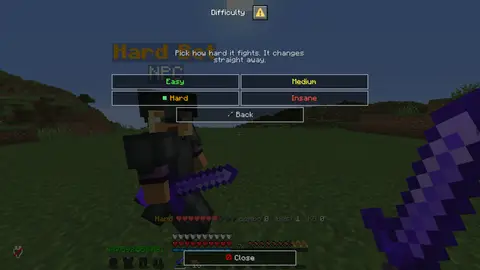
- /bot on its own opens a real Minecraft dialog window: spawn or put the bot away, copy your gear onto it, strip it, bring it to you, and read your session
- A difficulty screen lists every difficulty from config.yml with its speed, reach and hit chance, marks the one you are on, and switches the live bot the moment you click
- A field for a skin name, so the bot can wear the skin of whoever you are practising against
- The screen is a window, not a chest, so your hotbar stays where it is between rounds
menu: falseputs the plain help line back
Installation
Requirements
- Server
- Paper, or a Paper fork such as Purpur. Spigot and CraftBukkit won't work, because it uses Paper-only APIs.
- Minecraft
- 1.21.11 (or newer 1.21.x); plugin.yml api-version 1.21; built against Paper API 1.21.11
- Java
- 21 or newer
- Needs
- No other plugin
- Works with
PlaceholderAPI, when installed
The listing also says:
- No other plugins required
- No DRM, no licence key and no licence server; the code is not obfuscated
Steps
- Download
ArenaBots.jarfrom BuiltByBit. There's no licence key to enter. - Stop the server and put the jar in the
pluginsfolder. - Start the server. The plugin writes
plugins/ArenaBots/config.ymlwith the defaults listed under Configuration. - Change
config.ymlto fit your server. - Run
/bot reload(reload the config) to apply your changes, or restart the server.
Setup guide
- Drop ArenaBots.jar into /plugins and restart.
- Optional: set allowed-worlds to your practice or lobby world.
- Players run /bot spawn. That is the whole onboarding.
Duel / practice servers: put a "Practice" item or command in your lobby that runs /bot spawn hard. Players warm up while they wait in the queue.
FFA / KitPvP: give arenabots.use only in a training world, or set allowed-worlds so bots cannot be used inside the real arena.
SMP: leave anyone-can-hit off so a bot is a private target dummy; players test new gear against it without griefing anyone. If you want it as a perk, remove the default from arenabots.use and grant it to a rank.
Commands
Straight from plugin.yml. Where the permission column says "not set", plugin.yml puts no permission on the command itself; the nodes the plugin checks are under Permissions.
| Command | Aliases | Usage | What it does | Permission |
|---|---|---|---|---|
/bot | /arenabot /trainingbot | /bot <spawn|remove|difficulty|skin|gear|tp|stats|top> | Spawn and control your training bot. | not set |
Every subcommand
/bot spawn [difficulty] [skin]   Spawn your bot. Difficulty and skin are optional.
/bot remove                      Remove your bot and show the session summary.
/bot difficulty <name>           Change the difficulty of the bot you have out.
/bot skin <player>               Give the bot another player's skin.
/bot gear [clear]                Copy your current armour and weapon onto the bot, or strip it.
/bot tp                          Bring the bot to you.
/bot stats                       Combo, best combo and knockouts of this session.
/bot list                        (admin) Every bot that is out and who owns it.
/bot removeall                   (admin) Remove every bot.
/bot reload                      (admin) Reload the config.
/bot top                         The best-combo leaderboard.
/bot resetstats <player>         (admin) Remove one player's records.
Permissions
From plugin.yml.
| Node | Default | What it allows | Includes |
|---|---|---|---|
arenabots.use | everyone | Spawn and control a personal training bot, and see the leaderboard (/bot top). | none |
arenabots.admin | operators | Reload, list and remove every bot, and reset a player's records (/bot resetstats). | none |
Placeholders
Registered with PlaceholderAPI as arenabots. You need PlaceholderAPI installed for these to work.
| Placeholder | Shows |
|---|---|
%arenabots_has_bot% | yes or no |
%arenabots_difficulty% | the difficulty of the bot they have out, empty without one |
%arenabots_combo% | the combo they are on right now |
%arenabots_session_best% | best combo of this session |
%arenabots_session_knockouts% | knockouts of this session |
%arenabots_best_combo% | all-time best combo |
%arenabots_knockouts% | all-time knockouts |
%arenabots_rank% | place on the leaderboard, empty when not on it |
%arenabots_bots% | how many bots are out on the server |
%arenabots_top_<n>_name% | name on place n of the leaderboard (1 is the best) |
%arenabots_top_<n>_combo% | best combo on place n |
%arenabots_top_<n>_knockouts% | knockouts on place n |
%arenabots_name% | no description |
Configuration
The default files exactly as they ship in the jar, comments included. The plugin writes them to plugins/ArenaBots/ the first time it starts.
config.yml
| Key | Default | The comment above it |
|---|---|---|
menu | true | Bare /bot opens the menu instead of printing the help. |
default-difficulty | "medium" | Which difficulty /bot spawn uses when none is given. |
allowed-worlds | [] (empty list) | Worlds the bot may be spawned in. Empty means anywhere. |
copy-gear-on-spawn | true | Copy the player's armour and held item onto the bot when it spawns (/bot gear does it later too). |
anyone-can-hit | false | Whether other players may hit somebody's bot. Off keeps a training session private. |
show-name | true | Show the difficulty name above the bot's head. |
respawn-ticks | 40 | Ticks after a knockout before the bot stands back up. |
combo-window-millis | 1500 | Hits within this many milliseconds of each other count as one combo. |
leash-distance | 30 | If the bot ends up further than this from its owner it is teleported back beside them. |
records | true | All-time records per player (best combo and knockouts), kept in plugins/ArenaBots/stats.yml and shown by /bot top, the menu and the PlaceholderAPI placeholders. false stops recording; the file is kept. |
top-size | 10 | How many places /bot top and the leaderboard screen show. |
actionbar | "{bot} {hearts} <gray>combo</gray> <white>{combo}</white> <dark_gr..." | The line above the hotbar while a bot is out. |
difficulties | section, 4 keys | Difficulties. Speeds are blocks per tick (a walking player is ~0.22, sprinting ~0.28). |
theme | section, 11 keys | Every message below is written against these names, not against hex codes: <accent>Open</accent> rather than <#f2b616>Open</#f2b616>. Change a colour here and it changes on every screen at once. Ordinary MiniMessage still works, so <gradient:#a:#b> and... |
messages | section, 68 keys | none |
review-reminder | true | One thank-you line with the BuiltByBit review link: once in the console after install and once in chat for the first operator who joins. It never repeats and sends nothing anywhere. false turns it off. |
plugins/ArenaBots/config.yml208 lines
# ArenaBots - a training bot that fights back.
#
# One bot per player, spawned where they stand. Everything the bot does is tuned here; the code
# never mentions a difficulty by name, so add your own or retune the four shipped ones freely.
# Text uses MiniMessage (<red>, <bold>, <gradient:#hex:#hex>, ...).

# Bare /bot opens the menu instead of printing the help.
menu: true

# Which difficulty /bot spawn uses when none is given.
default-difficulty: medium

# Worlds the bot may be spawned in. Empty means anywhere.
allowed-worlds: []

# Copy the player's armour and held item onto the bot when it spawns (/bot gear does it later too).
copy-gear-on-spawn: true

# Whether other players may hit somebody's bot. Off keeps a training session private.
anyone-can-hit: false

# Show the difficulty name above the bot's head.
show-name: true

# Ticks after a knockout before the bot stands back up.
respawn-ticks: 40

# Hits within this many milliseconds of each other count as one combo.
combo-window-millis: 1500

# If the bot ends up further than this from its owner it is teleported back beside them.
leash-distance: 30

# All-time records per player (best combo and knockouts), kept in plugins/ArenaBots/stats.yml and
# shown by /bot top, the menu and the PlaceholderAPI placeholders. false stops recording; the file is kept.
records: true

# How many places /bot top and the leaderboard screen show.
top-size: 10

# The line above the hotbar while a bot is out.
actionbar: "{bot} {hearts} <gray>combo</gray> <white>{combo}</white> <dark_gray>·</dark_gray> <gray>best</gray> <white>{best}</white> <dark_gray>·</dark_gray> <gray>KO</gray> <white>{ko}</white>"

# Difficulties. Speeds are blocks per tick (a walking player is ~0.22, sprinting ~0.28).
#   speed                  how fast it closes distance
#   strafe                 0..1, how much of its movement is sideways
#   keep-distance          the gap it tries to hold from you
#   attack-interval-ticks  ticks between swings (20 = once a second)
#   accuracy               chance a swing in range connects
#   damage-factor          multiplier on its weapon's damage
#   reach                  how close it must be to swing
#   jump-chance            per-tick chance of a hop while approaching
#   recover-ticks          how long it drifts with your knockback before steering again (low = resets your combo)
#   reaction-ticks         how long after you come into range before its first swing
difficulties:
  easy:
    label: "Easy"
    color: "<green>"
    speed: 0.14
    strafe: 0.1
    keep-distance: 2.4
    attack-interval-ticks: 26
    accuracy: 0.55
    damage-factor: 0.75
    reach: 3.0
    jump-chance: 0.0
    recover-ticks: 16
    reaction-ticks: 16
  medium:
    label: "Medium"
    color: "<yellow>"
    speed: 0.18
    strafe: 0.4
    keep-distance: 2.1
    attack-interval-ticks: 18
    accuracy: 0.75
    damage-factor: 0.9
    reach: 3.0
    jump-chance: 0.015
    recover-ticks: 11
    reaction-ticks: 9
  hard:
    label: "Hard"
    color: "<gold>"
    speed: 0.2158
    strafe: 0.7
    keep-distance: 1.9
    attack-interval-ticks: 13
    accuracy: 0.9
    damage-factor: 1.0
    reach: 3.05
    jump-chance: 0.03
    recover-ticks: 7
    reaction-ticks: 5
  insane:
    label: "Insane"
    color: "<red>"
    speed: 0.2158
    strafe: 0.9
    keep-distance: 1.8
    attack-interval-ticks: 10
    accuracy: 1.0
    damage-factor: 1.0
    reach: 3.2
    jump-chance: 0.05
    recover-ticks: 4
    reaction-ticks: 3

# ------------------------------------------------------------------------------------------------
# THEME
# ------------------------------------------------------------------------------------------------
# Every message below is written against these names, not against hex codes: <accent>Open</accent>
# rather than <#f2b616>Open</#f2b616>. Change a colour here and it changes on every screen at
# once. Ordinary MiniMessage still works, so <gradient:#a:#b> and <#ff0000> are fine anywhere.
theme:
  accent: "#f2b616"     # your colour: headings and anything the player is meant to click
  accent2: "#f8d77f"    # a lighter accent, for a second level of emphasis
  title: "#f4f7ff"      # screen titles
  text: "#c2ccdd"       # ordinary prose
  muted: "#6b7a94"      # hints, separators, anything the eye should skip
  value: "#ffffff"      # the numbers and names the player opened the screen to read
  good: "#57e08a"
  warn: "#ffc857"
  bad: "#ff6b6b"
  small-caps: false     # ᴇхᴀᴍᴘʟᴇ - a garnish; whole menus in it read badly
  # Real Minecraft item pictures beside the buttons and in the chest screens. Drawn from the
  # client's own textures, so there is nothing to install and no resource pack: it needs a
  # 1.21.9 or newer client, and older ones simply see the buttons as words.
  item-icons: true

messages:
  prefix: "<warn><bold>Bots</bold></warn> <muted>»</muted> "
  help: "<text>/bot spawn [difficulty] [skin] <muted>·</muted> /bot remove <muted>·</muted> /bot difficulty <name> <muted>·</muted> /bot skin <player> <muted>·</muted> /bot gear [clear] <muted>·</muted> /bot tp <muted>·</muted> /bot stats <muted>·</muted> /bot top</text>"
  no-permission: "<bad>You cannot do that.</bad>"
  spawned: "<value>Bot up: </value><warn>{difficulty}</warn><value>. Hit it. </value><text>/bot remove when you are done.</text>"
  spawn-failed: "<bad>The bot could not be spawned here. </bad><text>The server console has the details.</text>"
  no-bot: "<text>You have no bot out. </text><value>/bot spawn</value>"
  difficulty-set: "<value>Difficulty: </value><warn>{difficulty}</warn>"
  unknown-difficulty: "<bad>Pick one of: </bad><value>{list}</value>"
  usage-skin: "<text>/bot skin <player></text>"
  skin-set: "<value>Skin: </value><warn>{name}</warn>"
  skin-unknown: "<bad>No skin found for </bad><value>{name}</value><bad>.</bad>"
  gear-copied: "<value>The bot is wearing what you are wearing.</value>"
  gear-cleared: "<value>The bot is unarmed.</value>"
  brought: "<value>Here it is.</value>"
  knockout: "<warn><bold>Knockout!</bold></warn> <text>That is </text><value>{count}</value><text>. It gets back up in a moment.</text>"
  summary: "<value>Session: best combo </value><warn>{best}</warn><value>, knockouts </value><warn>{ko}</warn><value>.</value>"
  left-behind: "<text>Your bot stayed in the other world.</text>"
  wrong-world: "<bad>Bots are not allowed in this world.</bad>"
  reloaded: "<value>Config reloaded.</value>"
  removed-all: "<value>Removed </value><warn>{count}</warn><value> bot(s).</value>"
  list-header: "<value>Bots out: </value><warn>{count}</warn>"
  list-row: "<text> - </text><value>{owner}</value><text> · {difficulty}</text>"

  # All-time records and the leaderboard.
  record-beaten: "<good><bold>New personal best!</bold></good> <text>A </text><value>{combo}</value><text> hit combo, and counting.</text>"
  summary-record: "<text>All-time: best combo </text><value>{best}</value><text>, knockouts </text><value>{ko}</value><text>.</text>"
  top-header: "<value>Best combos of all time</value>"
  top-row: "<muted>#{place}</muted> <value>{player}</value> <text>combo</text> <warn>{combo}</warn> <muted>·</muted> <text>{ko} KO</text>"
  top-row-you: "<muted>#{place}</muted> <good>{player}</good> <text>combo</text> <warn>{combo}</warn> <muted>·</muted> <text>{ko} KO</text>"
  top-your-place: "<text>You are </text><value>#{place}</value><text> with a best combo of </text><warn>{combo}</warn><text>.</text>"
  top-empty: "<text>No records yet. Spawn a bot and land a combo.</text>"
  usage-resetstats: "<text>/bot resetstats <player></text>"
  stats-reset: "<value>Records of </value><warn>{player}</warn><value> removed.</value>"
  stats-unknown: "<bad>No records for </bad><value>{player}</value><bad>.</bad>"
  # What %arenabots_has_bot% prints. "yes" and "no" stay in quotes: YAML reads them bare as true or false.
  "yes": "yes"
  "no": "no"

  # The /bot screen. Every line here is a screen title, a button label or a tooltip.
  menu-title: "<value>Training bot</value>"
  menu-close: "<white><icon:close></white><text>Close</text>"
  menu-back: "<white><icon:back></white><text>Back</text>"
  menu-back-tip: "<text>Back to the first screen.</text>"
  menu-no-bot: "<text>No bot out. Spawn one and start hitting it.</text>"
  menu-bot: "<text>Bot out on </text><warn>{difficulty}</warn><text>. Best combo {combo}, knockouts {knockouts}.</text>"
  menu-wrong-world: "<bad>Bots are not allowed in this world.</bad>"
  menu-spawn: "<white><icon:arena></white><good>Spawn the bot</good>"
  menu-respawn: "<good>Spawn it again</good>"
  menu-spawn-tip: "<text>Puts a fresh bot where you stand.</text>"
  menu-remove: "<white><icon:delete></white><bad>Put it away</bad>"
  menu-remove-tip: "<text>Remove the bot and show your session.</text>"
  menu-difficulty: "<white><icon:redstone></white><value>Difficulty: </value><warn>{difficulty}</warn>"
  menu-difficulty-tip: "<text>How fast, how far and how often it hits.</text>"
  menu-difficulty-title: "<value>Difficulty</value>"
  menu-difficulty-intro: "<text>Pick how hard it fights. It changes straight away.</text>"
  menu-difficulty-pick: "<text>{difficulty}</text>"
  menu-difficulty-current: "<good>■</good> {difficulty}"
  menu-difficulty-line: "<text>Speed {speed} · reach {reach} · hits {accuracy}%</text>"
  menu-gear: "<white><icon:kit></white><value>Copy my gear</value>"
  menu-gear-tip: "<text>The bot wears what you are wearing.</text>"
  menu-gear-clear: "<white><icon:delete></white><value>Strip its gear</value>"
  menu-gear-clear-tip: "<text>Fight it unarmed and unarmoured.</text>"
  menu-bring: "<white><icon:link></white><value>Bring it here</value>"
  menu-bring-tip: "<text>Teleport the bot to you.</text>"
  menu-field-skin: "<text>Skin from player</text>"
  menu-skin: "<white><icon:skin></white><value>Wear this skin</value>"
  menu-skin-tip: "<text>Put another player's skin on the bot.</text>"
  menu-stats: "<white><icon:stats></white><value>My session</value>"
  menu-stats-tip: "<text>Best combo and knockouts so far.</text>"
  menu-record: "<text>Your all-time best: combo </text><warn>{best}</warn><text>, knockouts </text><warn>{ko}</warn><text>.</text>"
  menu-top: "<white><icon:top></white><value>Leaderboard</value>"
  menu-top-tip: "<text>The best combos anyone has landed on a bot.</text>"
  menu-top-title: "<value>Leaderboard</value>"

# One thank-you line with the BuiltByBit review link: once in the console after install and once
# in chat for the first operator who joins. It never repeats and sends nothing anywhere. false turns it off.
review-reminder: true
Config guide
The short annotated version from the listing. If it and the files above disagree, the files are what actually ships.
default-difficulty: medium     which one /bot spawn uses without an argument
allowed-worlds: []             empty = anywhere, otherwise a list of world names
copy-gear-on-spawn: true       bot starts with the owner's armour and weapon
anyone-can-hit: false          let other players hit somebody's bot
respawn-ticks: 40              how long a knocked-out bot stays down
combo-window-millis: 1500      hits closer together than this are one combo
leash-distance: 30             bring the bot back if it gets further away than this
A difficulty looks like this. Copy the block, rename it, change the numbers, done:
difficulties:
  hard:
    label: "Hard"
    color: "<gold>"
    speed: 0.2158            blocks per tick (a sprinting player is ~0.28)
    strafe: 0.7              0..1, how much of its movement is sideways
    keep-distance: 1.9       the gap it tries to hold
    attack-interval-ticks: 13
    accuracy: 0.9            chance a swing in range connects
    damage-factor: 1.0       multiplier on its weapon damage
    reach: 3.05
    jump-chance: 0.03        per-tick chance of a hop while approaching
    recover-ticks: 7         how long it drifts with your knockback (low = resets your combo)
    reaction-ticks: 5        delay before its first swing once you are in range
FAQ
Which servers and versions does it run on?
It needs Paper or a Paper fork like Purpur, because it uses Paper-only APIs (the dialog API for its menus, Adventure text components, Paper player profiles). Spigot and CraftBukkit won't work. The listing says Minecraft 1.21.11 (or newer 1.21.x). plugin.yml declares api-version 1.21, the jar is built against Paper API 1.21.11, and it needs Java 21 or newer.
Does it need other plugins?
No, it runs without any other plugin (plugin.yml has no hard dependencies). Optional: PlaceholderAPI (softdepend), used when it's there.
How do I apply config changes?
Edit plugins/ArenaBots/config.yml and run /bot reload (reload the config). Restarting works too.
Does it run on Folia, or for Bedrock players?
I haven't tested it on Folia, and plugin.yml doesn't declare folia-supported. I haven't tested Bedrock players through Geyser either.
Is there DRM or a licence key?
No. There is nothing to activate and no licence server to reach, and the code is not obfuscated.
How long does setup take?
Drop the jar into /plugins and restart. The setup guide above has 3 short steps.
Can I show the leaderboard on a hologram?
Yes. With PlaceholderAPI installed, %arenabots_top_<n>_name% and %arenabots_top_<n>_combo% work in any hologram or scoreboard plugin.
Links
- BuiltByBit
- ArenaBots
- Support
- discord.gg/KG4ubAZEuw
- Everything
- The Complete Collection on BuiltByBit
- More plugins
- All my plugins
- Custom work
- Commissions
Support
Questions, bugs or ideas: the active support Discord or the discussion tab on BuiltByBit. When something breaks, include your server version and the error from the console.