 Frostyh

Overview
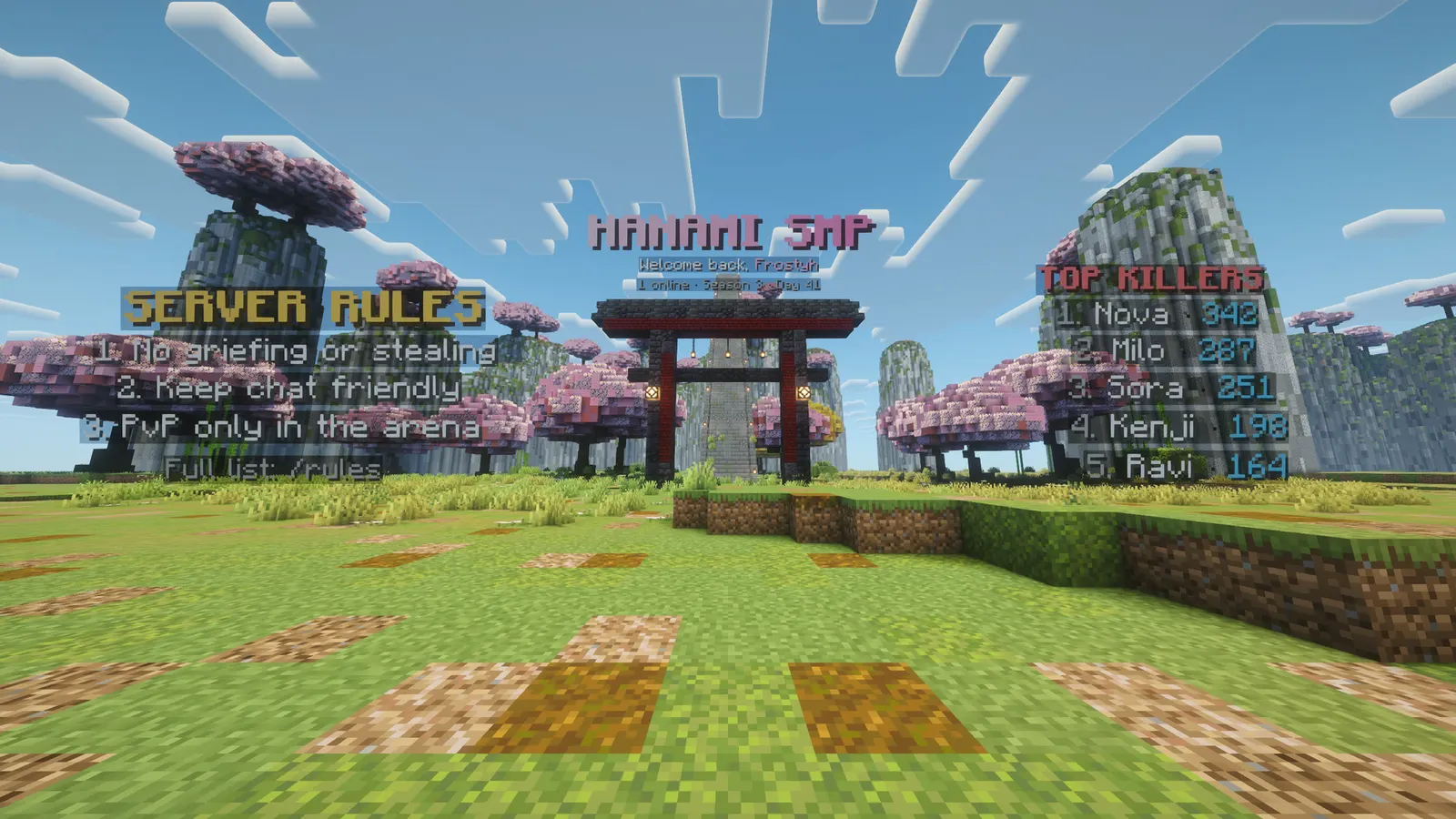
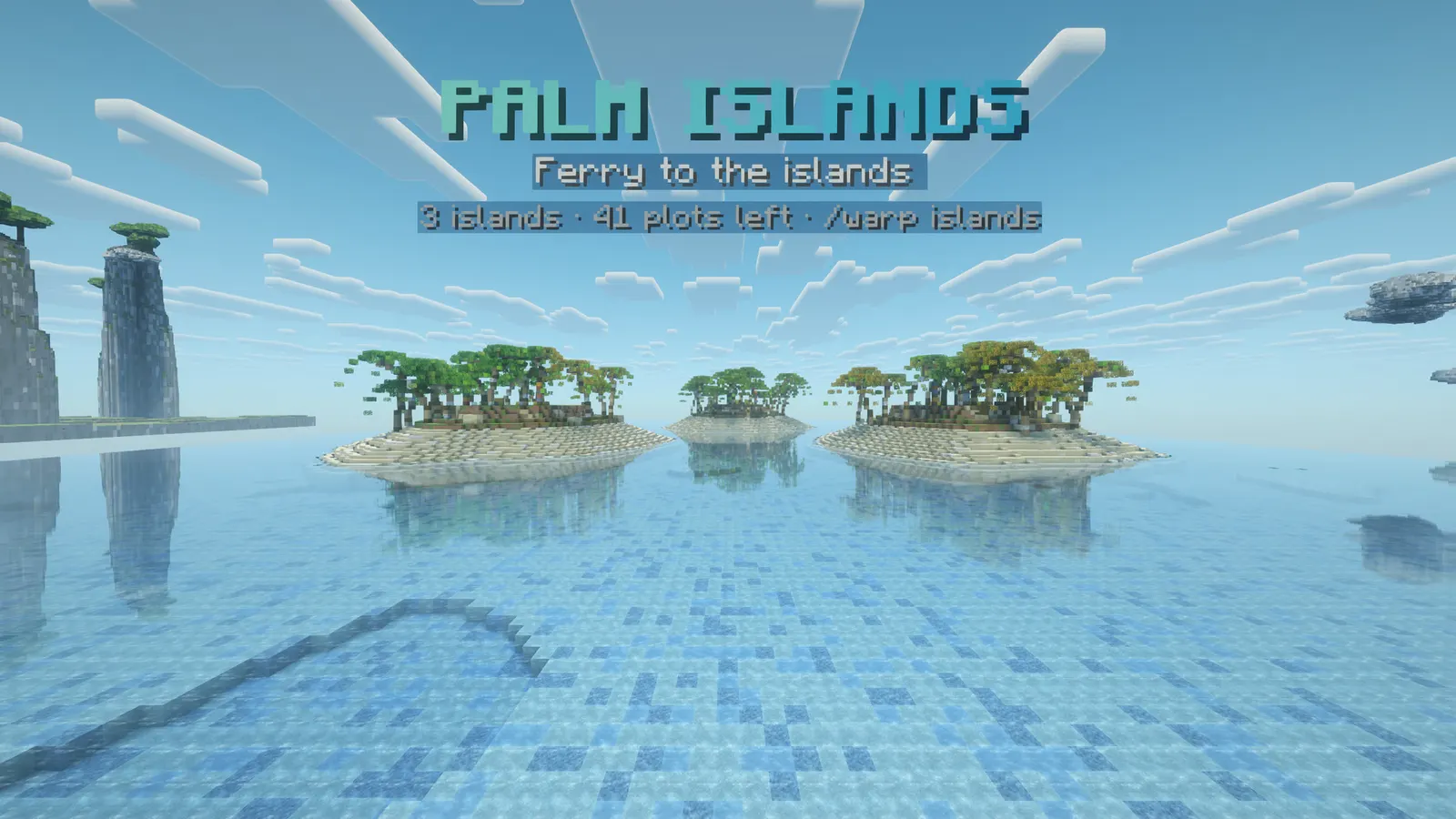
Floating text that stays crisp at any distance, built on the game's own text displays
Armour stands went out with 1.19. A hologram here is a stack of text displays, the same thing the game uses for floating text: crisp at any distance, with a real background, a real scale, and almost no cost to the server. No packet library, no dependencies, and nothing to install beside it.
In short
- Text displays, not armour stands: crisp and cheap
- Placeholders and six animations
- Conditions and a copy per viewer
- Leaderboards and an editor in game
- No packet library, no dependencies
- Latest version
- 1.2.1
- Runs on
- Paper or Purpur 1.21.11 (or a newer 1.21.x), Java 21
- BuiltByBit
- Holograms on BuiltByBit
What changed in 1.2.1
- Fixed: a typewriter line with colour tags could show half a tag while it typed, for example "pagoda</white". It now types only the visible letters, and every letter has its final colour from the first frame, gradients included.
- Fixed: a typewriter line with a speed above 1 stopped before the end of a long line. Speed now sets how many letters appear per step, and every line types out in full.
- No config changes. Drop in the new jar and restart.
Features
01What makes it different
- Text displays instead of armour stands: crisp at any distance and cheap for the server
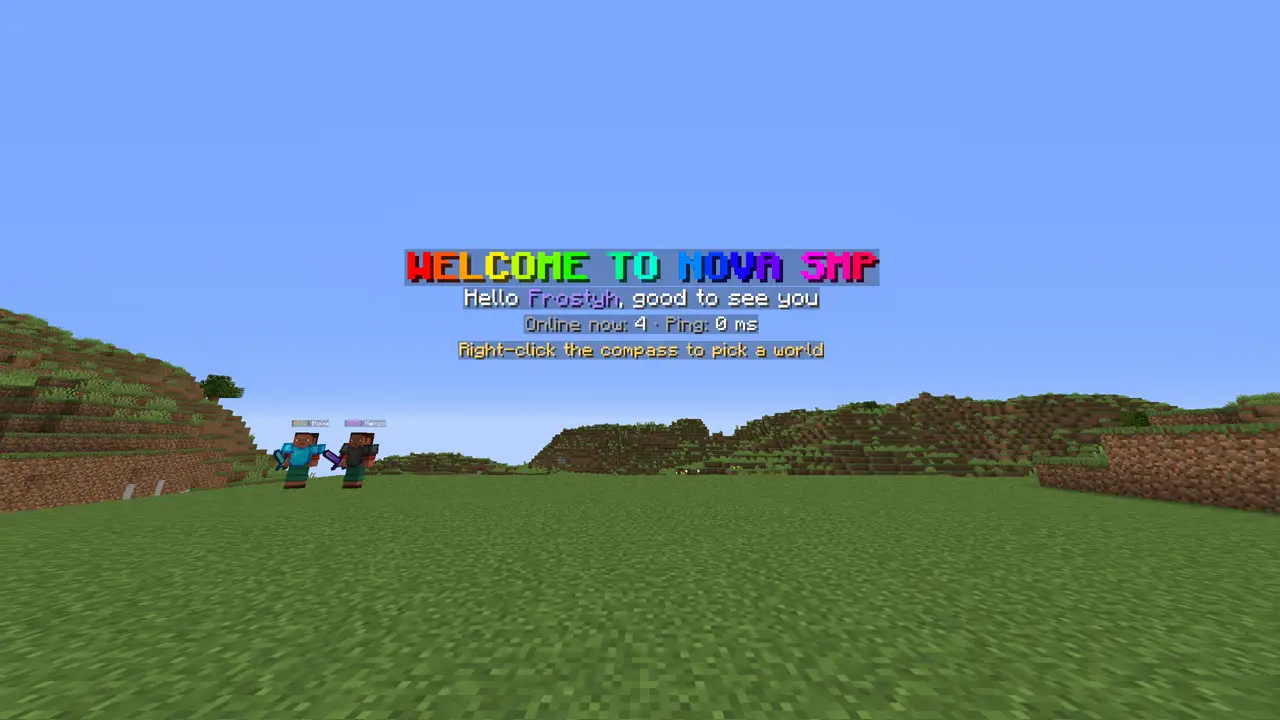
- Text with {player} or a personal placeholder gets its own copy per viewer, so nobody reads somebody else's name
- Every line is tagged, so leftovers are cleared on start after a crash instead of piling up in your world
02What you get
- New in v1.3.0: Clone: /hologram clone copies a hologram with every line, look, condition and leaderboard
- New in v1.3.0: Insert and inspect lines: /hologram insertline and /hologram info, which works from the console
- New in v1.3.0: Find them: /hologram near lists holograms around you, nearest first, click to teleport
- As many lines as you like, each with its own size, shadow, background colour and see-through setting
- Six animations: bob, pulse, rainbow, typewriter, spin, or none, per line, at the speed you set
- Placeholders that update themselves: {online} {max} {tps} {server} {world}, and with PlaceholderAPI installed, every placeholder it knows
- A copy per viewer when it needs one: a hologram whose text says {player} or uses a personal placeholder is built for each player nearby and hidden from everybody else, so nobody reads somebody else's name
- Shown to the right people: a permission, or a condition like %vault_eco_balance% > 1000, decides who sees it, per player, live
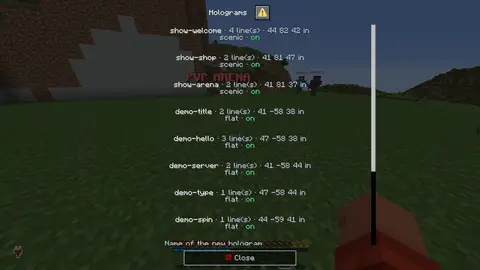
- Edited in game: type a line into a field on a screen, or use the commands, and the floating text changes while you stand in front of it
- Clean after a crash: every line is tagged, so leftovers are cleared on start instead of piling up in your world
03Leaderboards
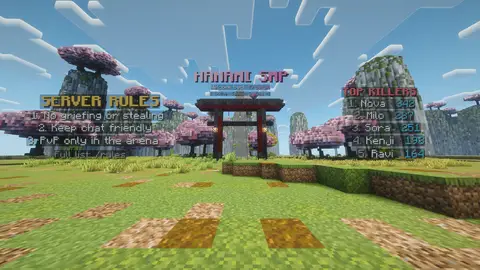
- A hologram that ranks people: one command turns any hologram into a top list that writes its own lines and keeps them up to date
- Counted by the plugin: kills, deaths, kill/death, playtime and times joined are tracked here, so a fresh server has a working leaderboard with nothing else installed
- Money too, read from Vault when an economy plugin is present, offline players included
- Any PlaceholderAPI number can be ranked with papi:%placeholder%. Said plainly: PlaceholderAPI cannot be asked about everybody at once, so the value is sampled while a player is online and the last one they had is what the board ranks
- Written how you like it: the header and the row format are yours, with {rank} {player} {value}, and the whole board wears the styling of the first line
- One to fifteen places, changed with a button while you watch it
04The editor
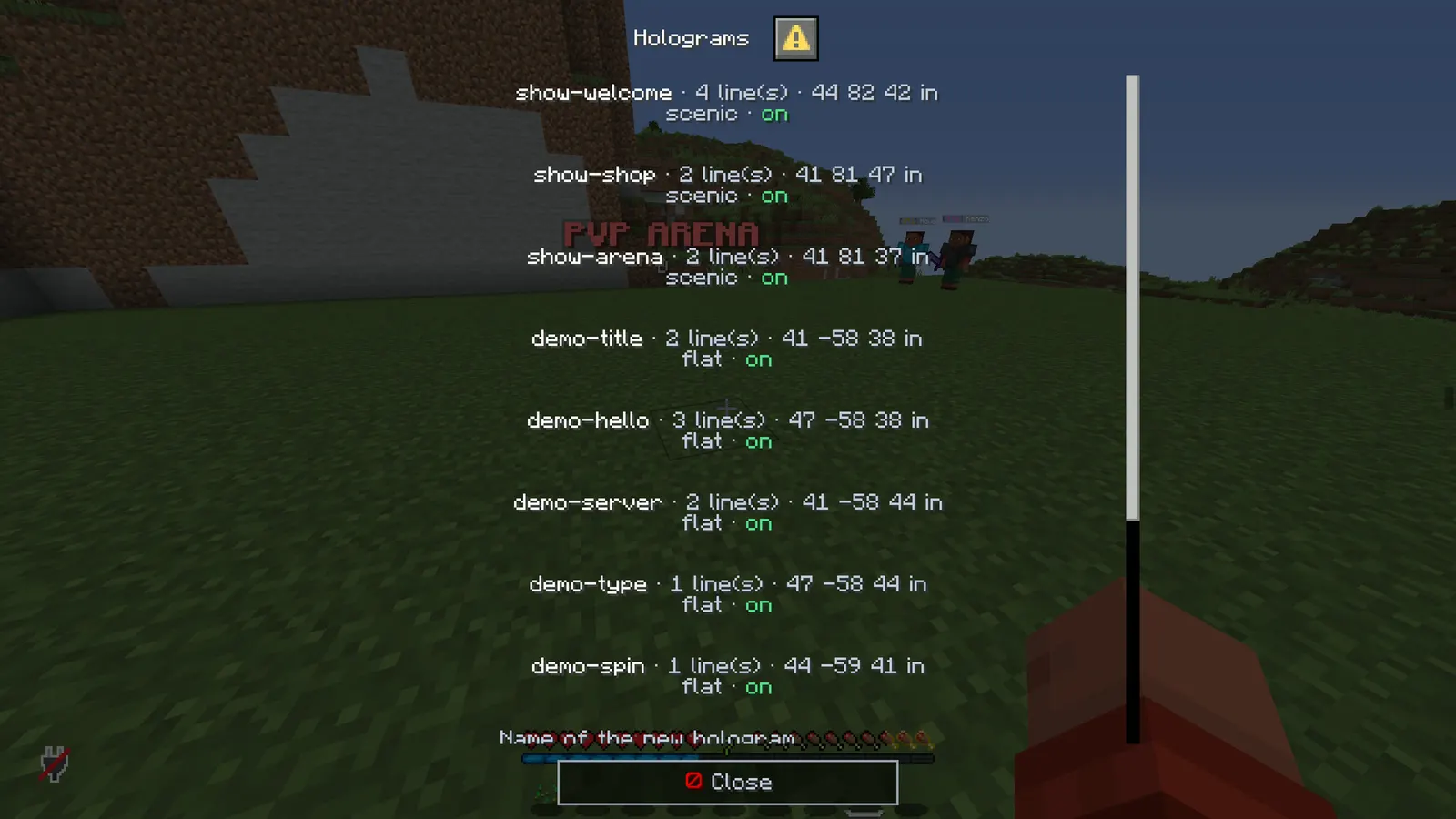
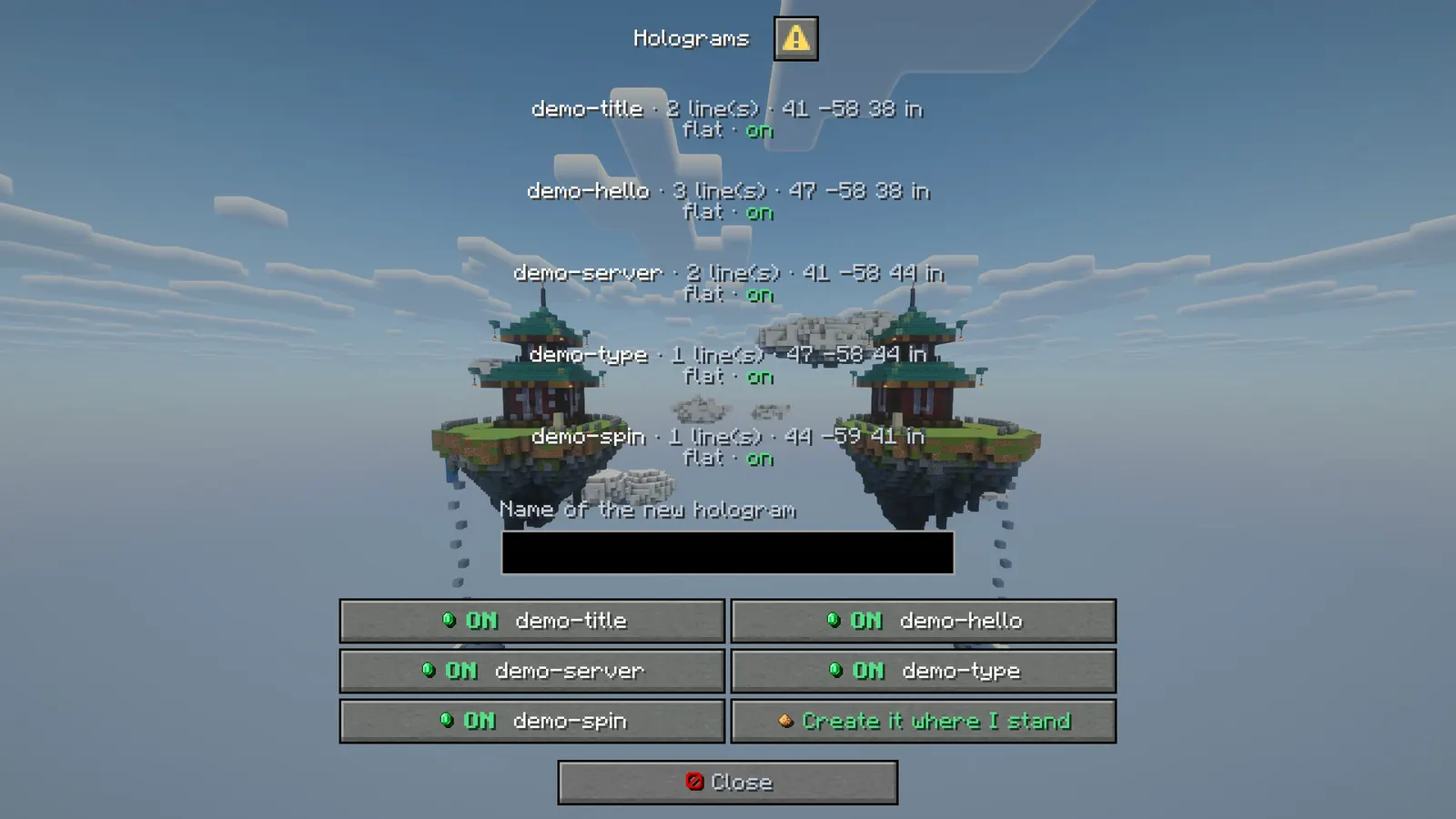
- /holograms opens a real Minecraft dialog window with every hologram: how many lines, where it is, and whether it is showing
- Open one and the lines are listed with their animation; a text field and a line picker do the editing
- Buttons for add, replace, remove, next animation, bigger, smaller, permission, move it here, go to it, hide and delete
- Creating one is a name in a field and a button; it appears where you stand
menu: falsekeeps the commands only
Installation
Requirements
- Server
- Paper, or a Paper fork such as Purpur. Spigot and CraftBukkit won't work, because it uses Paper-only APIs.
- Minecraft
- 1.21.11 (or a newer 1.21.x); plugin.yml api-version 1.21; built against Paper API 1.21.11
- Java
- 21 or newer
- Needs
- No other plugin
- Works with
PlaceholderAPI, when installed
The listing also says:
- PlaceholderAPI is optional, and only needed for its placeholders
- No DRM, no licence key and no licence server; the code is not obfuscated
Steps
- Download
Holograms.jarfrom BuiltByBit. There's no licence key to enter. - Stop the server and put the jar in the
pluginsfolder. - Start the server. The plugin writes
plugins/Holograms/config.ymlwith the defaults listed under Configuration. - Change
config.ymlto fit your server. - Run
/hologram reload(read holograms.yml again) to apply your changes, or restart the server.
Setup guide
- Drop Holograms.jar into /plugins and restart.
- Stand where you want the text and run /hologram create spawn.
- Add the rest of the lines with /hologram addline spawn <text>, or open /holograms and type them into the field.
- Put a placeholder in a line, for example {online} of {max} online, and watch it count.
- Give a line an animation from the editor if you want it to move.
Commands
Straight from plugin.yml. Where the permission column says "not set", plugin.yml puts no permission on the command itself; the nodes the plugin checks are under Permissions.
| Command | Aliases | Usage | What it does | Permission |
|---|---|---|---|---|
/hologram | /holo /hd | /hologram create|delete|addline|insertline|setline|removeline|info|clone|move|moveto|nudge|tp|near|toggle|permission|top|untop|list|reload | Make and edit holograms. | not set |
/holograms | /holos | /holograms | The hologram editor. | not set |
Every subcommand
/holograms                        The editor screen.
/hologram create <id> [text]      A new hologram where you stand.
/hologram addline <id> <text>     Add a line at the bottom.
/hologram setline <id> <n> <text> Replace line n.
/hologram removeline <id> <n>     Remove line n.
/hologram move <id>               Move it to where you stand.
/hologram tp <id>                 Teleport to it.
/hologram toggle <id>             Show or hide it.
/hologram permission <id> <node>  Who may see it, or none.
/hologram top <id> <source> [n]   Turn it into a top list (kills, deaths, kdr,
                                  playtime, joins, money, or papi:%placeholder%).
/hologram untop <id>              Back to normal lines.
/hologram list                    Every hologram.
/hologram reload                  Read holograms.yml again.
/hologram clone <id> <new id>      Copy a hologram (alias copy).
/hologram insertline <id> <line> <text>
/hologram info <id>                Every line with its number and raw text.
/hologram near [radius]            Holograms around you, click to teleport.
Permissions
From plugin.yml.
| Node | Default | What it allows | Includes |
|---|---|---|---|
holograms.admin | operators | Make, edit and delete holograms. | none |
Placeholders
This plugin doesn't add any PlaceholderAPI placeholders.
If PlaceholderAPI is installed, it fills in other plugins' placeholders inside its own messages.
Configuration
The default files exactly as they ship in the jar, comments included. The plugin writes them to plugins/Holograms/ the first time it starts.
config.yml
| Key | Default | The comment above it |
|---|---|---|
menu | true | Bare /hologram opens the editor screen instead of printing the list. |
update-ticks | 10 | How often the lines are refreshed. 10 is twice a second; raise it if you only show static text. |
personal-range | 48 | How close a player has to be before a per-viewer hologram is built for them. |
server-name | "Server" | Used by {server}. |
leaderboards | section, 1 key | ██╗ ███████╗ █████╗ ██████╗ ███████╗██████╗ ██████╗ ██████╗ █████╗ ██████╗ ██████╗ ███████╗ ██║ ██╔════╝██╔══██╗██╔══██╗██╔════╝██╔══██╗██╔══██╗██╔═══██╗██╔══██╗██╔══██╗██╔══██╗██╔════╝ ██║ █████╗ ███████║██║ ██║█████╗ ██████╔╝██████╔╝██║... |
theme | section, 11 keys | ████████╗██╗ ██╗███████╗███╗ ███╗███████╗ ╚══██╔══╝██║ ██║██╔════╝████╗ ████║██╔════╝ |
messages | section, 137 keys | ███╗ ███╗███████╗███████╗███████╗ █████╗ ██████╗ ███████╗███████╗ ████╗ ████║██╔════╝██╔════╝██╔════╝██╔══██╗██╔════╝ ██╔════╝██╔════╝ ██╔████╔██║█████╗ ███████╗███████╗███████║██║ ███╗█████╗ ███████╗ ██║╚██╔╝██║██╔══╝ ╚════██║╚════██║██╔══██║██║ ██║██╔══╝... |
review-reminder | true | ██████╗ ███████╗██╗ ██╗██╗███████╗██╗ ██╗ ██╔══██╗██╔════╝██║ ██║██║██╔════╝██║ ██║ ██████╔╝█████╗ ██║ ██║██║█████╗ ██║ █╗ ██║█████╗ ██╔══██╗██╔══╝ ╚██╗ ██╔╝██║██╔══╝ ██║███╗██║╚════╝ ██║ ██║███████╗ ╚████╔╝ ██║███████╗╚███╔███╔╝ ╚═╝ ╚═╝╚══════╝ ╚═══╝... |
plugins/Holograms/config.yml233 lines
# ██╗  ██╗ ██████╗ ██╗      ██████╗  ██████╗ ██████╗  █████╗ ███╗   ███╗███████╗
# ██║  ██║██╔═══██╗██║     ██╔═══██╗██╔════╝ ██╔══██╗██╔══██╗████╗ ████║██╔════╝
# ███████║██║   ██║██║     ██║   ██║██║  ███╗██████╔╝███████║██╔████╔██║███████╗
# ██╔══██║██║   ██║██║     ██║   ██║██║   ██║██╔══██╗██╔══██║██║╚██╔╝██║╚════██║
# ██║  ██║╚██████╔╝███████╗╚██████╔╝╚██████╔╝██║  ██║██║  ██║██║ ╚═╝ ██║███████║
# ╚═╝  ╚═╝ ╚═════╝ ╚══════╝ ╚═════╝  ╚═════╝ ╚═╝  ╚═╝╚═╝  ╚═╝╚═╝     ╚═╝╚══════╝
# Holograms - floating text on display entities.
#
# No armour stands and no packet library: a hologram is a stack of text displays, which is what
# Minecraft itself uses for floating text. Lines stay crisp at any distance, carry a background and
# a scale, and cost the server almost nothing.
#
# Text is MiniMessage (<red>, <bold>, <gradient:#a:#b>) and understands {online} {max} {tps}
# {server} {world}, plus {player} {health} {level} {ping} and every PlaceholderAPI placeholder when
# the hologram is shown per viewer.

# Bare /hologram opens the editor screen instead of printing the list.
menu: true

# How often the lines are refreshed. 10 is twice a second; raise it if you only show static text.
update-ticks: 10

# How close a player has to be before a per-viewer hologram is built for them.
personal-range: 48

# Used by {server}.
server-name: "Server"

# ██╗     ███████╗ █████╗ ██████╗ ███████╗██████╗ ██████╗  ██████╗  █████╗ ██████╗ ██████╗ ███████╗
# ██║     ██╔════╝██╔══██╗██╔══██╗██╔════╝██╔══██╗██╔══██╗██╔═══██╗██╔══██╗██╔══██╗██╔══██╗██╔════╝
# ██║     █████╗  ███████║██║  ██║█████╗  ██████╔╝██████╔╝██║   ██║███████║██████╔╝██║  ██║███████╗
# ██║     ██╔══╝  ██╔══██║██║  ██║██╔══╝  ██╔══██╗██╔══██╗██║   ██║██╔══██║██╔══██╗██║  ██║╚════██║
# ███████╗███████╗██║  ██║██████╔╝███████╗██║  ██║██████╔╝╚██████╔╝██║  ██║██║  ██║██████╔╝███████║
# ╚══════╝╚══════╝╚═╝  ╚═╝╚═════╝ ╚══════╝╚═╝  ╚═╝╚═════╝  ╚═════╝ ╚═╝  ╚═╝╚═╝  ╚═╝╚═════╝ ╚══════╝
leaderboards:
  # How often kills, deaths, playtime and any placeholder a board uses are written down.
  refresh-seconds: 30
  # PlaceholderAPI has no way to ask for every player at once, so a placeholder leaderboard is
  # sampled while players are online and the last value each player had is the one it ranks.

# ████████╗██╗  ██╗███████╗███╗   ███╗███████╗
# ╚══██╔══╝██║  ██║██╔════╝████╗ ████║██╔════╝
#    ██║   ███████║█████╗  ██╔████╔██║█████╗
#    ██║   ██╔══██║██╔══╝  ██║╚██╔╝██║██╔══╝
#    ██║   ██║  ██║███████╗██║ ╚═╝ ██║███████╗
#    ╚═╝   ╚═╝  ╚═╝╚══════╝╚═╝     ╚═╝╚══════╝
# Every message below is written against these names, not against hex codes: <accent>Open</accent>
# rather than <#5ac8fa>Open</#5ac8fa>. Change a colour here and it changes on every screen at
# once. Ordinary MiniMessage still works, so <gradient:#a:#b> and <#ff0000> are fine anywhere.
theme:
  accent: "#5ac8fa"     # your colour: headings and anything the player is meant to click
  accent2: "#a4e1fc"    # a lighter accent, for a second level of emphasis
  title: "#f4f7ff"      # screen titles
  text: "#c2ccdd"       # ordinary prose
  muted: "#6b7a94"      # hints, separators, anything the eye should skip
  value: "#ffffff"      # the numbers and names the player opened the screen to read
  good: "#57e08a"
  warn: "#ffc857"
  bad: "#ff6b6b"
  small-caps: false     # ᴇхᴀᴍᴘʟᴇ - a garnish; whole menus in it read badly
  # Real Minecraft item pictures beside the buttons and in the chest screens. Drawn from the
  # client's own textures, so there is nothing to install and no resource pack: it needs a
  # 1.21.9 or newer client, and older ones simply see the buttons as words.
  item-icons: true

# ███╗   ███╗███████╗███████╗███████╗ █████╗  ██████╗ ███████╗███████╗
# ████╗ ████║██╔════╝██╔════╝██╔════╝██╔══██╗██╔════╝ ██╔════╝██╔════╝
# ██╔████╔██║█████╗  ███████╗███████╗███████║██║  ███╗█████╗  ███████╗
# ██║╚██╔╝██║██╔══╝  ╚════██║╚════██║██╔══██║██║   ██║██╔══╝  ╚════██║
# ██║ ╚═╝ ██║███████╗███████║███████║██║  ██║╚██████╔╝███████╗███████║
# ╚═╝     ╚═╝╚══════╝╚══════╝╚══════╝╚═╝  ╚═╝ ╚═════╝ ╚══════╝╚══════╝
messages:
  prefix: "<accent><bold>Holo</bold></accent> <muted>»</muted> "
  no-permission: "<bad>You cannot do that.</bad>"
  players-only: "<text>Players only.</text>"
  everyone: "everyone"
  word-on: "<good>on</good>"
  word-off: "<bad>off</bad>"
  first-line: "<value>{id}</value>"
  help: "<text>/hologram create <id> [text] · addline · insertline · setline · removeline · info · clone · move · moveto · nudge · tp · near · toggle · permission · top · list · reload</text>"
  usage-create: "<text>/hologram create <id> [first line]</text>"
  usage-addline: "<text>/hologram addline <id> \\<text></text>"
  usage-setline: "<text>/hologram setline <id> <line> \\<text></text>"
  usage-id: "<text>/hologram {sub} <id></text>"
  bad-name: "<bad>Names: letters, numbers, - and _, up to 24 characters.</bad>"
  exists: "<bad>There is already a hologram called </bad><value>{id}</value>"
  unknown: "<bad>No hologram called </bad><value>{id}</value>"
  no-line: "<bad>There is no line {n}.</bad>"
  created: "<text>Hologram </text><value>{id}</value><text> created where you stand.</text>"
  deleted: "<text>Hologram </text><value>{id}</value><text> deleted.</text>"
  line-added: "<text>Line {n} added to </text><value>{id}</value><text>.</text>"
  line-set: "<text>Line {n} of </text><value>{id}</value><text> changed.</text>"
  line-removed: "<text>Line {n} removed from </text><value>{id}</value><text>.</text>"
  moved: "<text>Hologram </text><value>{id}</value><text> moved here.</text>"
  moved-to: "<text>Hologram </text><value>{id}</value><text> is now at </text><accent>{x} {y} {z}</accent><muted> in {world}</muted>"
  usage-moveto: "<text>/hologram moveto <id> <x> <y> <z> [world]</text>"
  usage-nudge: "<text>/hologram nudge <id> <dx> <dy> <dz></text><newline><muted>Shifts it by that much, for lining two up.</muted>"
  unknown-world: "<bad>No world called </bad><value>{world}</value>"
  need-colour: "<bad>Put a colour in the box first, like </bad><value>#40000000</value><bad> or </bad><value>#ff0000</value>"
  need-coords: "<bad>Put three numbers in the box, like </bad><value>120 71 -244</value>"
  background-set: "<text>Background set to </text><accent>{value}</accent>"
  shadow-colour-set: "<text>Text shadow set to </text><accent>{value}</accent>"
  default: "the game's own"
  facing-center: "faces you"
  facing-fixed: "fixed"
  facing-vertical: "turns sideways"
  facing-horizontal: "lies flat"
  enabled: "<text>Hologram </text><value>{id}</value><text> is showing again.</text>"
  disabled: "<text>Hologram </text><value>{id}</value><text> is hidden.</text>"
  permission-set: "<text>Permission of </text><value>{id}</value><text>: </text><value>{value}</value>"
  list: "<text>Holograms: </text><value>{list}</value>"
  # /hologram insertline: the new line takes number {n}, the lines under it move down one.
  usage-insertline: "<text>/hologram insertline <id> <line> \\<text></text>"
  line-inserted: "<text>Line {n} inserted into </text><value>{id}</value><text>.</text>"
  # /hologram info: one head line, then one row per line with its raw text.
  info-head: "<value>{id}</value><text> · {lines} line(s) · {x} {y} {z} in {world} · </text>{state}"
  info-row: "<muted>{n}.</muted> <text>{text}</text><muted> ({animate})</muted>"
  # /hologram clone: a copy where you stand (or on the same spot, from the console).
  usage-clone: "<text>/hologram clone <id> <new id></text>"
  cloned: "<text>Copied </text><value>{id}</value><text> to </text><value>{new}</value><text>.</text>"
  # /hologram near: click a row to go there.
  near-head: "<text>{count} hologram(s) within {radius} blocks:</text>"
  near-row: "<click:run_command:'/hologram tp {id}'><hover:show_text:'<text>Go to {id}</text>'><muted> - </muted><value>{id}</value><text> · {distance} blocks · {lines} line(s)</text></hover></click>"
  near-none: "<text>No holograms within {radius} blocks.</text>"
  reloaded: "<value>Reloaded {count} hologram(s).</value>"

  # The editor. Every line here is a screen title, a button label or a tooltip.
  menu-title: "<value>Holograms</value>"
  menu-edit-title: "<value>{id}</value>"
  menu-close: "<white><icon:close></white><text>Close</text>"
  menu-back: "<white><icon:back></white><text>Back</text>"
  menu-back-tip: "<text>Back to the list.</text>"
  menu-empty: "<text>No holograms yet. Type a name below and press create.</text>"
  menu-empty-field: "<text>Type the text in the field first.</text>"
  menu-line: "<value>{id}</value><text> · {lines} line(s) · {x} {y} {z} in {world} · </text>{state}"
  menu-open-tip: "<text>Edit {id}.</text>"
  menu-field-id: "<text>Name of the new hologram</text>"
  menu-create: "<white><icon:hologram></white><good>Create it where I stand</good>"
  menu-create-tip: "<text>Uses the name in the field above.</text>"
  menu-head: "<text>{id} at {x} {y} {z} in {world} · {permission} · {mode}</text>"
  menu-line-row: "<text>{n}. </text>{text}<muted> ({animate})</muted>"
  menu-line-option: "Line {n}"
  menu-field-text: "<text>Text</text>"
  menu-field-line: "<text>Which line</text>"
  menu-field-permission: "<text>Permission, empty for everyone</text>"
  menu-add: "<white><icon:yes></white><good>Add that line</good>"
  menu-add-tip: "<text>Puts the text above at the bottom of the stack.</text>"
  menu-set: "<white><icon:yes></white><value>Replace the chosen line</value>"
  menu-set-tip: "<text>Writes the text above into the line you picked.</text>"
  menu-remove: "<white><icon:delete></white><bad>Remove the chosen line</bad>"
  menu-remove-tip: "<text>Deletes the line you picked.</text>"
  menu-animate: "<white><icon:fire></white><value>Next animation</value>"
  menu-animate-tip: "<text>none, bob, pulse, rainbow, typewriter, spin.</text>"
  menu-bigger: "<white><icon:up></white><value>Bigger</value>"
  menu-smaller: "<white><icon:down></white><value>Smaller</value>"
  menu-size-tip: "<text>Scale of the line you picked.</text>"
  menu-permission: "<white><icon:save></white><value>Save the permission</value>"
  menu-permission-tip: "<text>Only players with it see this hologram.</text>"
  menu-field-colour: "<text>A colour, #AARRGGBB or #RRGGBB</text>"
  menu-field-at: "<text>Coordinates, like 120 71 -244</text>"
  menu-move: "<white><icon:teleport></white><value>Move it here</value>"
  menu-move-to: "<white><icon:teleport></white><value>Move to coordinates</value>"
  menu-move-to-tip: "<text>Puts it where the box says, in this world. For a spot you cannot stand on.</text>"
  menu-background: "<white><icon:settings></white><value>Background</value>"
  menu-background-tip: "<text>Cycles: your colour, the game's own, or none at all.</text>"
  menu-background-colour: "<white><icon:settings></white><value>Background colour</value>"
  menu-background-colour-tip: "<text>Sets it to the colour in the box. The first two digits are how see-through it is.</text>"
  menu-shadow-on: "<accent>✔</accent> <good>Text shadow</good>"
  menu-shadow-off: "<accent>✖</accent> <muted>Text shadow</muted>"
  menu-shadow-tip: "<text>The drop shadow behind the letters.</text>"
  menu-shadow-colour: "<white><icon:settings></white><value>Shadow colour</value>"
  menu-shadow-colour-tip: "<text>Colours the drop shadow. Empty or 'none' gives it back to the game. Needs a 1.21.4+ client.</text>"
  menu-facing: "<white><icon:settings></white><value>Facing</value><text>  ·  {value}</text>"
  menu-facing-tip: "<text>Whether it turns to face you, lies flat, or stays put.</text>"
  menu-fade: "<white><icon:settings></white><value>Fade</value>"
  menu-fade-tip: "<text>Makes the text more see-through each click, then back to solid.</text>"
  menu-move-tip: "<text>Puts the hologram where you stand.</text>"
  menu-tp: "<white><icon:teleport></white><value>Go to it</value>"
  menu-tp-tip: "<text>Teleport to the hologram.</text>"
  menu-on: "<good>■</good> <value>Showing</value>"
  menu-off: "<muted>■</muted> <text>Hidden</text>"
  menu-toggle-tip: "<text>Show or hide this hologram.</text>"
  menu-delete: "<white><icon:delete></white><bad>Delete this hologram</bad>"
  menu-delete-tip: "<text>Removes it and its lines for good.</text>"
  mode-shared: "one copy for everybody"
  mode-personal: "a copy per viewer"
  switch-on: "<white><icon:yes></white><good><bold>ON</bold></good>  <value>{title}</value>"
  switch-off: "<white><icon:no></white><bad><bold>OFF</bold></bad> <text>{title}</text>"

  # Leaderboards.
  usage-top: "<text>/hologram top <id> <source> [rows] · sources: {sources}, or papi:<placeholder></text>"
  top-set: "<value>{id}</value><text> now shows the top {count} of </text><value>{source}</value><text>.</text>"
  top-cleared: "<text>{id} is a normal hologram again.</text>"
  source-kills: "Kills"
  source-deaths: "Deaths"
  source-kdr: "Kill / death"
  source-playtime: "Playtime in minutes"
  source-joins: "Times joined"
  source-money: "Money (needs Vault)"
  menu-board: "<white><icon:board></white><accent>Make it a leaderboard</accent>"
  menu-board-on: "<accent>Leaderboard: {source}</accent>"
  menu-board-tip: "<text>Let the lines come from a ranking instead of fixed text.</text>"
  menu-board-title: "<value>{id} · leaderboard</value>"
  menu-board-none: "<text>Not a leaderboard yet. Pick what it should rank and press apply.</text>"
  menu-board-head: "<text>Ranking </text><value>{source}</value><text>, top {count}.</text>"
  menu-board-preview: "<text>{rank}. {player} · {value}</text>"
  menu-board-empty: "<text>Nothing counted yet. It fills up as people play.</text>"
  menu-field-source: "<text>What it ranks</text>"
  menu-field-papi: "<text>Or a PlaceholderAPI placeholder, empty to use the choice above</text>"
  menu-field-format: "<text>How a row is written</text>"
  menu-board-apply: "<white><icon:yes></white><good>Apply</good>"
  menu-board-apply-tip: "<text>Use the source and the row format above.</text>"
  menu-board-more: "<value>One row more</value> <muted>({count})</muted>"
  menu-board-fewer: "<value>One row less</value> <muted>({count})</muted>"
  menu-board-rows-tip: "<text>How many places the board shows.</text>"
  menu-board-off: "<white><icon:delete></white><bad>Back to normal lines</bad>"
  menu-board-off-tip: "<text>Stop ranking and keep the lines you wrote.</text>"

# ██████╗ ███████╗██╗   ██╗██╗███████╗██╗    ██╗
# ██╔══██╗██╔════╝██║   ██║██║██╔════╝██║    ██║
# ██████╔╝█████╗  ██║   ██║██║█████╗  ██║ █╗ ██║█████╗
# ██╔══██╗██╔══╝  ╚██╗ ██╔╝██║██╔══╝  ██║███╗██║╚════╝
# ██║  ██║███████╗ ╚████╔╝ ██║███████╗╚███╔███╔╝
# ╚═╝  ╚═╝╚══════╝  ╚═══╝  ╚═╝╚══════╝ ╚══╝╚══╝
# ██████╗ ███████╗███╗   ███╗██╗███╗   ██╗██████╗ ███████╗██████╗
# ██╔══██╗██╔════╝████╗ ████║██║████╗  ██║██╔══██╗██╔════╝██╔══██╗
# ██████╔╝█████╗  ██╔████╔██║██║██╔██╗ ██║██║  ██║█████╗  ██████╔╝
# ██╔══██╗██╔══╝  ██║╚██╔╝██║██║██║╚██╗██║██║  ██║██╔══╝  ██╔══██╗
# ██║  ██║███████╗██║ ╚═╝ ██║██║██║ ╚████║██████╔╝███████╗██║  ██║
# ╚═╝  ╚═╝╚══════╝╚═╝     ╚═╝╚═╝╚═╝  ╚═══╝╚═════╝ ╚══════╝╚═╝  ╚═╝
# One thank-you line with the BuiltByBit review link: once in the console after install and once
# in chat for the first operator who joins. It never repeats and sends nothing anywhere. false turns it off.
review-reminder: true
Config guide
The short annotated version from the listing. If it and the files above disagree, the files are what actually ships.
menu: true
update-ticks: 10        how often the lines refresh (10 = twice a second)
personal-range: 48      how close a viewer must be for a per-viewer copy
server-name: "Server"   used by {server}

holograms.yml, written by the plugin:
  spawn:
    world: world
    x: 0.5  y: 66.0  z: 0.5
    permission: ""       empty = everybody
    condition: ""        e.g. "%vault_eco_balance% > 1000"
    per-player: false    true = one copy per viewer
    line-height: 0.28
    view-range: 1.0      1.0 is about 64 blocks
    lines:
      0: { text: "<gold><bold>SPAWN</bold></gold>", scale: 1.4, animate: pulse }
      1: { text: "<gray>{online} of {max} online</gray>", animate: none }
FAQ
Which servers and versions does it run on?
It needs Paper or a Paper fork like Purpur, because it uses Paper-only APIs (the dialog API for its menus, Adventure text components). Spigot and CraftBukkit won't work. The listing says Minecraft 1.21.11 (or a newer 1.21.x). plugin.yml declares api-version 1.21, the jar is built against Paper API 1.21.11, and it needs Java 21 or newer.
Does it need other plugins?
No, it runs without any other plugin (plugin.yml has no hard dependencies). Optional: PlaceholderAPI (softdepend), used when it's there. The listing adds: PlaceholderAPI is optional, and only needed for its placeholders.
How do I apply config changes?
Edit plugins/Holograms/config.yml and run /hologram reload (read holograms.yml again). Restarting works too.
Does it run on Folia, or for Bedrock players?
I haven't tested it on Folia, and plugin.yml doesn't declare folia-supported. I haven't tested Bedrock players through Geyser either.
Is there DRM or a licence key?
No. There is nothing to activate and no licence server to reach, and the code is not obfuscated.
How long does setup take?
Drop the jar into /plugins and restart. The setup guide above has 5 short steps.
Links
- BuiltByBit
- Holograms
- Support
- discord.gg/KG4ubAZEuw
- Everything
- The Complete Collection on BuiltByBit
- More plugins
- All my plugins
Support
Questions, bugs or ideas: the active support Discord or the discussion tab on BuiltByBit. When something breaks, include your server version and the error from the console.