 Frostyh

Overview
Crates players trust: the real chances shown before a key is spent, and a draw they can watch
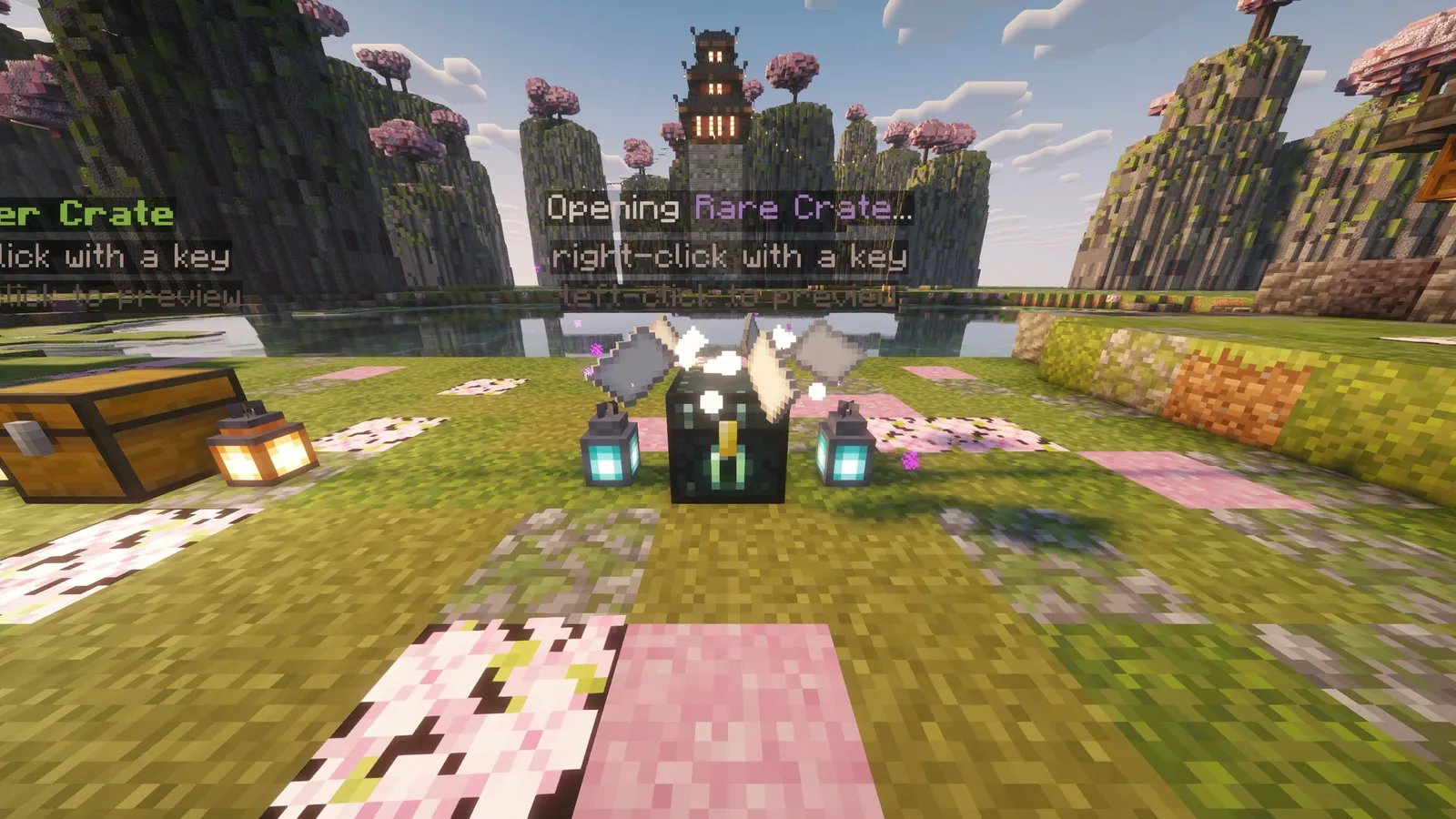
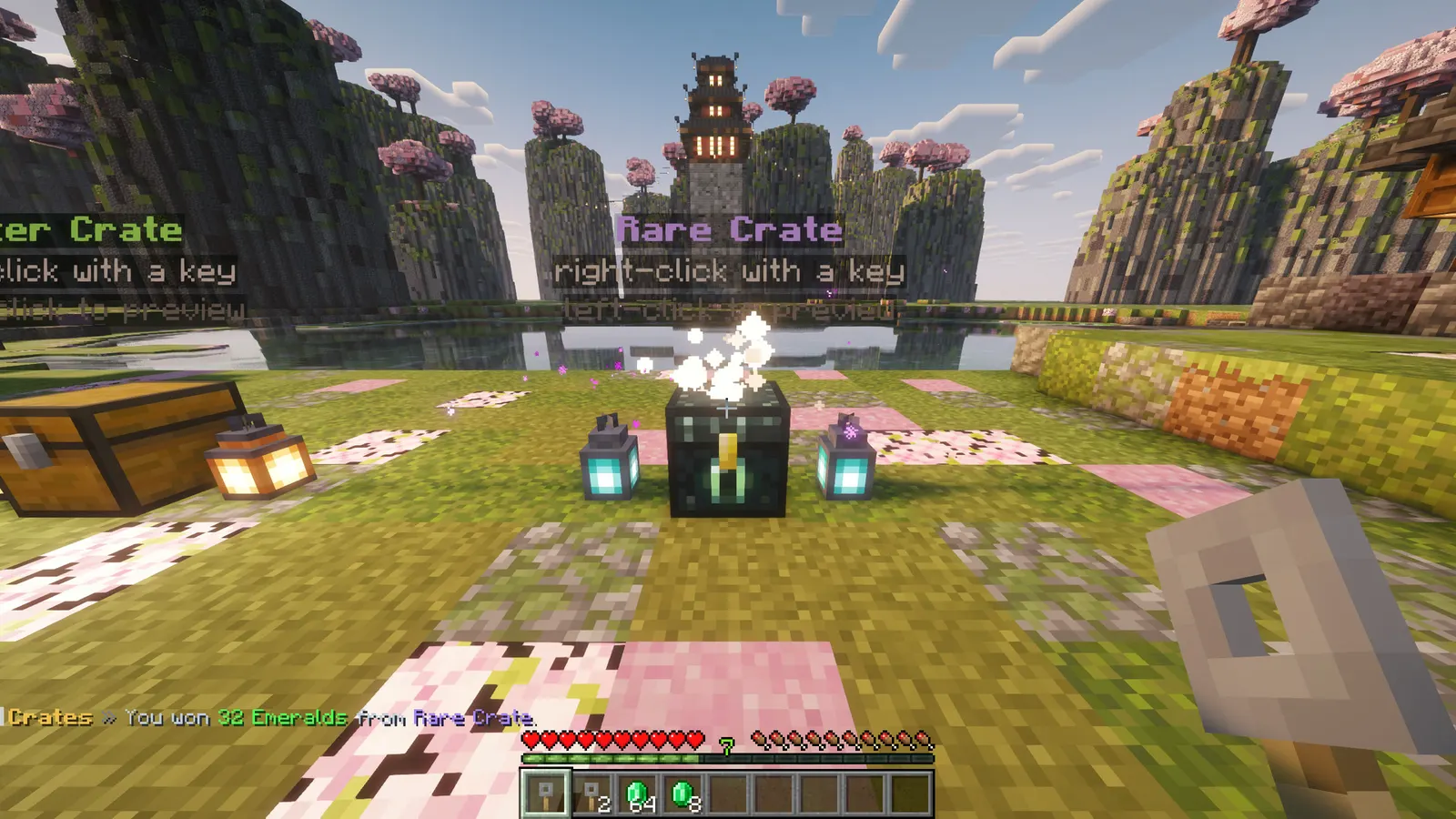
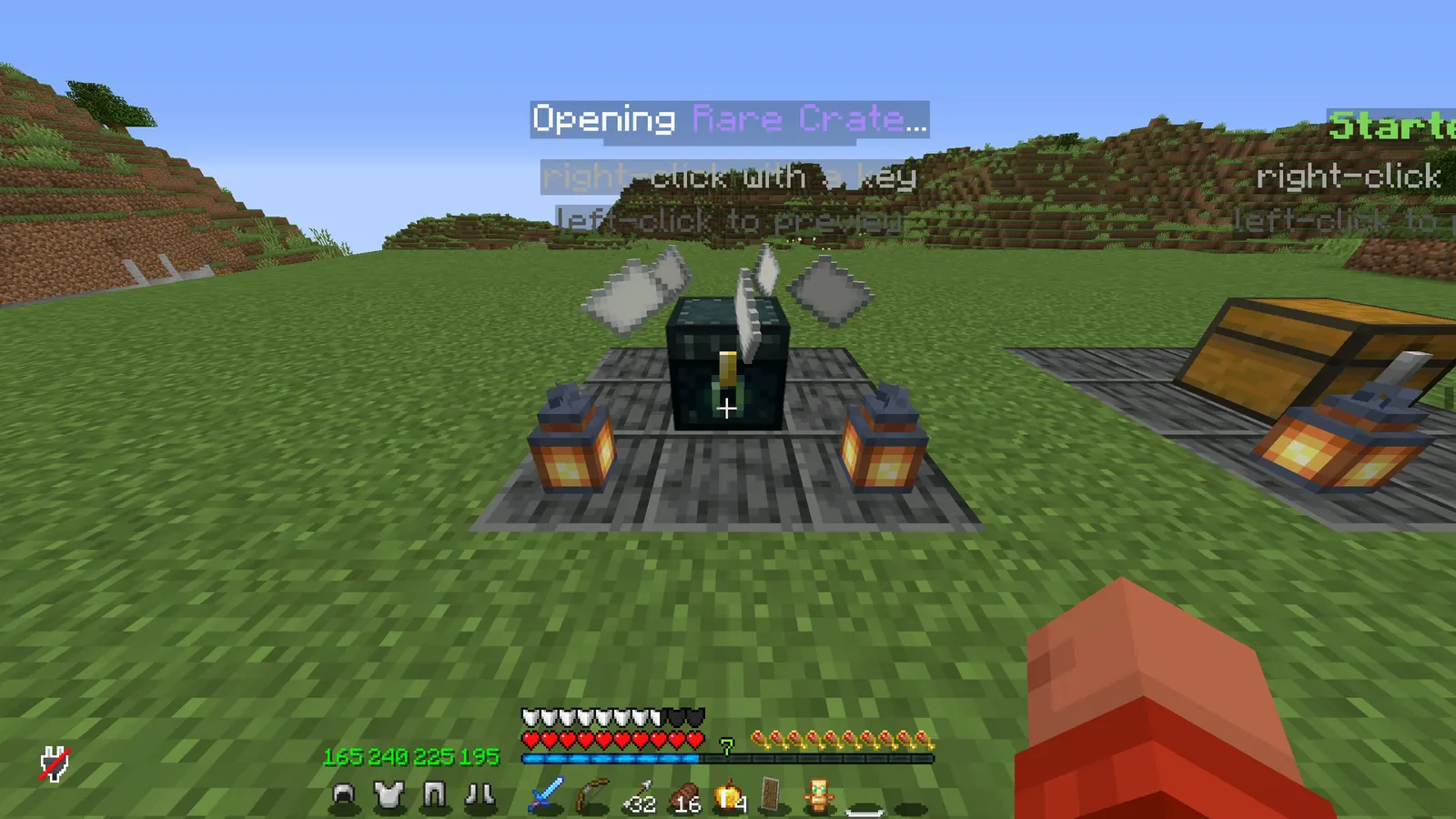
Most crate plugins are a chest menu full of glass panes and a percentage nobody can verify. This one opens in the world on item displays, tells the player every reward and its real chance before they spend anything, and rolls the reward before the animation starts, so a disconnect in the middle of a spin cannot eat it.
In short
- Every reward and its real chance shown up front
- Opens in the world on item displays, not a chest menu
- The reward is rolled before the animation, so a disconnect cannot eat it
- Virtual keys
- No dependencies
- Latest version
- 1.1.1
- Runs on
- Paper or Purpur 1.21.11, 26.1, 26.2 or 26.3, Java 21
- BuiltByBit
- Crates on BuiltByBit
What changed in 1.1.1
- Fixed: the preview screen showed no picture for an enchanted golden apple. Minecraft has no separate texture for it (it draws the golden apple with a glint), so the icon lookup found nothing. It now shows the golden apple picture.
- The same fix covers about 390 other items that had no picture in the preview: glass panes, tall flowers like the sunflower, the crossbow, tipped arrows, stairs, slabs, walls, fences, buttons, carpets, waxed copper, and full blocks such as TNT, ancient debris, pumpkins and crafting tables.
- Beds, banners, chests, mob heads and copper golem statues still show no picture in the reward list, because the game draws them as 3D models with no flat texture. The reward tiles show the real item as before.
- Nothing to change in config.yml or crates.yml.
Features
01What makes it different
- Every reward and its real chance is shown before a key is spent
- The reward is rolled before the animation starts, so a disconnect in the middle cannot eat it
- Keys are stamped in their item data, so a renamed item opens nothing
02What you get
- New in v1.2.0: Key all: /crate giveall gives every online player a key at once, as items or onto their accounts
- New in v1.2.0: Mass open: players with several keys open up to 10 at once with one summary line
- New in v1.2.0: PlaceholderAPI (optional): key counts per crate for scoreboards and holograms
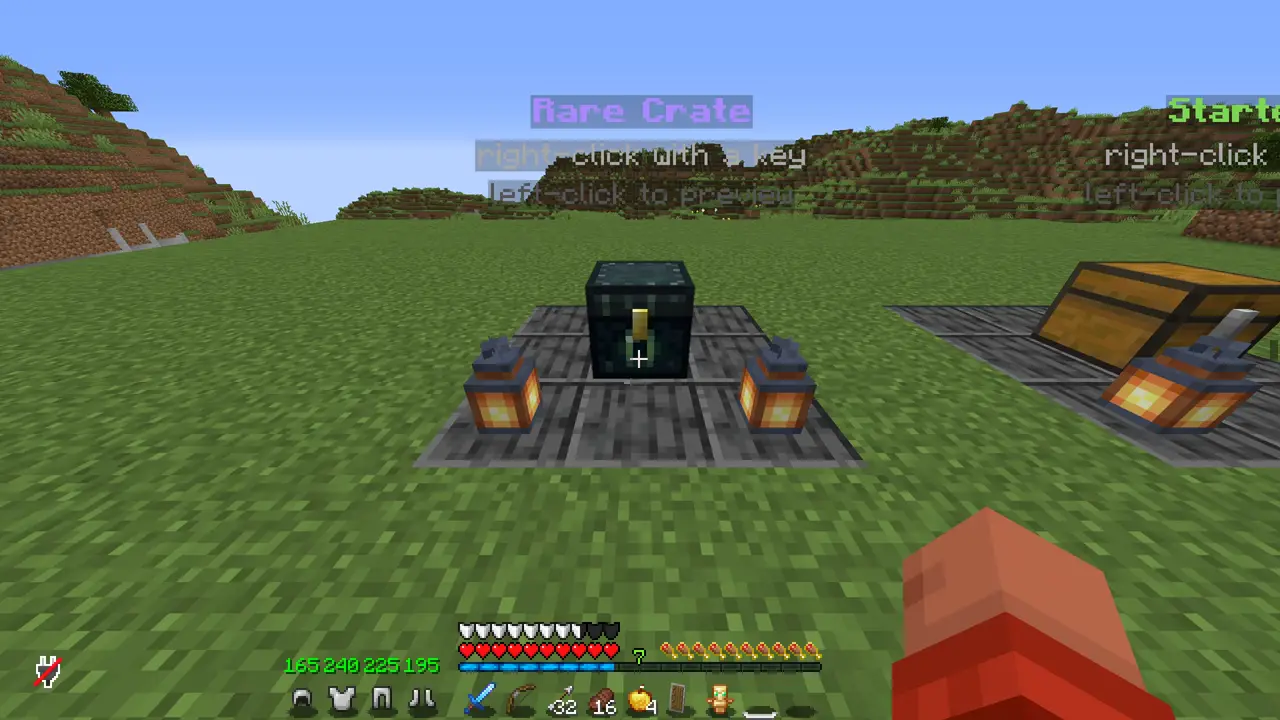
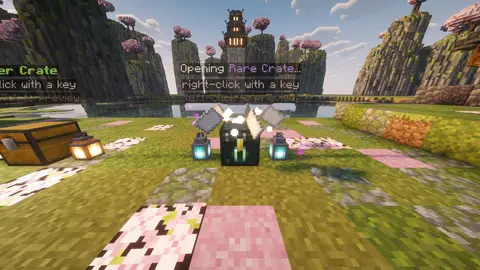
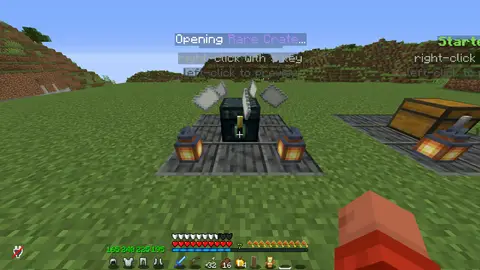
- Opens in the world: the draw happens above the crate on item displays, with sound and particles, not behind an inventory screen
- Three ways to open: a roulette that slows down as it lands, an orbit of the possible rewards, or instant for a server that does not want a show
- Real chances, shown: rewards carry weights, and the preview screen turns them into percentages, so nobody has to trust a number in a description
- Keys that cannot be faked: a key is stamped in its item data, so a renamed tripwire hook does not open anything
- Virtual keys for your store: /crate givevirtual works while the buyer is offline, and they open the crate from the screen wherever they are
- Rewards are items, commands, or both, with an optional message, and an announcement to the whole server for the rare ones
- Built in game: hold an item, press add, and it is a reward. Bind any block as the crate. No YAML unless you want it
- A label over every crate built from display entities, cleaned up properly after a crash
- The crate block is protected: only an admin sneaking can break it
03The crate screens
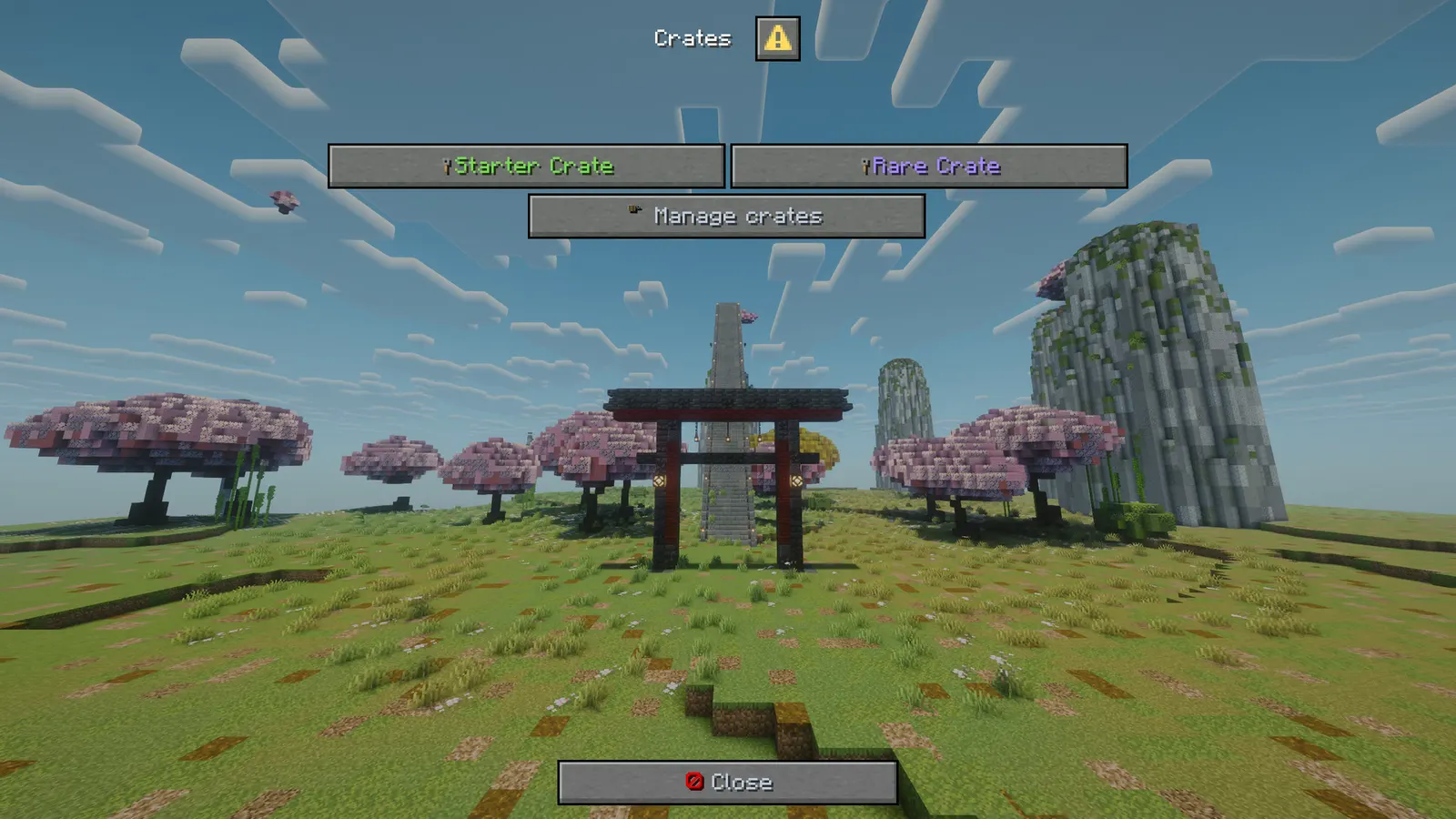
- /crates opens a real Minecraft dialog window with every crate, how many keys you hold, and what each one holds
- The preview screen lists every reward with its percentage, marks the ones that announce, and offers a one-click open when you have a virtual key
- Left-click or sneak-click a crate in the world for the same preview, without spending anything
- Admins get a manage screen: create a crate, add the item in your hand as a reward with a weight, set weights, mark a reward rare, use your held item as the key, bind the block you are looking at, and cycle the animation
- Everything the plugin says is in config.yml, in MiniMessage
Installation
Requirements
- Server
- Paper, or a Paper fork such as Purpur. Spigot and CraftBukkit won't work, because it uses Paper-only APIs.
- Minecraft
- 1.21.11, 26.1, 26.2 or 26.3; plugin.yml api-version 1.21; built against Paper API 1.21.11
- Java
- 21 or newer
- Needs
- No other plugin
- Works with
PlaceholderAPI, when installed
The listing also says:
- Java 21+ (26.x servers run on Java 25, as Paper requires)
- No other plugin, no database, no library
- No DRM, no licence key and no licence server; the code is not obfuscated
Steps
- Download
Crates.jarfrom BuiltByBit. There's no licence key to enter. - Stop the server and put the jar in the
pluginsfolder. - Start the server. The plugin writes
plugins/Crates/config.ymlwith the defaults listed under Configuration. - Change
config.ymlto fit your server. - Run
/crate reload(read crates.yml again) to apply your changes, or restart the server.
Setup guide
- Drop Crates.jar into /plugins and restart.
- Run /crates, press manage, type a name and create the crate.
- Hold the item you want to give away, set a weight, and press add. Repeat for every reward.
- Hold the item you want to be the key and press use my item as the key.
- Look at the block that should be the crate and press bind. Give yourself a key and try it.
Commands
Straight from plugin.yml. Where the permission column says "not set", plugin.yml puts no permission on the command itself; the nodes the plugin checks are under Permissions.
| Command | Aliases | Usage | What it does | Permission |
|---|---|---|---|---|
/crates | none | /crates | Your crates and your keys. | not set |
/crate | none | /crate preview|keys|key|givevirtual|giveall|set|list|reload | Crate admin and key giving. | not set |
Every subcommand
/crates                              Your crates and keys.
/crate preview <crate>               What is inside and what it costs.
/crate keys                          How many keys you hold of each crate.
/crate key <crate> <player> [n]      (admin) Give physical keys.
/crate givevirtual <crate> <p> [n]   (admin) Give keys to an account, even offline.
/crate set <crate>                   (admin) Bind the block you are looking at.
/crate list                          Every crate id.
/crate reload                        (admin) Read crates.yml again.
/crate giveall <crate> [amount] [virtual]   (admin) Keys for everyone online (alias keyall).
Permissions
From plugin.yml.
| Node | Default | What it allows | Includes |
|---|---|---|---|
crates.use | everyone | Open crates and see the screens. | none |
crates.admin | operators | Build crates, give keys (also /crate giveall), bind blocks, reload. | none |
Placeholders
Registered with PlaceholderAPI as crates. You need PlaceholderAPI installed for these to work.
| Placeholder | Shows |
|---|---|
%crates_keys_<crate>% | keys held: in the inventory plus on the account |
%crates_virtual_<crate>% | keys on the account only (also for offline players) |
%crates_physical_<crate>% | key items in the inventory only |
%crates_name_<crate>% | the crate's display name |
%crates_rewards_<crate>% | how many rewards the crate holds |
%crates_total_keys% | every key the player holds, all crates together |
%crates_count% | how many crates the server has |
Configuration
The default files exactly as they ship in the jar, comments included. The plugin writes them to plugins/Crates/ the first time it starts.
config.yml
| Key | Default | The comment above it |
|---|---|---|
key-lore | ['<gray>Right-click a {crate} crate to open it.</gray>'] | The lore put on a key that has none of its own. {crate} is the crate's name. |
default-hologram | list of 3 | The floating label put over a new crate. {crate} is the crate's name. |
mass-open-max | 10 | Mass open: the preview screen offers "Open N at once" to a player with at least two keys on their account (virtual keys). It skips the animation and sends one summary line. This is the most it opens in one click; 0 or 1 hides the button. |
theme | section, 11 keys | Every message below is written against these names, not against hex codes: <accent>Open</accent> rather than <#f2c14e>Open</#f2c14e>. Change a colour here and it changes on every screen at once. Ordinary MiniMessage still works, so <gradient:#a:#b> and... |
messages | section, 101 keys | none |
review-reminder | true | One thank-you line with the BuiltByBit review link: once in the console after install and once in chat for the first operator who joins. It never repeats and sends nothing anywhere. false turns it off. |
plugins/Crates/config.yml162 lines
# Crates - keys, a draw you can watch, and honest chances.
#
# A crate is a block you bind, a key item, and a list of rewards with weights. The opening happens
# in the world on item displays, not in a chest menu, and the preview screen shows every reward with
# its real percentage before anybody spends a key.
#
# Crates themselves live in crates.yml, which the plugin writes; build them in game with /crates.

# The lore put on a key that has none of its own. {crate} is the crate's name.
key-lore:
  - "<gray>Right-click a {crate} crate to open it.</gray>"

# The floating label put over a new crate. {crate} is the crate's name.
default-hologram:
  - "<#f2c14e><bold>{crate}</bold></#f2c14e>"
  - "<gray>right-click with a key</gray>"
  - "<dark_gray>left-click to look inside</dark_gray>"

# Mass open: the preview screen offers "Open N at once" to a player with at least two keys on their
# account (virtual keys). It skips the animation and sends one summary line. This is the most it
# opens in one click; 0 or 1 hides the button.
mass-open-max: 10

# ------------------------------------------------------------------------------------------------
# THEME
# ------------------------------------------------------------------------------------------------
# Every message below is written against these names, not against hex codes: <accent>Open</accent>
# rather than <#f2c14e>Open</#f2c14e>. Change a colour here and it changes on every screen at
# once. Ordinary MiniMessage still works, so <gradient:#a:#b> and <#ff0000> are fine anywhere.
theme:
  accent: "#f2c14e"     # your colour: headings and anything the player is meant to click
  accent2: "#f8dd9e"    # a lighter accent, for a second level of emphasis
  title: "#f4f7ff"      # screen titles
  text: "#c2ccdd"       # ordinary prose
  muted: "#6b7a94"      # hints, separators, anything the eye should skip
  value: "#ffffff"      # the numbers and names the player opened the screen to read
  good: "#57e08a"
  warn: "#ffc857"
  bad: "#ff6b6b"
  small-caps: false     # ᴇхᴀᴍᴘʟᴇ - a garnish; whole menus in it read badly
  # Real Minecraft item pictures beside the buttons and in the chest screens. Drawn from the
  # client's own textures, so there is nothing to install and no resource pack: it needs a
  # 1.21.9 or newer client, and older ones simply see the buttons as words.
  item-icons: true

messages:
  prefix: "<accent><bold>Crates</bold></accent> <muted>»</muted> "
  no-permission: "<bad>You cannot do that.</bad>"
  players-only: "<text>Players only.</text>"
  unknown: "<bad>No crate called </bad><value>{crate}</value>"
  unknown-player: "<bad>Unknown player: </bad><value>{name}</value>"
  bad-name: "<bad>Names: letters, numbers, - and _, up to 24 characters.</bad>"
  exists: "<bad>There is already a crate called </bad><value>{crate}</value>"
  hold-something: "<text>Hold the item first.</text>"
  look-at-block: "<text>Look at the block you want to be the crate.</text>"
  help: "<text>/crates · /crate preview <crate> · /crate keys · /crate key <crate> <player> [n] · /crate givevirtual <crate> <player> [n] · /crate giveall <crate> [n] [virtual] · /crate set <crate> · /crate reload</text>"
  usage-preview: "<text>/crate preview <crate></text>"
  usage-key: "<text>/crate key <crate> <player> [amount]</text>"
  usage-virtual: "<text>/crate givevirtual <crate> <player> [amount]</text>"
  usage-set: "<text>/crate set <crate>  (looking at the block)</text>"
  # /crate giveall: a key-all for everyone online. "virtual" puts the keys on their accounts.
  usage-giveall: "<text>/crate giveall <crate> [amount] [virtual]</text>"
  giveall-done: "<text>Gave </text><value>{amount}</value><text> {crate} key(s) to </text><value>{count}</value><text> online player(s).</text>"
  list: "<text>Crates: </text><value>{list}</value>"
  reloaded: "<value>Reloaded {count} crate(s).</value>"

  key-name: "<accent>{crate} Key</accent>"
  key-given: "<text>Gave </text><value>{amount}</value><text> {crate} key(s) to </text><value>{player}</value><text>.</text>"
  key-received: "<text>You got </text><value>{amount}</value><text> {crate} key(s).</text>"
  virtual-given: "<text>Put </text><value>{amount}</value><text> {crate} key(s) on </text><value>{player}</value><text>'s account.</text>"
  virtual-received: "<text>You have </text><value>{amount}</value><text> more {crate} key(s). </text><value>/crates</value>"
  keys-row: "<value>{crate}</value><text>: {keys} key(s)</text>"
  need-key: "<text>You need a </text><value>{crate}</value><text> key.</text>"
  no-virtual-key: "<text>No {crate} keys on your account.</text>"
  already-opening: "<text>One at a time.</text>"
  crate-empty: "<text>{crate} has nothing in it yet.</text>"
  opening: "<value>Opening {crate}...</value>"
  won: "<text>You won </text>{reward}<text> from {crate}.</text>"
  # A crate that finished while the player was offline (they logged out mid-opening, or the server stopped).
  pending-given: "<text>Your </text><value>{crate}</value><text> opening finished while you were away. Here it is.</text>"
  broadcast: "<value>{player}</value><text> won </text>{reward}<text> from </text><value>{crate}</value><text>.</text>"
  block-added: "<text>That block is now a </text><value>{crate}</value><text> crate.</text>"
  block-removed: "<text>That block is no longer a {crate} crate.</text>"
  block-protected: "<text>That is a </text><value>{crate}</value><text> crate. Sneak and break it to unbind it.</text>"

  # The screens. Every line here is a title, a button label or a tooltip.
  menu-title: "<value>Crates</value>"
  menu-close: "<white><icon:close></white><text>Close</text>"
  menu-back: "<white><icon:back></white><text>Back</text>"
  menu-back-tip: "<text>Back to the screen before.</text>"
  menu-crate-line: "<value>{crate}</value><text> · {rewards} rewards · you hold {keys} key(s) · {places} place(s)</text>"
  menu-crate-open: "{icon}<value>{crate}</value>"
  menu-crate-open-tip: "<text>See what is inside and what it costs.</text>"
  menu-no-crates: "<text>No crates yet.</text>"
  menu-manage: "<white><icon:staff></white><text>Manage crates</text>"
  menu-manage-tip: "<text>Admins: build and edit crates.</text>"

  preview-title: "<value>{crate}</value>"
  preview-head: "<text>Inside </text><value>{crate}</value><text>. You hold {keys} key(s).</text>"
  preview-row: "{icon}<value>{reward}</value><text> · {chance}%</text> {rare}"
  preview-rare: "<accent>rare</accent>"
  preview-empty: "<text>Nothing in this crate yet.</text>"
  # The reward tiles: the real item, with its odds under it.
  preview-tile-name: "<accent><bold>{reward}</bold></accent>"
  preview-tile-chance: "<text>Chance </text><value>{chance}%</value>"
  preview-tile-rare: "<warn>Announced to the server</warn>"
  preview-tile-common: "<muted>Quietly yours</muted>"
  # The crate rows on the list screen: the crate's own key is the icon.
  row-crate: "<accent><bold>{crate}</bold></accent>"
  row-crate-keys: "<good>{keys} key(s)</good><text> · {rewards} rewards</text>"
  row-crate-nokeys: "<muted>No keys</muted><text> · {rewards} rewards</text>"
  preview-where: "<muted>Standing in {count} place(s) in the world.</muted>"
  preview-open-virtual: "<white><icon:crate></white><good>Open one now ({keys} left)</good>"
  preview-open-virtual-tip: "<text>Uses a key from your account, wherever you are.</text>"
  # Mass open (see mass-open-max). {rewards} is the list of what came out.
  preview-open-many: "<white><icon:crate></white><good>Open {count} at once</good>"
  preview-open-many-tip: "<text>Uses {count} keys from your account and skips the animation.</text>"
  mass-opened: "<text>Opened </text><value>{count}</value><text> {crate} crate(s): </text>{rewards}"
  mass-reward-times: "{reward}<muted> x{times}</muted>"
  mass-reward-separator: "<muted>, </muted>"

  admin-title: "<value>Manage crates</value>"
  admin-empty: "<text>No crates yet. Type a name below and create one.</text>"
  admin-line: "<value>{crate}</value><text> ({id}) · {rewards} rewards · {places} place(s) · {animation}</text>"
  admin-open: "{icon}<value>Edit {crate}</value>"
  admin-open-tip: "<text>Edit this crate.</text>"
  admin-field-id: "<text>Name of the new crate</text>"
  admin-create: "<white><icon:yes></white><good>Create it</good>"
  admin-create-tip: "<text>Makes an empty crate with that name.</text>"

  edit-title: "<value>{crate}</value>"
  edit-head: "<text>{crate} ({id}) · {animation} · {places} place(s) · key: {key}</text>"
  edit-default-key: "tripwire hook"
  edit-reward: "<value>{reward}</value><text> · weight {weight} = {chance}% · {what}</text>"
  edit-no-rewards: "<text>No rewards yet. Hold an item and press add.</text>"
  edit-field-name: "<text>Name players see</text>"
  edit-field-weight: "<text>Weight for the reward</text>"
  edit-field-reward: "<text>Which reward</text>"
  edit-add-held: "<white><icon:yes></white><good>Add what I am holding</good>"
  edit-add-held-tip: "<text>The item in your hand becomes a reward with the weight above.</text>"
  edit-remove: "<white><icon:delete></white><bad>Remove the chosen reward</bad>"
  edit-remove-tip: "<text>Deletes the reward you picked.</text>"
  edit-weight: "<white><icon:weight></white><value>Set its weight</value>"
  edit-weight-tip: "<text>Writes the weight above onto the reward you picked.</text>"
  edit-rare: "<white><icon:arrange></white><value>Announce it or not</value>"
  edit-rare-tip: "<text>Whether the whole server hears when somebody wins it.</text>"
  edit-rename: "<white><icon:rename></white><value>Rename the crate</value>"
  edit-rename-tip: "<text>Uses the name field above.</text>"
  edit-key-held: "<white><icon:crate></white><value>Use my item as the key</value>"
  edit-key-held-tip: "<text>The item in your hand becomes this crate's key.</text>"
  edit-key-give: "<white><icon:crate></white><value>Give me one key</value>"
  edit-key-give-tip: "<text>For testing the crate you are building.</text>"
  edit-bind: "<white><icon:bind></white><value>Bind the block I am looking at</value>"
  edit-bind-tip: "<text>That block becomes a crate players can right-click.</text>"
  edit-animation: "<white><icon:fire></white><value>Animation: {animation}</value>"
  edit-animation-tip: "<text>roulette, orbit, or instant.</text>"
  edit-delete: "<white><icon:delete></white><bad>Delete this crate</bad>"
  edit-delete-tip: "<text>Removes the crate and its rewards.</text>"

# One thank-you line with the BuiltByBit review link: once in the console after install and once
# in chat for the first operator who joins. It never repeats and sends nothing anywhere. false turns it off.
review-reminder: true
Config guide
The short annotated version from the listing. If it and the files above disagree, the files are what actually ships.
key-lore: ["<gray>Right-click a {crate} crate to open it.</gray>"]
default-hologram:
  - "<#f2c14e><bold>{crate}</bold></#f2c14e>"
  - "<gray>right-click with a key</gray>"

crates.yml, written by the plugin as you build:
  vote:
    display: "Vote"
    animation: roulette      roulette, orbit, instant
    animation-ticks: 60
    key: <the item you chose>
    blocks: ["world,120,64,-30"]
    rewards:
      r1:
        display: "16x Diamond"
        weight: 10           weights, not percentages
        item: <the item you held>
        commands: []
        broadcast: false
FAQ
Which servers and versions does it run on?
It needs Paper or a Paper fork like Purpur, because it uses Paper-only APIs (the dialog API for its menus, Adventure text components). Spigot and CraftBukkit won't work. The listing says Minecraft 1.21.11, 26.1, 26.2 or 26.3. plugin.yml declares api-version 1.21, the jar is built against Paper API 1.21.11, and it needs Java 21 or newer.
Does it need other plugins?
No, it runs without any other plugin (plugin.yml has no hard dependencies). Optional: PlaceholderAPI (softdepend), used when it's there.
How do I apply config changes?
Edit plugins/Crates/config.yml and run /crate reload (read crates.yml again). Restarting works too.
Does it run on Folia, or for Bedrock players?
I haven't tested it on Folia, and plugin.yml doesn't declare folia-supported. I haven't tested Bedrock players through Geyser either.
Is there DRM or a licence key?
No. There is nothing to activate and no licence server to reach, and the code is not obfuscated.
How long does setup take?
Drop the jar into /plugins and restart. The setup guide above has 5 short steps.
Can I run a key-all event?
Yes. /crate giveall gives every online player keys at once and works from the console.
Links
- BuiltByBit
- Crates
- Support
- discord.gg/KG4ubAZEuw
- Everything
- The Complete Collection on BuiltByBit
- More plugins
- All my plugins
- Custom work
- Commissions
Support
Questions, bugs or ideas: the active support Discord or the discussion tab on BuiltByBit. When something breaks, include your server version and the error from the console.