 Frostyh




Overview
Find the exact chunk that is lagging your server, jump to it, and stop it filling up again
"There are 4,000 entities" helps nobody. LagCleaner tells you that chunk -42, 17 in world holds 900 dropped items and 60 minecarts, puts a button next to it that teleports you there, and then stops that chunk from filling up again.
In short
- Hotspots by chunk, not a vague entity count
- One click teleports staff to the problem
- Chunk limits stop it coming back
- A lag panel in game
- No dependencies
- Latest version
- 1.1.0
- Runs on
- Paper or Purpur 1.21.11, Java 21
- BuiltByBit
- LagCleaner on BuiltByBit
What changed in 1.1.0
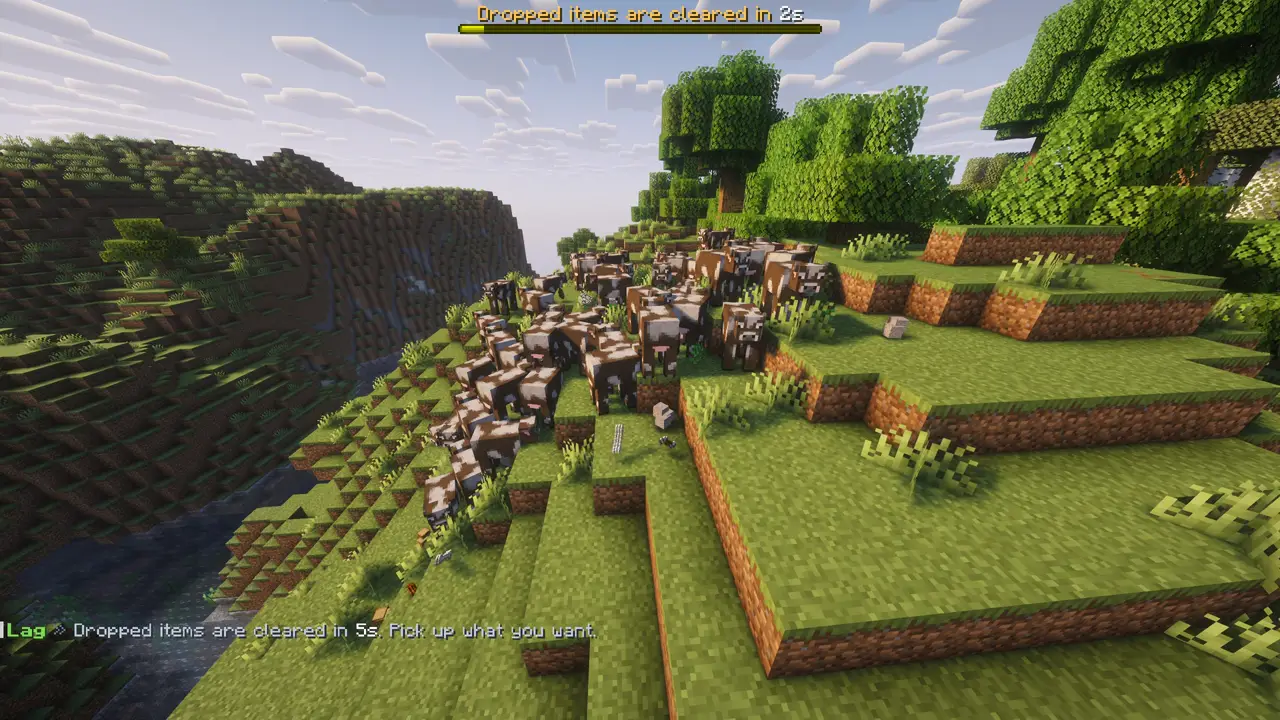
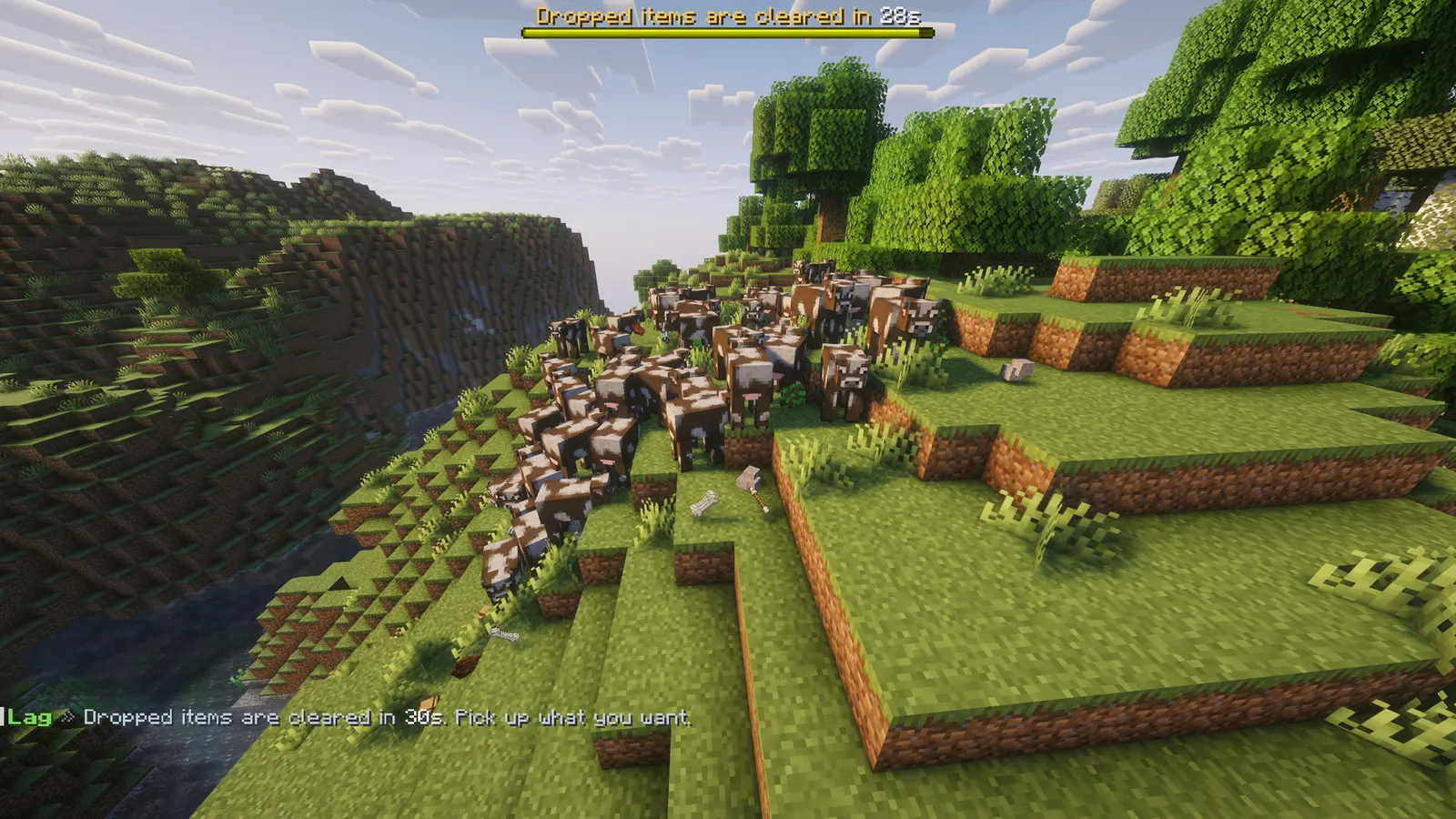
- Sweep countdown bar: a boss bar counts down the last 30 seconds before the timed sweep, so nobody loses their drops by surprise. Players in ignored worlds do not see it. Settings: sweep.boss-bar (on), sweep.boss-bar-seconds (30), sweep.boss-bar-colour (YELLOW). It can also be switched on and off from the /lagcleaner panel.
- PlaceholderAPI support (optional): %lagcleaner_next_sweep%, %lagcleaner_next_sweep_formatted% (m:ss), %lagcleaner_last_sweep%, %lagcleaner_tps%, %lagcleaner_items%, %lagcleaner_mobs%, %lagcleaner_entities%, %lagcleaner_removed_items%, %lagcleaner_removed_mobs% and %lagcleaner_merged%. Put "Next clear in %lagcleaner_next_sweep_formatted%" on your scoreboard.
- Tab completion for /lagcleaner sweep loud.
- The new settings and messages work without touching your config.yml. The countdown bar is on for existing servers too after this update; set sweep.boss-bar: false to keep the old behaviour.
Features
01What makes it different
- Names the chunk, not just a total: its coordinates, what is in it, and a button that takes you there
- Named, tamed, leashed and ridden entities, item frames, paintings and end crystals are never touched
- The machine throttles (hoppers, redstone, spawners) stay off until you turn them on, so farms are not changed behind your back
02What you get
- New in v1.2.0: Sweep countdown bar: a boss bar counts down the last 30 seconds before a timed sweep, so nobody loses drops by surprise
- New in v1.2.0: PlaceholderAPI (optional): next sweep, TPS and entity counts, like "Next clear in %lagcleaner_next_sweep_formatted%" on your scoreboard
- Hotspots: the busiest loaded chunks, worst first, with what is actually in them and a button that takes you there
- Limits per chunk: a ceiling for items, for mobs and for everything else; the oldest goes first, because that is what nobody is using
- Careful by default: named, tamed, leashed and ridden entities are never touched, and neither are item frames, paintings, end crystals or the items you list as valuable
- Item merging: two stacks of the same thing within a few blocks become one, which is the cheapest lag win a farm server can get
- A sweep with warnings: the timed clear counts down in chat, only takes items that have been lying there, and says how many it took
- Only when it matters: limits can be set to run only when the server is actually below the TPS you name
- Throttles for machines: hopper moves, redstone changes and spawner mobs can be capped per chunk per second. All three are off until you turn them on, because they change how a farm behaves
03The lag panel
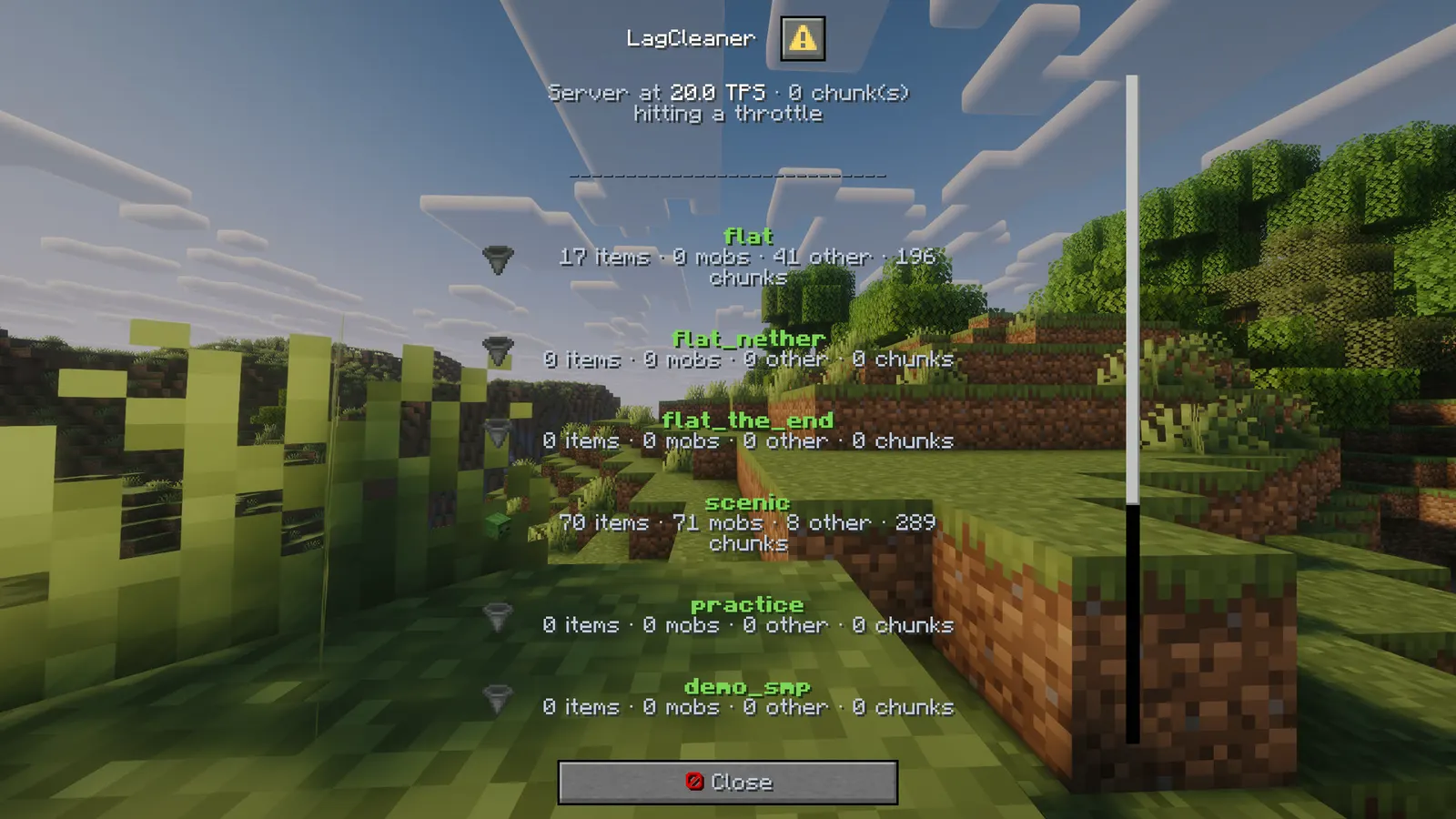
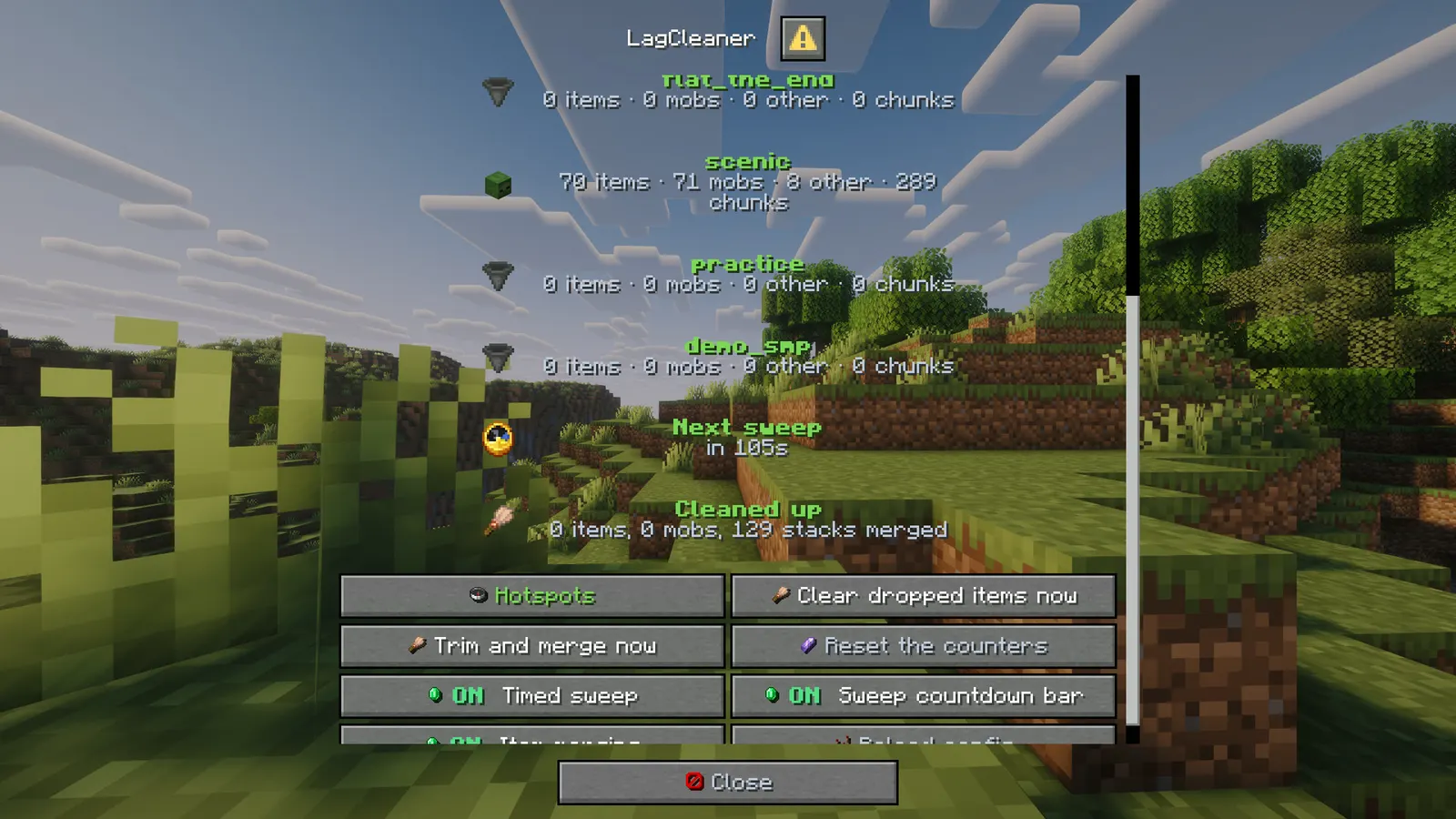
- /lagcleaner opens a real Minecraft dialog window: TPS, how many chunks are hitting a throttle, and a line per world with its items, mobs, other entities and loaded chunks
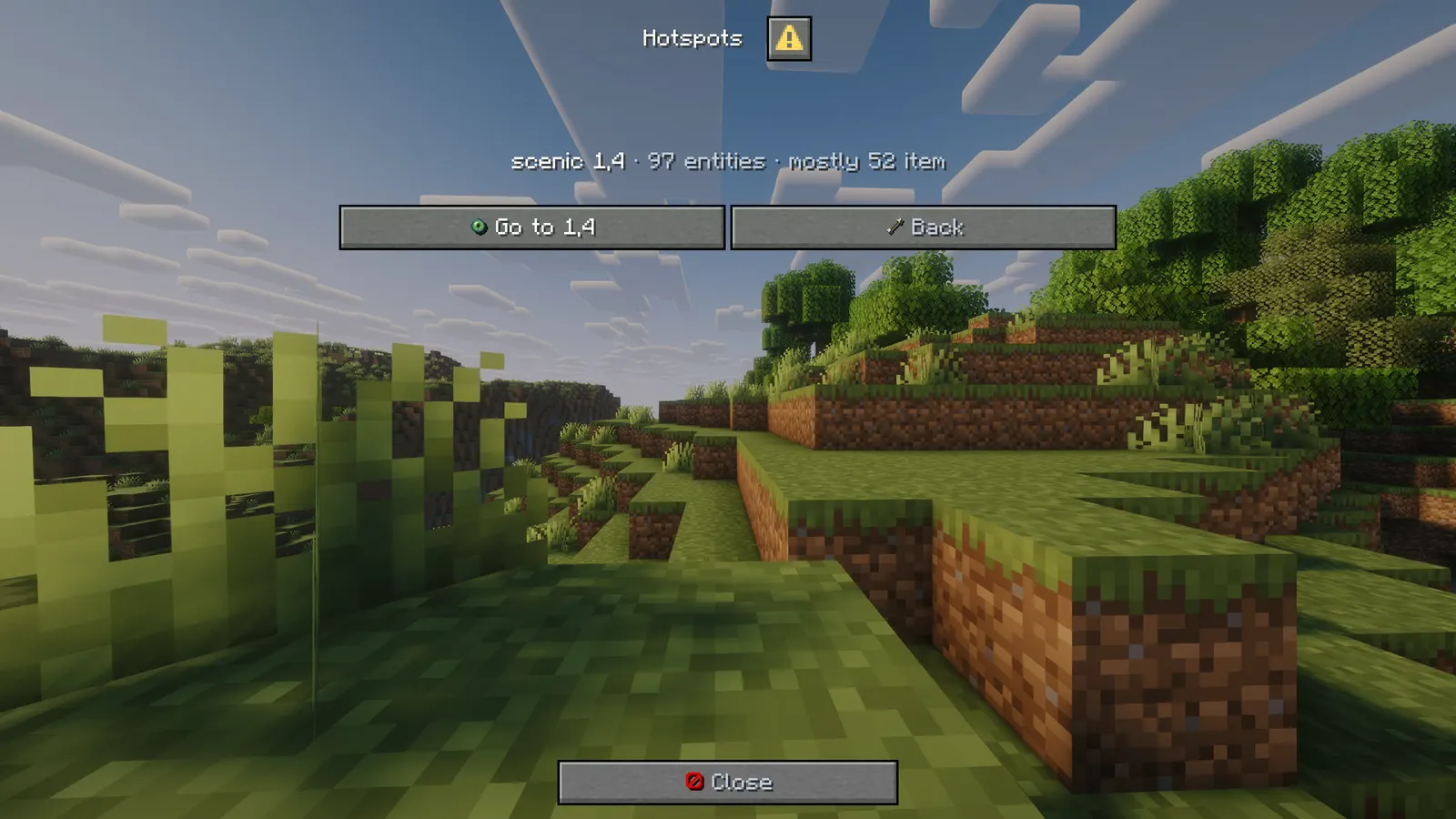
- The hotspots screen lists the worst chunks with a go-to button on each
- Buttons to sweep now, trim and merge now, reset the counters, and switch the sweep and the merging on or off
- It also says what it has removed since the last reset, so you can see whether it is doing anything
menu: falseprints the same numbers in chat instead
Installation
Requirements
- Server
- Paper, or a Paper fork such as Purpur. Spigot and CraftBukkit won't work, because it uses Paper-only APIs.
- Minecraft
- 1.21.11; plugin.yml api-version 1.21; built against Paper API 1.21.11
- Java
- 21 or newer
- Needs
- No other plugin
- Works with
PlaceholderAPI, when installed
The listing also says:
- The panel is a dialog window and needs a 1.21.6 or newer client; menu: false gives the same numbers in chat for any client
- No other plugin and no database
- No DRM, no licence key and no licence server; the code is not obfuscated
Steps
- Download
LagCleaner.jarfrom BuiltByBit. There's no licence key to enter. - Stop the server and put the jar in the
pluginsfolder. - Start the server. The plugin writes
plugins/LagCleaner/config.ymlwith the defaults listed under Configuration. - Change
config.ymlto fit your server. - Run
/lagcleaner reload(read config.yml again) to apply your changes, or restart the server.
Setup guide
- Drop LagCleaner.jar into /plugins and restart.
- Run /lagcleaner and look at the hotspots screen before you change anything.
- Set items-per-chunk and mobs-per-chunk to numbers your farms can live with.
- Add anything precious to protect.items, and any entity type you never want touched to protect.types.
- Leave the throttles at 0 unless a specific farm is the problem. They change how machines behave.
Commands
Straight from plugin.yml. Where the permission column says "not set", plugin.yml puts no permission on the command itself; the nodes the plugin checks are under Permissions.
| Command | Aliases | Usage | What it does | Permission |
|---|---|---|---|---|
/lagcleaner | /lag /clearlag /lc | /lagcleaner [status|hotspots|sweep|trim|reload] | The lag panel and its tools. | not set |
Every subcommand
/lagcleaner              The panel.
/lagcleaner status       TPS and entity counts per world.
/lagcleaner hotspots     The busiest chunks.
/lagcleaner sweep [loud] Clear dropped items now.
/lagcleaner trim         Bring every chunk under its limits and merge items.
/lagcleaner reload       Read config.yml again.
Permissions
From plugin.yml.
| Node | Default | What it allows | Includes |
|---|---|---|---|
lagcleaner.admin | operators | See the panel, sweep, trim and reload. | none |
Placeholders
Registered with PlaceholderAPI as lagcleaner. You need PlaceholderAPI installed for these to work.
| Placeholder | Shows |
|---|---|
%lagcleaner_next_sweep% | seconds until the timed sweep, or the "never" message when it is off |
%lagcleaner_next_sweep_formatted% | the same as m:ss |
%lagcleaner_last_sweep% | items the last sweep took |
%lagcleaner_tps% | TPS over the last minute, one decimal |
%lagcleaner_items% | dropped items on the server |
%lagcleaner_mobs% | living entities, players not counted |
%lagcleaner_entities% | every entity, players not counted |
%lagcleaner_removed_items% | items the limits removed since the last reset |
%lagcleaner_removed_mobs% | entities the limits removed since the last reset |
%lagcleaner_merged% | stacks merged since the last reset |
Configuration
The default files exactly as they ship in the jar, comments included. The plugin writes them to plugins/LagCleaner/ the first time it starts.
config.yml
| Key | Default | The comment above it |
|---|---|---|
menu | true | Bare /lagcleaner opens the panel instead of printing the numbers. |
ignored-worlds | [] (empty list) | Worlds this plugin leaves completely alone. |
limits | section, 6 keys | none |
merge | section, 4 keys | none |
sweep | section, 8 keys | none |
protect | section, 6 keys | What is never removed, whatever a chunk looks like. |
throttle | section, 3 keys | These change how machines behave, so they are off. Turn one on only when a farm is the problem. |
hotspots | section, 1 key | none |
theme | section, 11 keys | Every message below is written against these names, not against hex codes: <accent>Open</accent> rather than <#7ed957>Open</#7ed957>. Change a colour here and it changes on every screen at once. Ordinary MiniMessage still works, so <gradient:#a:#b> and... |
messages | section, 47 keys | none |
review-reminder | true | One thank-you line with the BuiltByBit review link: once in the console after install and once in chat for the first operator who joins. It never repeats and sends nothing anywhere. false turns it off. |
plugins/LagCleaner/config.yml132 lines
# LagCleaner - entity limits, item merging, a timed sweep, and a hotspot finder.
#
# Everything that deletes something is careful on purpose: named, tamed, leashed and ridden
# entities are skipped, the sweep only touches items that have been lying around, and the throttles
# that change how farms behave are off until you turn them on.

# Bare /lagcleaner opens the panel instead of printing the numbers.
menu: true

# Worlds this plugin leaves completely alone.
ignored-worlds: []

limits:
  every-ticks: 200            # how often the chunks are checked (200 = ten seconds)
  items-per-chunk: 64         # 0 turns the limit off
  mobs-per-chunk: 48
  other-per-chunk: 32         # armour stands, minecarts, boats, projectiles
  only-below-tps: false       # true = only enforce when the server is actually struggling
  tps-threshold: 18.0

merge:
  enabled: true
  every-ticks: 100
  radius: 3.0                 # blocks between two stacks that should become one
  max-stack: 0                # 0 = the item's own stack size

sweep:
  enabled: true
  every-minutes: 15           # 0 turns the timer off
  announce: true
  warn-seconds: [60, 30, 10, 5]
  min-age-ticks: 200          # an item has to have lain there ten seconds before a sweep takes it
  # A boss bar that counts down the last seconds before a timed sweep. false hides it.
  boss-bar: true
  boss-bar-seconds: 30        # how long before the sweep the bar appears
  boss-bar-colour: YELLOW     # PINK, BLUE, RED, GREEN, YELLOW, PURPLE, WHITE

# What is never removed, whatever a chunk looks like.
protect:
  named: true                 # anything with a custom name
  tamed: true
  leashed: true
  carrying-passengers: true
  types: [ARMOR_STAND, ITEM_FRAME, GLOW_ITEM_FRAME, PAINTING, END_CRYSTAL]
  items: [NETHER_STAR, DRAGON_EGG, ELYTRA, TOTEM_OF_UNDYING, BEACON, SHULKER_BOX]

# These change how machines behave, so they are off. Turn one on only when a farm is the problem.
throttle:
  hopper-moves-per-chunk-per-second: 0
  redstone-changes-per-chunk-per-second: 0
  spawner-mobs-per-chunk-per-second: 0

hotspots:
  report-above: 25            # a chunk needs this many entities before it is worth listing

# ------------------------------------------------------------------------------------------------
# THEME
# ------------------------------------------------------------------------------------------------
# Every message below is written against these names, not against hex codes: <accent>Open</accent>
# rather than <#7ed957>Open</#7ed957>. Change a colour here and it changes on every screen at
# once. Ordinary MiniMessage still works, so <gradient:#a:#b> and <#ff0000> are fine anywhere.
theme:
  accent: "#7ed957"     # your colour: headings and anything the player is meant to click
  accent2: "#b8eaa3"    # a lighter accent, for a second level of emphasis
  title: "#f4f7ff"      # screen titles
  text: "#c2ccdd"       # ordinary prose
  muted: "#6b7a94"      # hints, separators, anything the eye should skip
  value: "#ffffff"      # the numbers and names the player opened the screen to read
  good: "#57e08a"
  warn: "#ffc857"
  bad: "#ff6b6b"
  small-caps: false     # ᴇхᴀᴍᴘʟᴇ - a garnish; whole menus in it read badly
  # Real Minecraft item pictures beside the buttons and in the chest screens. Drawn from the
  # client's own textures, so there is nothing to install and no resource pack: it needs a
  # 1.21.9 or newer client, and older ones simply see the buttons as words.
  item-icons: true

messages:
  prefix: "<accent><bold>Lag</bold></accent> <muted>»</muted> "
  no-permission: "<bad>You cannot do that.</bad>"
  reloaded: "<value>Config reloaded.</value>"
  never: "never"
  help: "<text>/lagcleaner · status · hotspots · sweep · trim · reload</text>"
  sweep-warning: "<text>Dropped items are cleared in </text><value>{seconds}s</value><text>. Pick up what you want.</text>"
  sweep-bar: "<warn>Dropped items are cleared in </warn><value>{seconds}s</value>"
  sweep-done: "<text>Cleared </text><value>{count}</value><text> dropped item(s).</text>"
  swept: "<text>Cleared </text><value>{count}</value><text> item(s).</text>"
  trimmed: "<text>Removed {items} item(s) and {mobs} entity(s), merged {merged} stack(s).</text>"

  # The panel. Every line here is a screen title, a button label or a tooltip.
  # The icon rows: a small item beside a bold name and a grey line, so the panel can be scanned.
  row-world: "<accent><bold>{world}</bold></accent>"
  row-world-detail: "<text>{items} items · {mobs} mobs · {other} other · {chunks} chunks</text>"
  row-sweep: "<accent><bold>Next sweep</bold></accent>"
  row-sweep-detail: "<text>in {time}</text>"
  row-removed: "<accent><bold>Cleaned up</bold></accent>"
  row-removed-detail: "<text>{items} items, {mobs} mobs, {merged} stacks merged</text>"
  menu-title: "<value>LagCleaner</value>"
  menu-close: "<white><icon:close></white><text>Close</text>"
  menu-back: "<white><icon:back></white><text>Back</text>"
  menu-back-tip: "<text>Back to the first screen.</text>"
  menu-tps: "<text>Server at </text><value>{tps} TPS</value><text> · {chunks} chunk(s) hitting a throttle</text>"
  menu-world: "<value>{world}</value><text>: {items} items · {mobs} mobs · {other} other · {chunks} chunks loaded</text>"
  menu-next-sweep: "<text>Next sweep in </text><value>{time}</value>"
  menu-removed: "<text>Since the last reset: {items} items and {mobs} entities removed, {merged} stacks merged</text>"
  menu-hotspots: "<white><icon:compass></white><accent>Hotspots</accent>"
  menu-hotspots-tip: "<text>The busiest chunks on the server.</text>"
  menu-hotspots-title: "<value>Hotspots</value>"
  menu-spot: "<value>{world} {x},{z}</value><text> · {total} entities · mostly {worst}</text>"
  menu-spot-go: "<white><icon:teleport></white><value>Go to {x},{z}</value>"
  menu-spot-go-tip: "<text>Teleport above that chunk.</text>"
  menu-no-spots: "<text>No chunk is busy enough to worry about.</text>"
  menu-sweep: "<white><icon:clean></white><value>Clear dropped items now</value>"
  menu-sweep-tip: "<text>Runs the sweep at once, with its warning.</text>"
  menu-trim: "<white><icon:clean></white><value>Trim and merge now</value>"
  menu-trim-tip: "<text>Bring every chunk back under its limits.</text>"
  menu-reset: "<white><icon:dot></white><text>Reset the counters</text>"
  menu-reset-tip: "<text>Start counting removals again from zero.</text>"
  menu-reload: "<white><icon:reload></white><text>Reload config</text>"
  menu-reload-tip: "<text>Read config.yml again.</text>"
  switch-sweep: "Timed sweep"
  switch-sweep-tip: "<text>The clear on a timer, with its warnings.</text>"
  switch-sweep-bar: "Sweep countdown bar"
  switch-sweep-bar-tip: "<text>A boss bar counts down the last seconds before the sweep.</text>"
  switch-merge: "Item merging"
  switch-merge-tip: "<text>Two stacks of the same thing become one.</text>"
  switch-on: "<white><icon:yes></white><good><bold>ON</bold></good>  <value>{title}</value>"
  switch-off: "<white><icon:no></white><bad><bold>OFF</bold></bad> <text>{title}</text>"

# One thank-you line with the BuiltByBit review link: once in the console after install and once
# in chat for the first operator who joins. It never repeats and sends nothing anywhere. false turns it off.
review-reminder: true
Config guide
The short annotated version from the listing. If it and the files above disagree, the files are what actually ships.
menu: true
ignored-worlds: []
limits:
  every-ticks: 200
  items-per-chunk: 64       0 turns it off
  mobs-per-chunk: 48
  other-per-chunk: 32
  only-below-tps: false     true = only when the server is struggling
  tps-threshold: 18.0
merge:
  enabled: true
  radius: 3.0
sweep:
  every-minutes: 15         0 turns the timer off
  warn-seconds: [60, 30, 10, 5]
  min-age-ticks: 200
protect:
  named: true
  tamed: true
  leashed: true
  types: [ARMOR_STAND, ITEM_FRAME, GLOW_ITEM_FRAME, PAINTING, END_CRYSTAL]
  items: [NETHER_STAR, DRAGON_EGG, ELYTRA, TOTEM_OF_UNDYING, BEACON, SHULKER_BOX]
throttle:
  hopper-moves-per-chunk-per-second: 0
  redstone-changes-per-chunk-per-second: 0
  spawner-mobs-per-chunk-per-second: 0
FAQ
Which servers and versions does it run on?
It needs Paper or a Paper fork like Purpur, because it uses Paper-only APIs (the dialog API for its menus, Adventure text components). Spigot and CraftBukkit won't work. The listing says Minecraft 1.21.11. plugin.yml declares api-version 1.21, the jar is built against Paper API 1.21.11, and it needs Java 21 or newer.
Does it need other plugins?
No, it runs without any other plugin (plugin.yml has no hard dependencies). Optional: PlaceholderAPI (softdepend), used when it's there. The listing adds: No other plugin and no database.
How do I apply config changes?
Edit plugins/LagCleaner/config.yml and run /lagcleaner reload (read config.yml again). Restarting works too.
Does it run on Folia, or for Bedrock players?
I haven't tested it on Folia, and plugin.yml doesn't declare folia-supported. I haven't tested Bedrock players through Geyser either.
Is there DRM or a licence key?
No. There is nothing to activate and no licence server to reach, and the code is not obfuscated.
How long does setup take?
Drop the jar into /plugins and restart. The setup guide above has 5 short steps.
Do players get a warning before items are cleared?
Yes. A boss bar counts down the last 30 seconds before every timed sweep (sweep.boss-bar).
Links
- BuiltByBit
- LagCleaner
- Support
- discord.gg/KG4ubAZEuw
- Everything
- The Complete Collection on BuiltByBit
- More plugins
- All my plugins
- Custom work
- Commissions
Support
Questions, bugs or ideas: the active support Discord or the discussion tab on BuiltByBit. When something breaks, include your server version and the error from the console.