 Frostyh

Overview
A second pair of eyes for your staff that shows exactly what it saw, without kicking your legit players
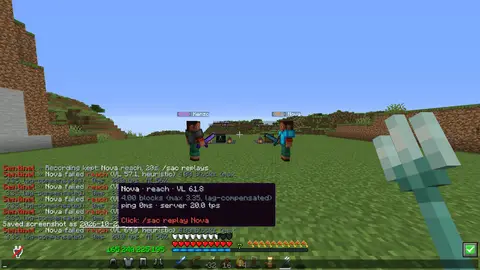
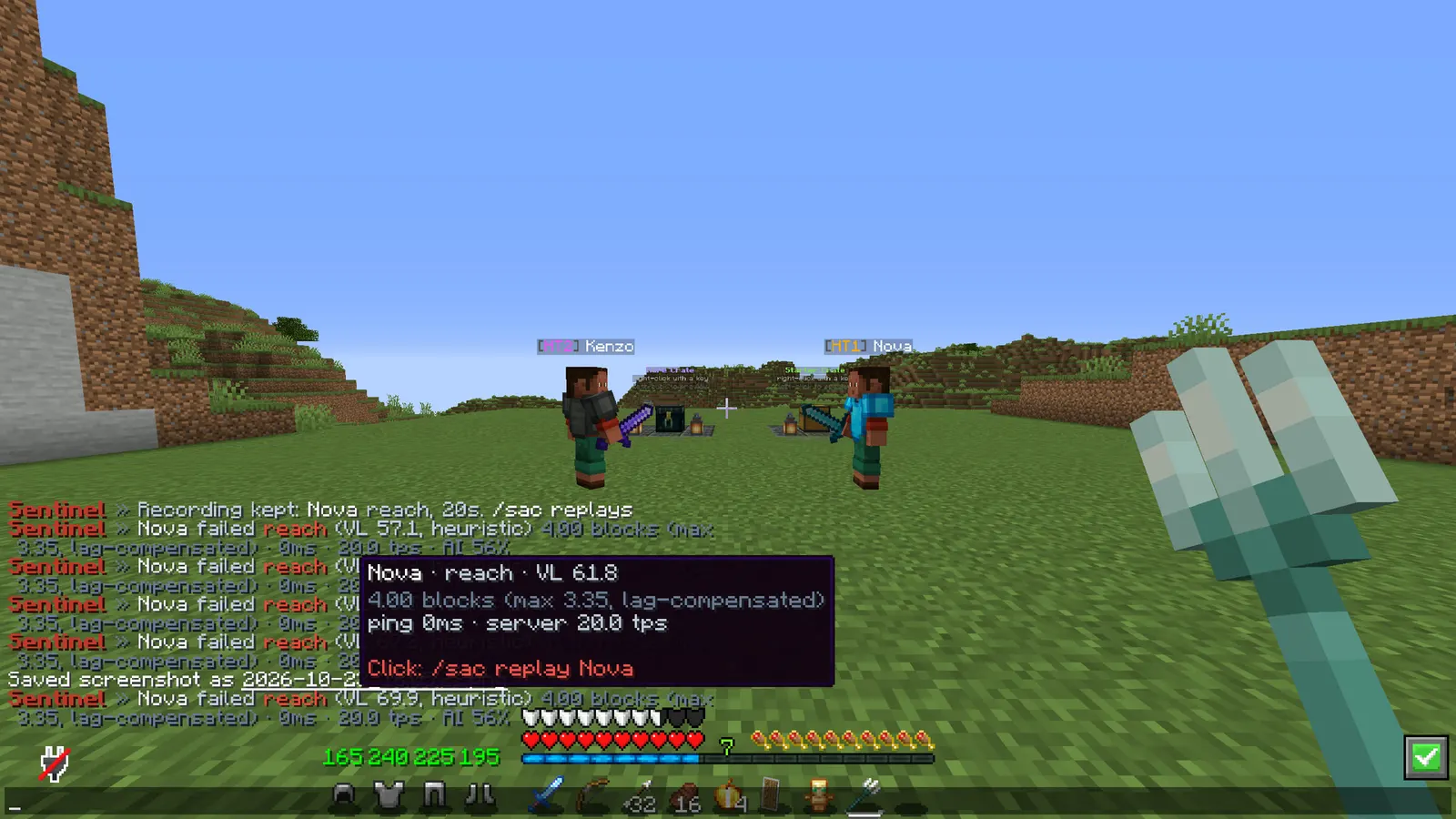
SentinelAC 2.0 runs 25 checks across combat, movement, world and player actions, and adds an AI-assisted combat score: a small statistical model that learns what normal fighting looks like on YOUR server and scores every fight against it. Every flag comes with its evidence (the numbers it measured, the score, the last rotations and a replay), so staff decide on facts.
Out of the box it only alerts. When you do switch actions on, certain-only mode lets only flags that a normal client cannot produce on any connection run a command, and only after several separate flags on a healthy server.
In short
- 25 checks across combat, movement, world and player actions
- An AI-assisted combat score that learns from your own players, on your own server
- Evidence on every flag: the numbers, the score, the last rotations and a replay
- Alert-only by default, and a certain-only mode for when you turn actions on
- No dependencies, no cloud service
- Latest version
- 2.0.2
- Runs on
- Paper or Purpur 1.21.11 (or a newer 1.21.x), Java 21
- BuiltByBit
- SentinelAC on BuiltByBit
What changed in 2.0.2
- Fixed: mining no longer flags AutoClicker. Holding the button on a block swings the arm every tick at a perfectly even rhythm, and once the dig took longer than a moment those swings were counted as clicks (about 16 to 20 cps with almost no spread), which read as a machine.
- Only real clicks are counted now: swings that hit a player or mob, and swings into the air. A swing at a block within reach is mining, including blocks the player is not allowed to break (spawn protection, adventure mode, region plugins).
- Autoclickers are still caught: a 50 ms clicker into the air or at a mob, and a randomised 60 to 90 ms one, still flag in our tests.
- Nothing to change in config.yml.
- Thanks to peterspeeder for the report.
Features
01What makes it different
- The AI-assisted score is computed on your server: no cloud service and no network call, and what it learns stays in plugins/SentinelAC/ai-model.yml
- Every flag says whether it is CERTAIN (something a normal client cannot do on any connection) or HEURISTIC, and certain-only mode keeps the second kind away from your punishments
- Reach is lag-compensated: measured against every position the target held inside both players' latency window, so a laggy hit on a sprinting player is not counted as reach
02New in v2.0.0
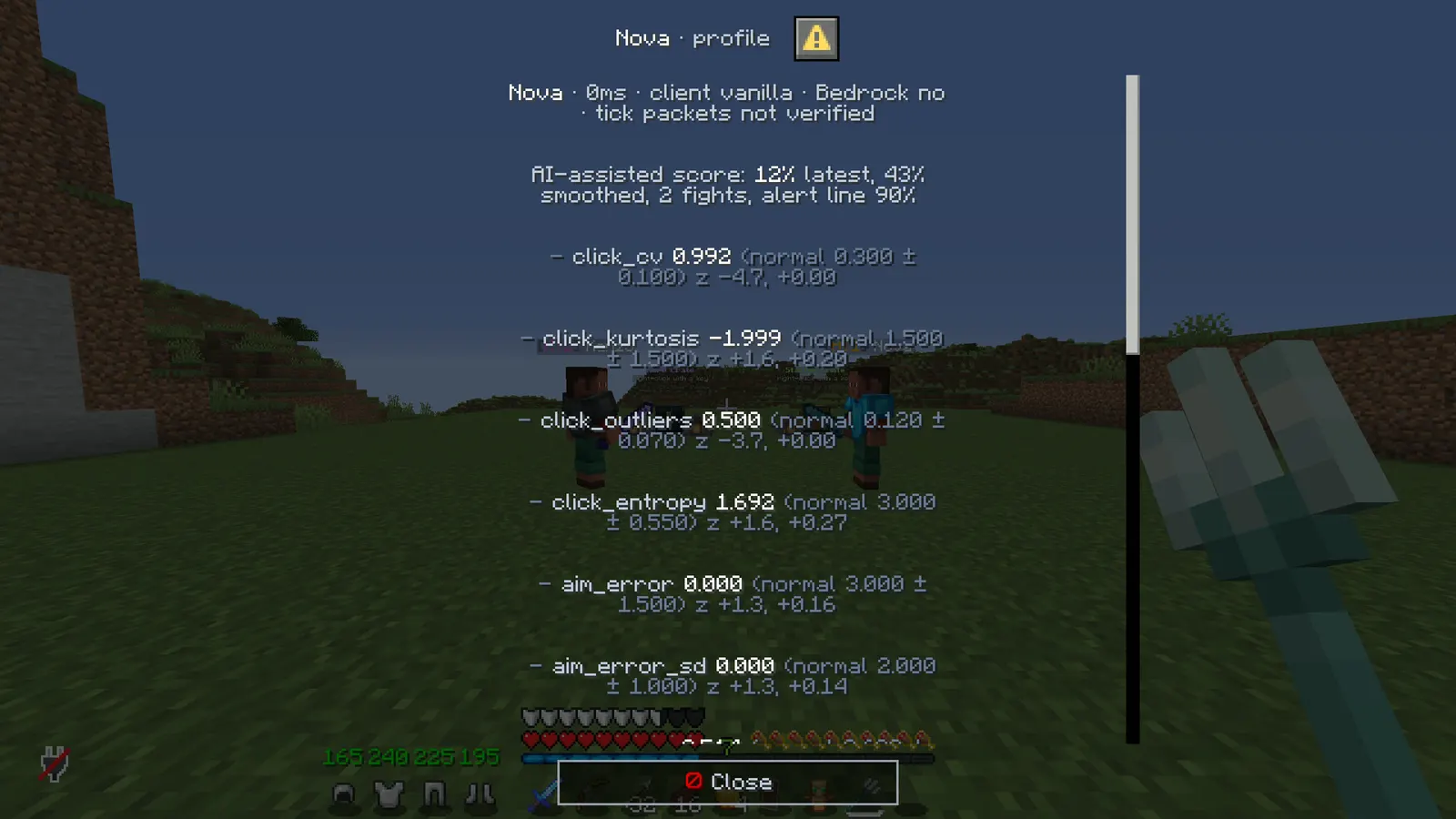
- AI-assisted detection: while a player fights, SentinelAC measures camera turns, click timing, hit distance and angle, hits per swing, target switches and movement beyond the prediction. Every 20 hits these become 15 measurements, compared with what is normal on your server and combined into a score from 0 to 100%. One odd number never reaches the alert line on its own; several have to agree.
- Training on your server: /sac ai train on while only trusted players play, off after a few hundred fights; it keeps learning slowly from clean players, and /sac ai label <player> cheater|legit teaches it from a confirmed case. It never runs a command on its own unless you set ai.may-punish: true.
- 18 new checks: killaura, criticals, velocity, hitbox, step, jesus, phase, noslow, elytra, vehicle, badpackets, fastbreak, nuker, scaffold, fastplace, ghosthand, fastuse and inventory
- Stronger old checks: lag-compensated reach with an "impossible" tier that refuses the hit, a per-tick movement prediction in speed, client tick packets in timer, ground spoofing in nofall, and timing shape in autoclicker
- Certain-only actions: only CERTAIN flags can run an action, after several separate flags spread over time, with no ping spike, teleport or join just before; a held action tells staff why
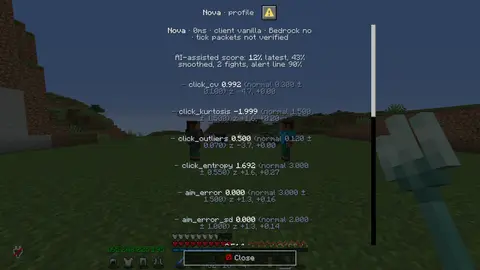
- Evidence and profiles: /sac evidence <player> lists the latest flags with the numbers, the AI score and the last rotations, the recording one click away; /sac profile <player> shows the score feature by feature, every level, client brand and connection
- Staff controls: /sac alerts off|certain|normal|verbose|debug, /sac debug <player>, /sac testmode (checks run and alert, nothing is cancelled or punished), /sac timings, and punishment ladders per check with /sac pardon
03Checks
Combat (7)
- reach: lag-compensated distance against the player's interaction range attribute, with an "impossible" tier and a "pattern" tier
- killaura: two targets in one client tick, hits on someone behind you, hits far off aim, attacks without an arm swing, silent rotations
- aim: impossible pitch, and snap-and-stop turns a mouse does not make
- autoclicker: clicks per second above a hand's, machine-like rhythm, and the shape of the click timing
- criticals, velocity (anti-knockback) and hitbox (expanders)
Movement (11)
- fly: measured against gravity itself, so hovering, rising and slow gliding are all caught
- speed: the sprint-jump peak plus a per-tick movement prediction, and sprinting backwards
- nofall: a real drop with no damage, and a client claiming ground while falling
- timer: movement and tick packets against the clock
- step, jesus (walking on water or lava), phase, noslow, elytra (height and speed without a boost), vehicle (boat and mount speed, boat fly) and badpackets (several moves in one tick, blink, sprinting while starving)
World (5)
- fastbreak, nuker, scaffold (and tower), fastplace and ghosthand (breaking or opening through walls)
Player (2)
- fastuse and inventory (moving while clicking in an inventory, chest stealers)
On top of these, several high AI scores within ten minutes raise the separate ai check, which is always HEURISTIC.
04Why it does not flag your legit players
- Nothing is judged above your ping limit, below your TPS limit, for 3 seconds after a join, teleport, respawn or world change, during a ping spike, or right after the server itself froze
- Knockback, explosions and plugin velocity give a grace period; so do taking damage, leaving a vehicle and the momentum after an elytra glide or a riptide
- Elytra, riptide, levitation, slow falling, vehicles, creative, spectator, flight permission, water, lava, ladders, vines, webs, scaffolding, bubble columns, trapdoors, fence gates, pistons, beds and slime are exempt before a movement check runs
- Most checks fill a buffer that drains over time and flag only when it is full; movement checks can set the player back first and world checks can refuse the block first
- Players joining through Geyser and Floodgate are skipped by the checks listed in gate.bedrock-skips, because their aim, clicks and ticks come from Geyser, not from a Java client
- Cancelled events (another plugin blocked the hit or the move) are never counted, and staff can exempt a player on the spot
05What you get
- Violation levels per player per check, decaying every second at a rate you set
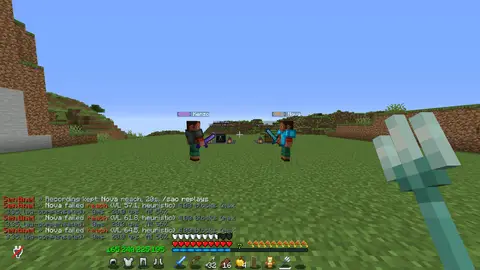
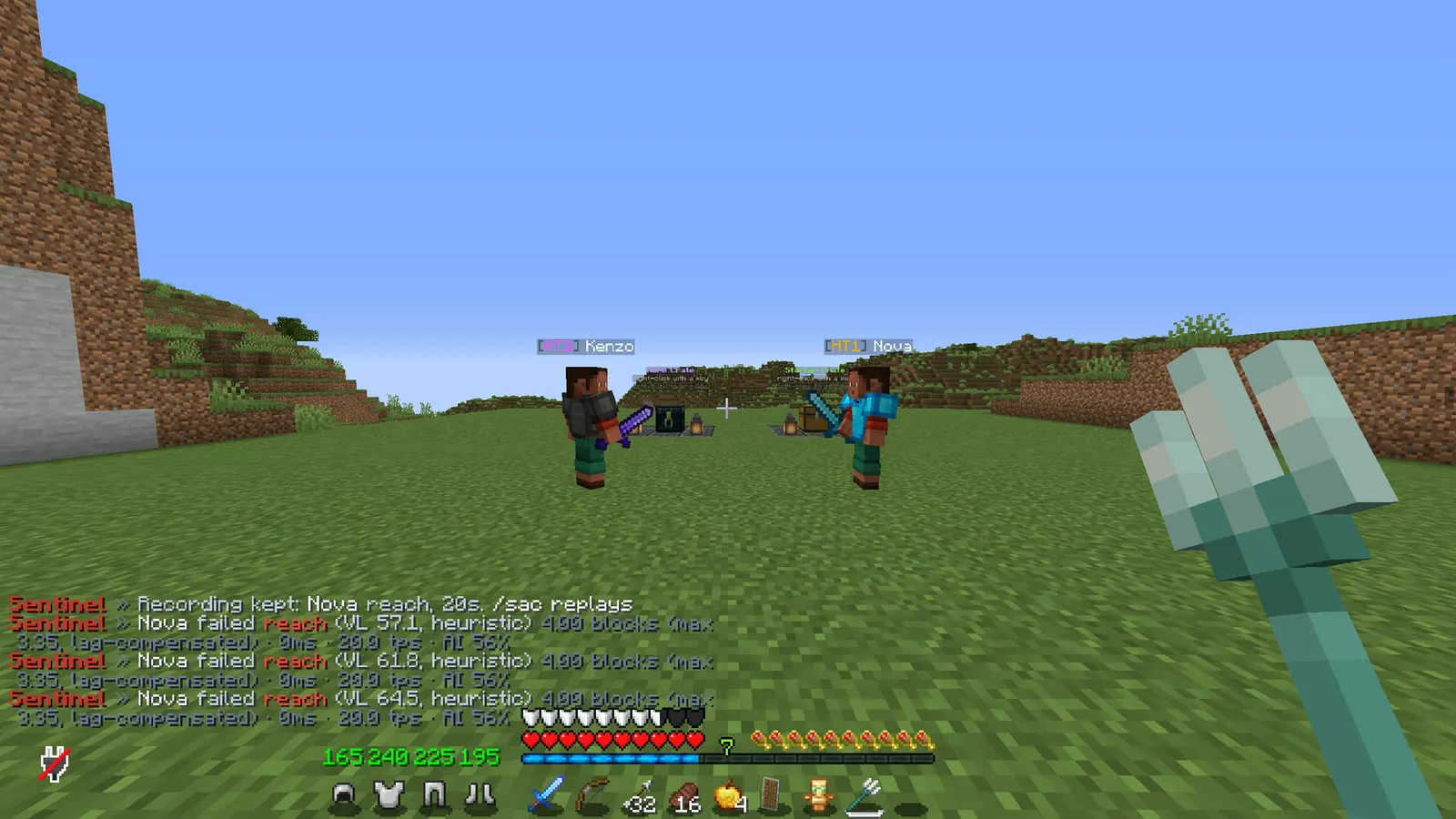
- Alerts with the detail, the AI score, the confidence, the player's ping and the server TPS; hover for the numbers, click for the replay; each staff member picks their own alert level
- Discord alerts through a channel webhook, rate limited per player, with the AI score and the confidence
- Actions per check at any level, or punishment ladders that remember earlier offences; all off by default, with a repeat cooldown
- Every threshold, weight and message in the config; reload without a restart
- No packet library, no NMS: built only on the Paper API, so it survives Minecraft updates
- The AI scoring runs on its own background thread; /sac timings shows what each check costs per tick
06Replay
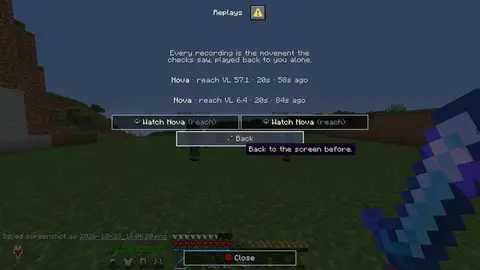
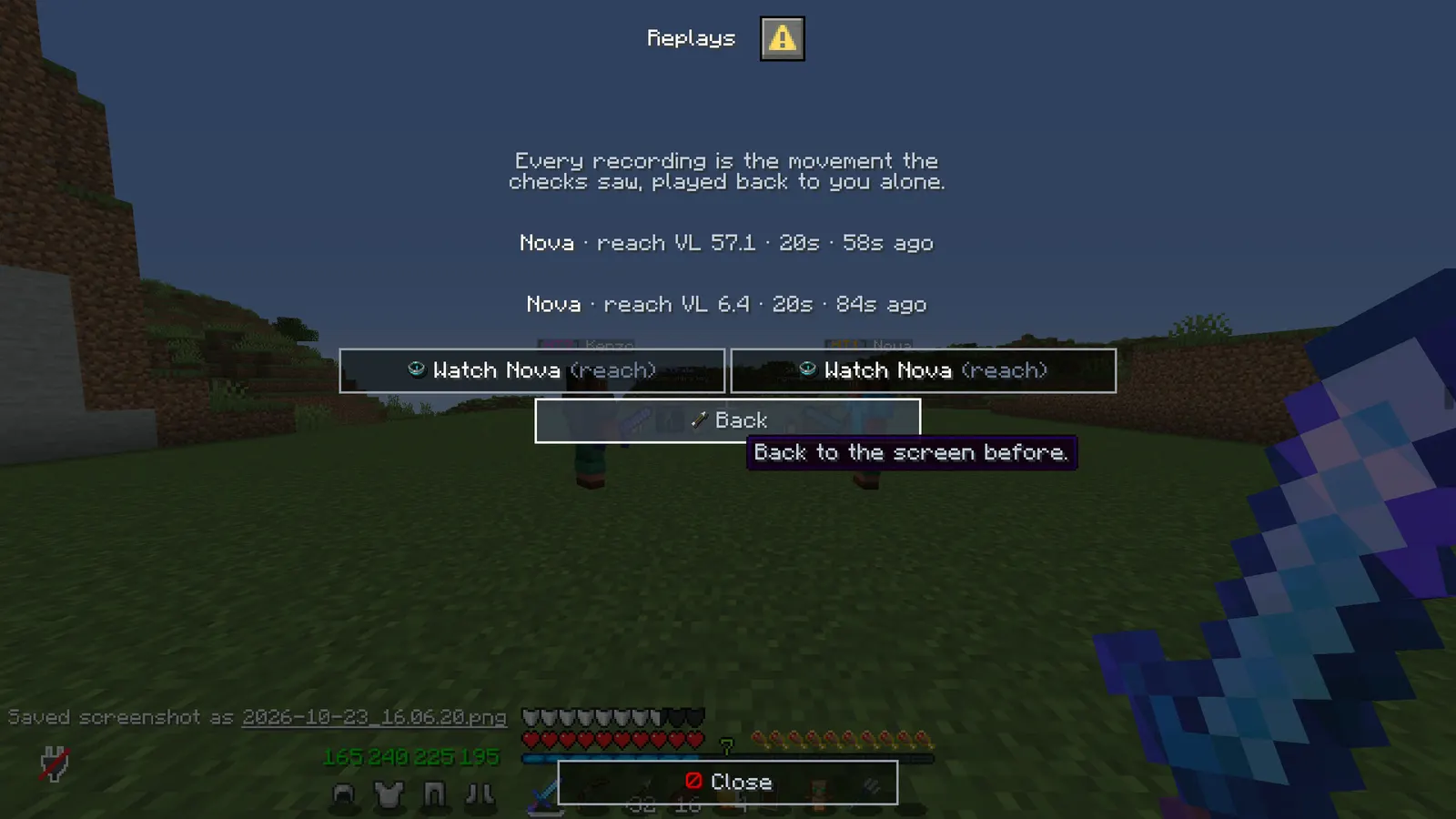
- The seconds before the flag, played back: when a check flags somebody, Sentinel keeps the movement it just saw and offers it to staff as a recording
- Watched in the world, not in a log: a stand-in wearing the suspect's skin walks the exact path that was recorded, where it happened, with the path drawn in particles
- Only you see it: the stand-in is hidden from every other player
- The numbers travel with it: the label over its head shows the check, the level, the ping and whether they were on the ground at that moment
- Kept in memory only: recordings stay for the minutes you configure and then go
- /sac replay <player> plays the last one, or records the last seconds right now if nothing was flagged
07Staff mode
- Your own things stay yours: the inventory you had before staff mode is written to disk, so a restart in the middle of a moderation session does not cost you your gear
- A hotbar that does the job: inspect, freeze, jump to a random player, vanish and leave, each named in the config
- Vanish that holds: hidden from everybody without the see permission, and players who join while you are vanished are not shown you either
- Freeze: they can look around and answer you, they cannot walk, fight or run commands except the ones you allow
- In staff mode you cannot break, place or drop anything by accident
08Inventory audit
- "Who has 400 netherite blocks?": /sac find netherite_block answers it for every player online, biggest holding first
- It looks where things are actually hidden: inventory, armour, offhand, ender chest, and inside every shulker box in either
- It says where: 64 carried, 320 in the ender chest, 900 in shulkers
- Straight to the player: a button opens a read-only copy of their inventory, another teleports you to them
09The staff panel
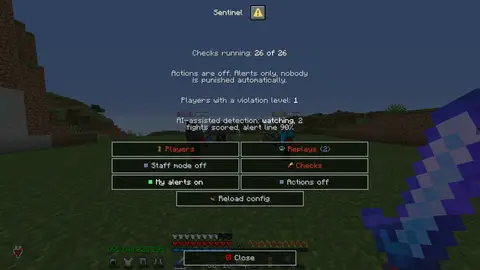
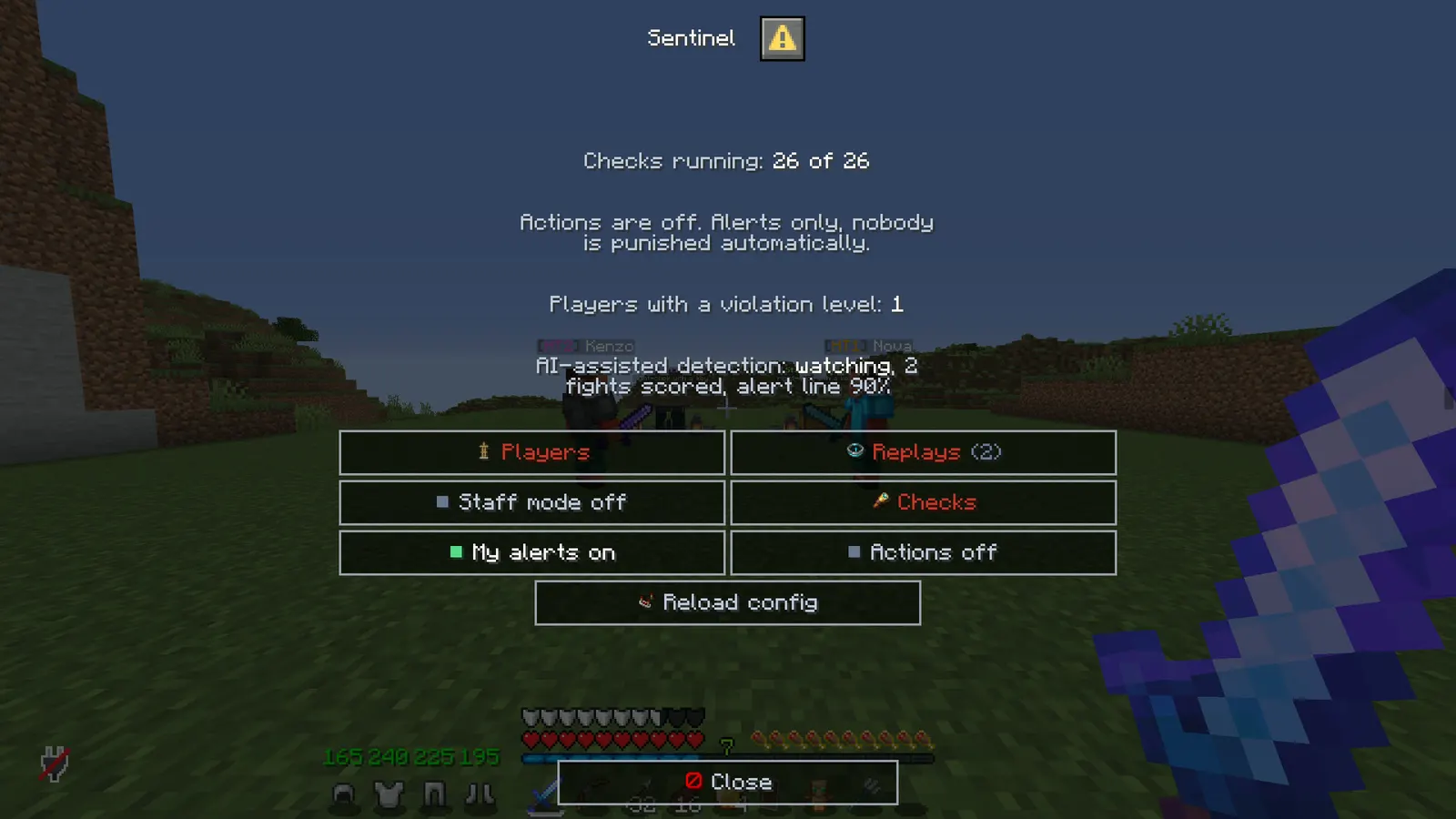
- /sac on its own opens a real Minecraft dialog window: who is flagging right now, worst level first, with ping and the check that fired
- Click a player for a card of every check with their level on it, and reset or exempt them from there
- A checks screen switches a single check on or off for the server, written to config.yml
- The switch that turns the punishment actions on says plainly that they then run by themselves; it stays off until somebody decides otherwise
Installation
Requirements
- Server
- Paper, or a Paper fork such as Purpur. Spigot and CraftBukkit won't work, because it uses Paper-only APIs.
- Minecraft
- 1.21.11 (or a newer 1.21.x); plugin.yml api-version 1.21; built against Paper API 1.21.11
- Java
- 21 or newer
- Needs
- No other plugin
- Works with
- Nothing optional
The listing also says:
- No other plugins required
- Discord alerts through a channel webhook, optional
- No DRM, no licence key and no licence server; the code is not obfuscated
Steps
- Download
SentinelAC.jarfrom BuiltByBit. There's no licence key to enter. - Stop the server and put the jar in the
pluginsfolder. - Start the server. The plugin writes
plugins/SentinelAC/config.ymlwith the defaults listed under Configuration. - Change
config.ymlto fit your server. - Run
/sac reload(reload the config) to apply your changes, or restart the server.
Setup guide
- Drop SentinelAC.jar into /plugins and restart. Give staff sentinelac.alerts.
- Run /sac ai train on while only trusted players are fighting, and /sac ai train off once /sac ai status shows a few hundred fights.
- Play normally for a few days and watch the alerts. If a legit player keeps tripping one check, raise that check's tolerance or alert-at.
- When the alerts match what your staff would have said anyway, set actions.enabled to true and put your ban or kick command under the levels you want. Keep certain-only on.
SMP: fly, speed, nofall, nuker and the world checks matter most; leave actions off and let staff spectate on alert.
Duel / FFA / KitPvP: reach, killaura, autoclicker, aim and the AI score are the ones that decide fights. A temp ban is still a human decision.
Networks: run it on the game servers, not the lobby, and put the server name into discord.server-name so staff know where to jump.
Commands
Straight from plugin.yml. Where the permission column says "not set", plugin.yml puts no permission on the command itself; the nodes the plugin checks are under Permissions.
| Command | Aliases | Usage | What it does | Permission |
|---|---|---|---|---|
/sac | /sentinel /sentinelac | /sac alerts|vl|profile|evidence|ai|debug|testmode|timings|replay|replays|staff|freeze|inv|ec|find|reset|pardon|exempt|checks|testalert|reload | SentinelAC staff commands. | not set |
Every subcommand
/sac alerts [off|certain|normal|verbose|debug]   Your own alert level.
/sac vl [player]         Current violation levels of a player, with their ping.
/sac profile <player>    The AI score feature by feature, every level, evidence, client and connection.
/sac evidence <player>   The latest flags with the numbers, the AI score and the rotations.
/sac ai status|train on|off|label <player> cheater|legit|reset|save   (admin) The AI-assisted layer.
/sac debug <player>      (admin) Every buffer step and dropped flag of one player.
/sac testmode            (admin) Checks run and alert, nothing is cancelled, set back or run.
/sac timings             (admin) What each check costs per tick.
/sac replay <player> [n] Watch the seconds before their flag, where it happened.
/sac replay stop · /sac replays
/sac staff               Staff mode: vanish, tools, your gear kept safe.
/sac freeze <player>     Hold somebody where they stand.
/sac inv <player> · /sac ec <player>   Read-only copies of inventory and ender chest.
/sac find <item> [name]  Who is holding it, and where they keep it.
/sac reset <player>      (admin) Clear a player's levels.
/sac pardon <player>     (admin) Clear their punishment ladder.
/sac exempt <player>     (admin) Toggle exemption for a player.
/sac checks              Which checks are on, and whether actions are enabled.
/sac testalert           (admin) Send a sample alert, and one to Discord.
/sac reload              (admin) Reload the config.
Permissions
From plugin.yml.
| Node | Default | What it allows | Includes |
|---|---|---|---|
sentinelac.alerts | operators | See alerts and use /sac alerts and /sac vl. | none |
sentinelac.admin | operators | Reset, pardon, exempt, debug, testmode, timings, AI training and labels, testalert, reload. | none |
sentinelac.staff | operators | Staff mode, freeze, inventory inspection and the item audit. | none |
sentinelac.staff.see | operators | See staff who are vanished. | none |
sentinelac.bypass | nobody until granted | Never checked. | none |
Placeholders
This plugin doesn't add any PlaceholderAPI placeholders.
Configuration
The default files exactly as they ship in the jar, comments included. The plugin writes them to plugins/SentinelAC/ the first time it starts.
config.yml
| Key | Default | The comment above it |
|---|---|---|
test-mode | false | Test mode: every check runs and alerts as normal, but nothing is cancelled, nobody is set back and no action command runs (the console says what would have run). /sac testmode toggles it. |
timings | section, 1 key | A timing log of the main-thread cost of each part of the plugin, in the console every this many minutes (0 = only when you ask with /sac timings). |
menu | true | Bare /sac opens the staff panel instead of printing the help. |
replay | section, 11 keys | Replay: the seconds before a flag, played back to a staff member as a stand-in wearing the suspect's skin walking the exact path that was recorded. Nothing is written to disk and only the watching staff member sees any of it. |
staff | section, 2 keys | Staff mode: vanish, a hotbar of tools, and the staff member's own inventory kept safe on disk so a restart in the middle of a session does not cost them their gear. |
menu-hides-clean-players | true | The panel lists only players with a violation level. Off lists everyone online. |
gate | section, 7 keys | none |
movement | section, 4 keys | none |
alerts | section, 4 keys | none |
discord | section, 6 keys | Alerts in a Discord channel, for when no staff are online. Make a webhook in the channel's settings (Integrations > Webhooks), paste its address here and /sac reload. Empty = off, and then nothing is ever sent anywhere. /sac testalert sends one post to... |
actions | section, 4 keys | none |
ai | section, 13 keys | A statistical model of how YOUR players fight, running on your server. No data leaves it: there is no cloud service and no network call. How it works, plainly: 1. While a player fights, it records numbers the server can see: how their camera turns every |
checks | section, 26 keys | none |
theme | section, 11 keys | Every message below is written against these names, not against hex codes: <accent>Open</accent> rather than <#ef5350>Open</#ef5350>. Change a colour here and it changes on every screen at once. Ordinary MiniMessage still works, so <gradient:#a:#b> and... |
messages | section, 169 keys | none |
review-reminder | true | One thank-you line with the BuiltByBit review link: once in the console after install and once in chat for the first operator who joins. It never repeats and sends nothing anywhere. false turns it off. |
plugins/SentinelAC/config.yml724 lines
# SentinelAC - an honest anticheat.
#
# Every check adds to a violation level (VL) that decays every second. At alert-at, staff with
# sentinelac.alerts see a message. Commands under actions run when a VL is reached, but ONLY when
# actions.enabled is true. Out of the box nothing is punished automatically: watch the alerts on
# your own server for a few days, then decide what you trust.
#
# Ping, low TPS, a frozen server, teleports, knockback, elytra, riptide, water, ladders, vehicles,
# creative and (for the checks listed in gate.bedrock-skips) Bedrock players are exempt before any
# check runs. Staff can toggle a player with /sac exempt <player>; sentinelac.bypass skips everything.
#
# Every flag has a confidence. CERTAIN means a vanilla client cannot produce it on any connection
# (two targets hit inside one client tick, a hit on someone behind every look you sent, a reach no
# ping explains, a client clock forty seconds fast). HEURISTIC is everything a bad connection, a mod
# or an unusual player could also produce. With actions.certain-only only CERTAIN flags act.
#
# No anticheat catches every client. This one aims for the best coverage it can get while keeping
# false flags very rare, which is why so much of it alerts and so little of it acts.

# Test mode: every check runs and alerts as normal, but nothing is cancelled, nobody is set back and
# no action command runs (the console says what would have run). /sac testmode toggles it.
test-mode: false

# A timing log of the main-thread cost of each part of the plugin, in the console every this many
# minutes (0 = only when you ask with /sac timings).
timings:
  log-every-minutes: 0

# Bare /sac opens the staff panel instead of printing the help.
menu: true

# Replay: the seconds before a flag, played back to a staff member as a stand-in wearing the
# suspect's skin walking the exact path that was recorded. Nothing is written to disk and only the
# watching staff member sees any of it.
replay:
  enabled: true
  seconds: 20              # how much movement is kept per player
  sample-every-ticks: 2    # 2 = ten samples a second
  record-at-vl: 5          # a flag at or above this level saves a recording
  min-seconds-between: 20  # do not save a second recording of the same player within this
  keep-per-player: 3
  keep-minutes: 20         # recordings older than this are dropped
  speed: 1.0               # 0.5 is half speed, 2.0 is double
  trail: true              # draw the path in particles for the watcher
  teleport-viewer: true    # put the staff member beside the start of the recording
  tell-staff: true         # say in chat when a recording was saved

# Staff mode: vanish, a hotbar of tools, and the staff member's own inventory kept safe on disk so a
# restart in the middle of a session does not cost them their gear.
staff:
  vanish-on-enter: true
  # Commands a frozen player may still run, so they can answer you.
  frozen-may-use: [msg, r, reply, tell, w, discord]
# The panel lists only players with a violation level. Off lists everyone online.
menu-hides-clean-players: true

gate:
  max-ping: 300        # above this, nothing flags
  min-tps: 17.5        # below this, nothing flags
  grace-ms: 3000       # after join, teleport, respawn or world change
  timing-max-ping: 250 # above this, timing checks (click rhythm, packet order) stand down
  ping-spike-ms: 150   # a ping jump this big marks the connection unsteady for a few seconds
  stall-grace-ms: 4000 # after the server itself froze for over a second, nothing flags for this long
  # Bedrock players (Geyser + Floodgate, found by their Floodgate UUID or the Floodgate API) are not
  # judged by these checks: their aim, clicks and ticks come from Geyser, not from a Java client.
  # "all" skips every check for them.
  bedrock-skips: [aim, killaura, hitbox, autoclicker, ai, badpackets, timer, criticals, velocity, inventory, scaffold, noslow, speed, elytra]

movement:
  velocity-grace-ms: 2500   # after knockback / explosion / plugin velocity
  damage-grace-ms: 1500
  aerial-grace-ms: 2500     # after an elytra glide or a riptide ends, the momentum keeps going
  vehicle-grace-ms: 1500    # after leaving a vehicle

alerts:
  console: true
  console-every-flag: false # every flag in the console, not only those past alert-at (on in test mode)
  min-interval-ms: 1000     # per player, so a run of flags is one line not twenty
  # Staff pick their own level with /sac alerts <level>: off, certain (only CERTAIN flags), normal
  # (past alert-at, the default), verbose (every flag) or debug (verbose plus every AI-scored fight).
  # What clicking an alert line in chat runs, as the staff member who clicked. {player} and {check}
  # are filled in. The default plays back the seconds before the flag. "/tp {player}" or
  # "/sac vl {player}" work too; "" makes alerts plain text. Hovering always shows the numbers.
  click-command: "/sac replay {player}"

# Alerts in a Discord channel, for when no staff are online. Make a webhook in the channel's
# settings (Integrations > Webhooks), paste its address here and /sac reload. Empty = off, and then
# nothing is ever sent anywhere. /sac testalert sends one post to check it.
discord:
  webhook-url: ""
  per-player-seconds: 30    # one post per player per this many seconds, so a fight is one message
  actions: true             # also post when a configured action (kick, ban command) runs
  server-name: ""           # shown on every post, for networks with several servers
  alert-title: "{player} failed {check} (VL {vl})"
  action-title: "Action taken: {player} reached {check} VL {vl}"

actions:
  enabled: false
  repeat-after-ms: 60000    # an action fires again only after this, even if the VL stays high
  # Certain only: only CERTAIN flags can run an action, the level compared is the one built from
  # CERTAIN flags alone, and the gate below must agree. Recommended. (A config.yml from before 2.0
  # has no such line and keeps the old behaviour, where any flag counts.)
  certain-only: true
  gate:
    min-flags: 3            # this many separate certain flags of the same check...
    min-spread-seconds: 3   # ...spread over at least this long, not one burst...
    window-seconds: 120     # ...inside this window
    min-tps: 18.5           # and the server healthy
    quiet-seconds: 10       # and no ping spike, teleport or join in this many seconds
  # Besides the "actions" map on each check (a command at a level), each check can have a
  # punishment ladder: the first time it is reached the first line runs, the second time the second,
  # and so on (remembered in offences.yml; /sac pardon <player> clears it). Several commands on one
  # rung are joined with " && ". Example, under checks.reach:
  #   punish:
  #     at-vl: 10
  #     ladder:
  #       - "kick {player} Unfair advantage ({check})"
  #       - "tempban {player} 7d Unfair advantage ({check}) && broadcast {player} was removed"
  #       - "ban {player} Unfair advantage ({check})"
  # Placeholders: {player} {uuid} {check} {vl} {detail} {ai}

# ------------------------------------------------------------------------------------------------
# AI-ASSISTED DETECTION
# ------------------------------------------------------------------------------------------------
# A statistical model of how YOUR players fight, running on your server. No data leaves it: there
# is no cloud service and no network call.
#
# How it works, plainly:
#  1. While a player fights, it records numbers the server can see: how their camera turns every
#     tick (steps of a mouse, smooth curves, dead stops after a snap), the timing of every click
#     (how even, whether there are the pauses and doubles a hand makes), the distance and angle of
#     every hit, how often a swing hits, how often the target switches, and how far their movement
#     goes beyond the movement prediction.
#  2. After twenty hits (or at the end of a fight with ten) those numbers become fifteen features
#     and are compared with what is normal ON THIS SERVER: the median and spread of each feature,
#     learned from fights of players who were not flagged. Only the suspicious direction counts
#     (very even clicks count, messy ones do not) and no feature can count more than six spreads.
#  3. A small logistic model with shipped weights combines them into a score from 0 to 100%. It is
#     tuned so that ONE strange number, however strange, stays under the line: it takes several
#     measurements agreeing. The line is calibrated: once 200 clean fights have been seen it is
#     raised to the score only target-false-alarm of your own clean fights reach.
#  4. Several high fights within period-minutes raise the "ai" check (always HEURISTIC). The score
#     is in every alert, every piece of evidence, /sac profile and the Discord posts.
# It never acts on its own unless may-punish is true.
#
# Training: /sac ai train on while only trusted players play (an event, staff, regulars) makes it
# learn every fight as normal and raise no AI flags. /sac ai train off when you have a few hundred
# fights (/sac ai status shows the count). It keeps learning slowly from clean players afterwards.
# Labels: /sac ai label <player> cheater (after you have confirmed one) teaches it from their recent
# fights; "legit" does the opposite. /sac ai reset starts again from the shipped baselines.
ai:
  enabled: true
  training: false
  may-punish: false          # true lets the "ai" check run its actions (actions.enabled still needed)
  window-hits: 20            # a fight is scored every this many hits
  min-hits: 10               # a fight that ends with fewer is not scored
  flag-score: 0.90           # never alert below this score, however the calibration comes out
  target-false-alarm: 0.005  # the calibrated line: half a percent of clean fights may reach it
  windows-needed: 2          # this many fights over the line...
  period-minutes: 10         # ...within this long raise the "ai" check
  learn: true                # keep learning from clean fights after training
  clean-minutes: 10          # a player with any flag in this many minutes is not learned from
  prior-strength: 30         # how many fights the shipped baseline is worth against what is learned
  # Optional: override the weight of a feature (0 turns it off). Keys: click_cv, click_kurtosis,
  # click_outliers, click_entropy, gcd_off, rot_jerk, snap_stop, aim_error, aim_error_sd, aim_lock,
  # accuracy, reach_p90, snap_hit, switch_rate, move_residual. Example: gcd_off: 0
  weights: {}

checks:
  # Flight is measured against gravity itself. Airborne vertical speed in Minecraft is
  # v = (v - 0.08) * 0.98 every tick, with no exception for a player in open air, so it has to fall
  # away tick after tick. Hovering holds it at zero, ascending holds it positive and a slow glide
  # holds it just under zero: all three are the same violation and all three are caught.
  #
  # A jump, a wind charge, an explosion and a crystal all decay exactly as the formula says, so a
  # launch is one violating move and the move after it clears the streak. A stalled connection
  # delivers several ticks of falling as one move, which looks like falling FASTER, never like being
  # held up, so lag cannot manufacture this.
  fly:
    enabled: true
    gravity-streak: 10        # consecutive moves with no gravity: half a second of flight
    gravity-window: 60        # and the window the second tier measures over
    gravity-window-hits: 50   # how much of that window has to be gravity-defying, for a client that bobs
    weight-gravity: 4.0
    alert-at: 6
    decay-per-second: 0.5
    actions:
      "20": ["kick {player} Unfair advantage ({check})"]
  # Two tiers. The peak: horizontal distance per move against a sprint-jump with your speed
  # attribute and effects. The prediction (2.0): per client tick, movement is last tick's times the
  # friction of the block plus at most one tick of acceleration (plus 0.2 on a sprint-jump), so any
  # movement beyond the larger of the ground and air answers is speed the game did not give. That
  # catches strafe and low-hop modules that stay under the peak. Also sprinting backwards.
  speed:
    enabled: true
    base-per-tick: 0.62     # sprint-jump peak on flat ground at speed 0.1
    tolerance: 1.15
    ice-multiplier: 1.8
    streak: 6               # consecutive too-fast ticks before a flag
    weight: 1.0
    prediction-threshold: 0.04  # blocks per tick beyond the prediction that count as suspicious
    prediction-slack: 0.02
    weight-prediction: 1.0
    omni-ticks: 10              # ticks of sprinting away from where you look
    weight-omni: 1.0
    buffer: 12                  # suspicious ticks needed (the buffer drains by buffer-decay a second)
    buffer-decay: 4
    setback: false
    alert-at: 6
    decay-per-second: 0.5
    actions:
      "25": ["kick {player} Unfair advantage ({check})"]
  # Landing after a real drop with no fall damage, and (2.0) a client claiming to stand on the
  # ground while falling with nothing under it, which is how most nofall modules work.
  nofall:
    enabled: true
    min-drop: 4.0
    weight: 2.0
    weight-spoof: 1.5
    buffer: 3
    buffer-decay: 0.5
    alert-at: 4
    decay-per-second: 0.25
    actions: {}
  # Lag-compensated (2.0): measured against every position the victim held inside both players'
  # latency window, so a laggy hit on a sprinting target is not charged as reach. Three tiers:
  # past range + tolerance (heuristic), past what both pings can explain + impossible-margin
  # (CERTAIN, and the hit is refused), and half of the last thirty hits past 3.05 (pattern).
  reach:
    enabled: true
    tolerance: 0.35         # on top of the player's entity interaction range (3.0 vanilla)
    high-ping-bonus: 0.25   # extra when ping is above 100
    weight: 1.0
    impossible-margin: 1.0
    cancel-impossible: true
    pattern: true
    pattern-share: 0.5
    weight-pattern: 2.0
    alert-at: 5
    decay-per-second: 0.3
    actions:
      "20": ["kick {player} Unfair advantage ({check})"]
  # Too many clicks, too even a rhythm, and (2.0) the wrong shape: forty click gaps with no human
  # tails (negative kurtosis, not one outlier) at a real clicking pace, which is what randomised
  # autoclickers produce.
  autoclicker:
    enabled: true
    max-cps: 22
    rhythm-samples: 16
    rhythm-max-deviation-ms: 4.0
    weight-cps: 1.0
    weight-rhythm: 1.5
    stats-samples: 40
    stats-min-cps: 8
    stats-max-kurtosis: -0.9
    stats-max-outliers: 0
    weight-stats: 1.5
    alert-at: 5
    decay-per-second: 0.3
    actions: {}
  aim:
    enabled: true
    window: 40
    snap-degrees: 25.0
    snaps: 4
    weight-snap: 1.0
    weight-invalid: 5.0
    alert-at: 5
    decay-per-second: 0.3
    actions: {}
  # Moves per second over a window, and (2.0) the balance of the client's own tick-end packets
  # against the clock: a client running fast drifts ahead and keeps drifting, a lag spike only
  # bunches ticks up. Past balance-certain-ms (longer than any connection survives a stall) it is
  # CERTAIN.
  timer:
    enabled: true
    window-seconds: 4
    max-ratio: 1.12
    weight: 1.0
    balance-alert-ms: 5000
    balance-certain-ms: 40000
    balance-step-ms: 2000
    weight-balance-certain: 3.5
    alert-at: 4
    decay-per-second: 0.3
    actions:
      "15": ["kick {player} Unfair advantage ({check})"]

  # ---- 2.0: combat ------------------------------------------------------------------------------
  # Two entities attacked inside one client tick (CERTAIN), a hit on someone behind every look
  # direction sent in the latency window (CERTAIN), a hit far off aim, an attack without an arm
  # swing, and silent rotations (the look jumps to the target for the attack's tick and back).
  killaura:
    enabled: true
    suspicious-degrees: 70.0
    impossible-degrees: 95.0
    weight-multi: 3.0
    weight-noswing: 1.0
    silent-snap-degrees: 20.0
    silent-return-degrees: 1.0
    silent-count: 3
    weight-silent: 2.0
    buffer: 4
    buffer-decay: 0.5
    alert-at: 3
    decay-per-second: 0.3
    actions: {}
  # A critical hit from a player who has not gone up or down for six client ticks (standing on
  # flat ground, where no critical exists). Uses positions, not the client's on-ground flag.
  criticals:
    enabled: true
    still-ticks: 6
    weight: 2.0
    buffer: 2
    buffer-decay: 0.2
    alert-at: 4
    decay-per-second: 0.3
    actions: {}
  # Anti-knockback: on the tick a knockback lands, a vanilla client moves along it by most of its
  # strength. Walls, water, webs and crowds excuse it.
  velocity:
    enabled: true
    min-strength: 0.25
    min-taken: 0.35
    weight: 1.5
    buffer: 3
    buffer-decay: 0.1
    alert-at: 3
    decay-per-second: 0.2
    actions: {}
  # Hitbox expanders: forty swings whose median passes more than 0.22 blocks outside the target.
  hitbox:
    enabled: true
    sample: 40
    median-miss: 0.22
    miss-share: 0.65
    weight: 3.0
    alert-at: 3
    decay-per-second: 0.1
    actions: {}

  # ---- 2.0: movement -----------------------------------------------------------------------------
  # setback: true puts the player back where every movement check last agreed with them as soon as
  # the buffer is half full, before any flag. An honest player gets one rubber band at worst.
  step:
    enabled: true
    tolerance: 0.05
    weight: 2.0
    buffer: 2
    buffer-decay: 0.2
    setback: true
    alert-at: 4
    decay-per-second: 0.3
    actions: {}
  jesus:
    enabled: true
    moves: 10
    weight: 2.0
    buffer: 2
    buffer-decay: 0.2
    setback: true
    alert-at: 4
    decay-per-second: 0.3
    actions: {}
  phase:
    enabled: true
    weight: 2.0
    buffer: 2
    buffer-decay: 0.2
    setback: true
    alert-at: 4
    decay-per-second: 0.3
    actions: {}
  noslow:
    enabled: true
    grace-ms: 350
    max-speed: 0.13
    ticks: 7
    weight: 1.0
    buffer: 3
    buffer-decay: 0.3
    setback: false
    alert-at: 3
    decay-per-second: 0.3
    actions: {}
  # Gliding that holds its height and speed for two seconds without a firework, wind charge or
  # riptide (the glide physics always pays with one or the other), or faster than 4 blocks a tick.
  elytra:
    enabled: true
    window-ticks: 40
    min-drop: 1.0
    max-speed: 4.0
    boost-grace-ms: 3500
    weight: 2.0
    buffer: 2
    buffer-decay: 0.1
    setback: false
    alert-at: 4
    decay-per-second: 0.3
    actions: {}
  vehicle:
    enabled: true
    max-speed-boat: 1.2
    max-speed-boat-ice: 4.2
    max-speed-mount: 1.4
    fly-moves: 10
    weight: 1.5
    buffer: 5
    buffer-decay: 1.0
    alert-at: 3
    decay-per-second: 0.3
    actions: {}
  # Several movement packets inside one client tick, blink (a silence then a burst of held ticks),
  # and sprinting with six food points or fewer.
  badpackets:
    enabled: true
    weight: 1.0
    weight-blink: 0.5
    blink-gap-ms: 1000
    blink-burst: 15
    hungry-sprint-moves: 20
    buffer: 4
    buffer-decay: 0.5
    alert-at: 4
    decay-per-second: 0.3
    actions: {}

  # ---- 2.0: world --------------------------------------------------------------------------------
  # cancel: true refuses the block break or placement first; flags come only past the buffer.
  fastbreak:
    enabled: true
    ratio: 0.9              # under this share of the game's own break time...
    latency-ms: 50          # ...minus this, is too fast
    weight: 1.0
    buffer: 3
    buffer-decay: 0.1
    cancel: true
    alert-at: 3
    decay-per-second: 0.2
    actions: {}
  nuker:
    enabled: true
    max-per-second: 22
    max-angle: 100.0
    weight: 2.0
    buffer: 3
    buffer-decay: 0.5
    cancel: true
    alert-at: 4
    decay-per-second: 0.3
    actions: {}
  scaffold:
    enabled: true
    face-tolerance: 0.4
    look-margin: 0.25
    tower-min-ms: 300
    bridge-max-pitch: 40.0
    bridge-blocks: 6
    weight: 1.5
    buffer: 3
    buffer-decay: 0.2
    cancel: true
    alert-at: 3
    decay-per-second: 0.3
    actions: {}
  fastplace:
    enabled: true
    max-per-second: 24
    weight: 1.0
    buffer: 3
    buffer-decay: 0.5
    cancel: true
    alert-at: 3
    decay-per-second: 0.3
    actions: {}
  ghosthand:
    enabled: true
    weight: 1.5
    buffer: 3
    buffer-decay: 0.05
    cancel: true
    alert-at: 3
    decay-per-second: 0.1
    actions: {}

  # ---- 2.0: player -------------------------------------------------------------------------------
  fastuse:
    enabled: true
    ratio: 0.75
    latency-ms: 100
    bow-min-ms: 650
    weight: 1.5
    buffer: 2
    buffer-decay: 0.05
    alert-at: 3
    decay-per-second: 0.1
    actions: {}
  # Inventory move (clicking slots while the client still reports a movement key held: a screen
  # always releases them; also what auto-armour does while running) and chest stealers.
  inventory:
    enabled: true
    move-held-ms: 400
    first-click-ms: 40
    steal-clicks: 6
    steal-max-gap-ms: 70
    steal-max-deviation-ms: 4.0
    weight: 1.5
    buffer: 2
    buffer-decay: 0.05
    alert-at: 3
    decay-per-second: 0.1
    actions: {}
  # The AI-assisted layer as a check (see the ai section above). Always heuristic.
  ai:
    enabled: true
    weight: 2.0
    alert-at: 2
    decay-per-second: 0.02
    actions: {}

# ------------------------------------------------------------------------------------------------
# THEME
# ------------------------------------------------------------------------------------------------
# Every message below is written against these names, not against hex codes: <accent>Open</accent>
# rather than <#ef5350>Open</#ef5350>. Change a colour here and it changes on every screen at
# once. Ordinary MiniMessage still works, so <gradient:#a:#b> and <#ff0000> are fine anywhere.
theme:
  accent: "#ef5350"     # your colour: headings and anything the player is meant to click
  accent2: "#f6a09f"    # a lighter accent, for a second level of emphasis
  title: "#f4f7ff"      # screen titles
  text: "#c2ccdd"       # ordinary prose
  muted: "#6b7a94"      # hints, separators, anything the eye should skip
  value: "#ffffff"      # the numbers and names the player opened the screen to read
  good: "#57e08a"
  warn: "#ffc857"
  bad: "#ff6b6b"
  small-caps: false     # ᴇхᴀᴍᴘʟᴇ - a garnish; whole menus in it read badly
  # Real Minecraft item pictures beside the buttons and in the chest screens. Drawn from the
  # client's own textures, so there is nothing to install and no resource pack: it needs a
  # 1.21.9 or newer client, and older ones simply see the buttons as words.
  item-icons: true

messages:
  prefix: "<#c0392b><bold>Sentinel</bold></#c0392b> <muted>»</muted> "
  alert: "<value>{player}</value><text> failed </text><#e74c3c>{check}</#e74c3c><text> (VL {vl}, {confidence}) </text><muted>{detail} · {ping}ms · {tps} tps · {ai}</muted>"
  # Added after the alert line of a config.yml from before 2.0, which has no {ai} in it.
  alert-ai-suffix: "<muted> · {ai}</muted>"
  # Hovering over an alert line in chat. The second one is used when alerts.click-command is set.
  alert-hover: "<value>{player}</value><text> · {check} · VL {vl}</text><newline><muted>{detail}</muted><newline><text>ping {ping}ms · server {tps} tps</text>"
  alert-hover-click: "<value>{player}</value><text> · {check} · VL {vl}</text><newline><muted>{detail}</muted><newline><text>ping {ping}ms · server {tps} tps</text><newline><newline><accent>Click: {command}</accent>"
  action-held: "<warn>Held an action for </warn><value>{player}</value><warn> ({check}): </warn><text>{reason}.</text>"
  test-would-run: "<warn>[test mode]</warn><text> would run: </text><value>{command}</value>"
  debug-line: "<muted>[debug] {player} {check}: {line}</muted>"
  debug-on: "<text>Debug output for </text><value>{player}</value><text> on. Same command again to stop.</text>"
  debug-off: "<text>Debug output for </text><value>{player}</value><text> off.</text>"
  testmode-on: "<warn>Test mode on.</warn><text> Checks alert, but nothing is cancelled, set back or run.</text>"
  testmode-off: "<good>Test mode off.</good><text> Cancels, setbacks and actions work again.</text>"
  timings-reset: "<text>Timings reset.</text>"
  usage-alerts: "<text>/sac alerts [off|certain|normal|verbose|debug]</text>"
  alerts-level: "<text>Your alerts: </text><value>{level}</value>"
  usage-pardon: "<text>/sac pardon <player> clears their punishment ladder.</text>"
  pardoned: "<text>Punishment ladder of </text><value>{player}</value><text> cleared.</text>"
  usage-ai: "<text>/sac ai status · /sac ai train on|off · /sac ai label <player> cheater|legit · /sac ai reset · /sac ai save</text>"
  ai-training-on: "<warn>AI training on.</warn><text> Every fight is learned as normal play and no AI flags are raised. Turn it off with /sac ai train off.</text>"
  ai-training-off: "<good>AI training off.</good><text> Fights are scored against what was learned.</text>"
  ai-labelled: "<text>Learned from </text><value>{count}</value><text> recent fights of {player} as </text><value>{label}</value><text>.</text>"
  ai-label-none: "<text>{player} has no scored fights yet to learn from.</text>"
  ai-reset: "<text>The AI model is back to the shipped baselines and weights.</text>"
  ai-saved: "<text>The AI model was written to ai-model.yml.</text>"
  ai-window: "<muted>[ai] {player}: {line}</muted>"
  profile-head: "<value>{player}</value><text> · {ping}ms · client {brand} · Bedrock {bedrock} · tick packets {ticks}</text>"
  profile-ai: "<text>AI-assisted score: </text><value>{score}</value><text> latest, {smoothed} smoothed, {windows} fights, alert line {line}</text>"
  profile-ai-none: "<text>AI-assisted score: no fight scored yet ({windows}).</text>"
  profile-feature: "<muted> - </muted><text>{feature} </text><value>{value}</value><muted> (normal {normal} ± {spread}) z {z}, +{points}</muted>"
  profile-levels: "<text>Levels: </text><value>{levels}</value>"
  profile-evidence: "<muted> - {ago}s ago </muted><text>{check} [{confidence}] </text><muted>{detail}</muted>"
  profile-offences: "<text>Punishment ladder: </text><value>{offences}</value>"
  evidence-head: "<text>Evidence for </text><value>{player}</value><text> ({count} kept, newest first). Hover for the numbers, click to watch.</text>"
  evidence-row: "<muted>{ago}s </muted><#e74c3c>{check}</#e74c3c><text> [{confidence}] VL {vl} </text><muted>{detail}</muted>"
  evidence-hover: "<value>{check}</value><text> · {confidence} · +{weight} · VL {vl}</text><newline><muted>{detail}</muted><newline><text>ping {ping}ms · server {tps} tps</text><newline><text>AI-assisted {ai}: {top}</text><newline><muted>last rotations (yaw/pitch per sample): {rotations}</muted><newline>{replay}"
  evidence-replay: "<accent>Click to watch the recording.</accent>"
  evidence-no-replay: "<muted>No recording for this flag.</muted>"
  replay-expired: "<text>That recording is no longer kept.</text>"
  menu-home-ai-on: "<text>AI-assisted detection: </text><value>watching</value><text>, {windows} fights scored, alert line {line}</text>"
  menu-home-ai-training: "<warn>AI-assisted detection is training:</warn><text> {windows} fights so far, no AI flags.</text>"
  menu-home-ai-off: "<text>AI-assisted detection is off.</text>"
  menu-player-ai: "<text>AI-assisted: </text><value>{ai}</value><muted> ({top})</muted>"
  menu-player-clean: "<muted>{count} checks at zero.</muted>"
  menu-profile: "<white><icon:stats></white><value>Profile of {player}</value>"
  menu-profile-tip: "<text>The AI-assisted score feature by feature, the levels and the latest evidence.</text>"
  menu-profile-title: "<value>{player}</value><text> · profile</text>"
  menu-evidence: "<white><icon:search></white><text>Evidence in chat</text>"
  menu-evidence-tip: "<text>Every recent flag with its numbers on hover and its recording on click.</text>"
  menu-debug: "<white><icon:settings></white><text>Debug {player}</text>"
  menu-debug-tip: "<text>Every buffer step and dropped flag of this player in your chat. Click again to stop.</text>"
  testalert-discord: "<text>Test alert shown above and posted to Discord. If it does not arrive, the console says why.</text>"
  testalert-no-discord: "<text>Test alert shown above. Discord is off: set discord.webhook-url in config.yml.</text>"
  help: "<text>/sac alerts [level] · /sac vl [player] · /sac profile <player> · /sac evidence <player> · /sac ai · /sac debug <player> · /sac testmode · /sac timings · /sac replay <player> · /sac replays · /sac staff · /sac freeze <player> · /sac inv <player> · /sac ec <player> · /sac find <item> · /sac reset <player> · /sac pardon <player> · /sac exempt <player> · /sac checks · /sac testalert · /sac reload</text>"
  no-permission: "<bad>You cannot do that.</bad>"
  unknown-player: "<bad>Unknown player: </bad><value>{name}</value>"
  alerts-on: "<value>Alerts on.</value>"
  alerts-off: "<value>Alerts off.</value>"
  vl: "<value>{player}</value><text> ({ping}ms): </text><value>{levels}</value>"
  reset: "<text>Levels of </text><value>{player}</value><text> reset.</text>"
  exempt-on: "<value>{player}</value><text> is now exempt.</text>"
  exempt-off: "<value>{player}</value><text> is checked again.</text>"
  checks: "{checks}  <text>actions: {actions}</text>"
  reloaded: "<value>Config reloaded.</value>"

  # The staff panel. Every line here is a screen title, a button label or a tooltip.
  menu-title: "<value>Sentinel</value>"
  menu-close: "<white><icon:close></white><text>Close</text>"
  menu-back: "<white><icon:back></white><text>Back</text>"
  menu-back-tip: "<text>Back to the screen before.</text>"
  menu-word-on: "<good>on</good>"
  menu-word-off: "<bad>off</bad>"
  menu-home-checks: "<text>Checks running: </text><value>{on} of {all}</value>"
  menu-home-actions-on: "<bad>Actions are on: configured commands run by themselves.</bad>"
  menu-home-actions-off: "<text>Actions are off. Alerts only, nobody is punished automatically.</text>"
  menu-home-flagging: "<text>Players with a violation level: </text><value>{count}</value>"
  menu-players: "<white><icon:players></white><#c0392b>Players</#c0392b>"
  menu-players-tip: "<text>Who is flagging, worst first.</text>"
  menu-players-title: "<value>Players</value>"
  menu-players-clean: "<text>Nobody has flagged anything.</text>"
  menu-player-line: "<value>{player}</value><text> · {check} VL {vl} · {ping}ms</text>"
  menu-player-open: "<white><icon:players></white><value>{player}</value>"
  menu-player-open-tip: "<text>Every check on {player}.</text>"
  menu-player-title: "<value>{player}</value>"
  menu-player-head: "<text>{player} · {ping}ms · server {tps} tps</text>"
  menu-player-check: "<text> - {check}: </text><value>VL {vl}</value><text> ({state})</text>"
  menu-reset: "<white><icon:dot></white><value>Reset levels</value>"
  menu-reset-tip: "<text>Back to zero on every check.</text>"
  menu-exempt-on: "<good>■</good> <value>{player} is exempt</value>"
  menu-exempt-off: "<muted>■</muted> <text>{player} is checked</text>"
  menu-exempt-tip: "<text>Exempt players are never flagged.</text>"
  menu-checks: "<white><icon:check></white><#c0392b>Checks</#c0392b>"
  menu-checks-tip: "<text>Turn a single check on or off.</text>"
  menu-checks-title: "<value>Checks</value>"
  menu-checks-intro: "<text>A check that is off never flags and never acts.</text>"
  menu-check-tip: "<text>Click to switch this check.</text>"
  menu-check-readonly: "<text>Admins only.</text>"
  menu-alerts-on: "<good>■</good> <value>My alerts on</value>"
  menu-alerts-off: "<muted>■</muted> <text>My alerts off</text>"
  menu-alerts-tip: "<text>Whether you see the alert messages.</text>"
  menu-actions-on: "<bad>■</bad> <value>Actions on</value>"
  menu-actions-off: "<muted>■</muted> <text>Actions off</text>"
  menu-actions-tip: "<text>On means the configured commands run by themselves. Watch the alerts first.</text>"
  menu-reload: "<white><icon:reload></white><text>Reload config</text>"
  menu-reload-tip: "<text>Read config.yml again.</text>"
  switch-on: "<white><icon:yes></white><good><bold>ON</bold></good>  <value>{title}</value>"
  switch-off: "<white><icon:no></white><bad><bold>OFF</bold></bad> <text>{title}</text>"

  # Replay.
  usage-replay: "<text>/sac replay <player> [n] · /sac replay stop · /sac replays</text>"
  replay-saved: "<text>Recording kept: </text><value>{player}</value><text> {check}, {seconds}s. </text><value>/sac replays</value>"
  replay-none: "<text>Nothing recorded for </text><value>{player}</value><text>.</text>"
  replay-playing: "<value>{player}</value><text> · {check} · {seconds}s from {ago}s ago. </text><value>/sac replay stop</value>"
  replay-stopped: "<text>Replay stopped.</text>"
  replay-world-gone: "<bad>That recording is from {world}, which is not loaded.</bad>"
  replay-ghost-name: "<text>{player}</text>"
  replay-label: "<#e74c3c><bold>REPLAY</bold></#e74c3c> <value>{player}</value><text> · {check} VL {vl} · {time}s of {total}s · {ping}ms · {state}</text>"
  replay-ground: "on ground"
  replay-air: "<warn>in the air</warn>"
  replays-header: "<text>Recordings kept: </text><value>{count}</value>"
  replays-row: "<text> - </text><value>{player}</value><text> {check}, {seconds}s, {ago}s ago</text>"
  menu-replays: "<white><icon:replay></white><#c0392b>Replays</#c0392b> <muted>({count})</muted>"
  menu-replays-tip: "<text>Watch the seconds before a flag.</text>"
  menu-replays-title: "<value>Replays</value>"
  menu-replays-intro: "<text>Every recording is the movement the checks saw, played back to you alone.</text>"
  menu-replays-off: "<text>Replay is switched off in config.yml.</text>"
  menu-replays-empty: "<text>Nothing has been recorded yet.</text>"
  menu-replay-line: "<value>{player}</value><text> · {check} VL {vl} · {seconds}s · {ago}s ago</text>"
  menu-replay-play: "<white><icon:replay></white><value>Watch {player}</value> <muted>({check})</muted>"
  menu-replay-play-tip: "<text>Play the {seconds} seconds back where they happened.</text>"
  menu-replay-last: "<white><icon:replay></white><value>Watch the last flag</value>"
  menu-replay-now: "<value>Record the last seconds now</value>"
  menu-replay-last-tip: "<text>Play back what {player} just did.</text>"
  menu-replay-stop: "<white><icon:delete></white><text>Stop watching</text>"
  menu-replay-stop-tip: "<text>Remove the stand-in and stop the replay.</text>"

  # Staff mode and the inventory audit.
  usage-freeze: "<text>/sac freeze <player></text>"
  usage-inv: "<text>/sac inv <player> · /sac ec <player></text>"
  usage-find: "<text>/sac find <item> [name contains]</text>"
  unknown-item: "<bad>No item called </bad><value>{item}</value>"
  staff-on: "<value>Staff mode on.</value><text> Your things are kept safe until you leave it.</text>"
  staff-off: "<text>Staff mode off. Everything you had is back.</text>"
  staff-recovered: "<text>You were still in staff mode from before the restart.</text>"
  staff-tool-inspect: "<value>Inspect</value>"
  staff-tool-inspect-lore: "<text>Right-click a player to look in their inventory.</text>"
  staff-tool-freeze: "<accent2>Freeze</accent2>"
  staff-tool-freeze-lore: "<text>Right-click a player to hold them where they stand.</text>"
  staff-tool-random: "<value>Visit somebody</value>"
  staff-tool-random-lore: "<text>Right-click to jump to a random player.</text>"
  staff-tool-vanish: "<good>Vanish</good>"
  staff-tool-vanish-lore: "<text>Right-click to disappear.</text>"
  staff-tool-unvanish: "<text>Come back</text>"
  staff-tool-unvanish-lore: "<text>Right-click to be seen again.</text>"
  staff-tool-exit: "<bad>Leave staff mode</bad>"
  staff-tool-exit-lore: "<text>Right-click to get your own inventory back.</text>"
  frozen: "<bad><bold>You are frozen.</bold></bad> <text>Staff are talking to you. Do not log out.</text>"
  frozen-reminder: "<bad>You are frozen.</bad>"
  unfrozen: "<good>You can move again.</good>"
  froze: "<value>{player}</value><text> is frozen.</text>"
  unfroze: "<value>{player}</value><text> can move again.</text>"
  visiting: "<text>Dropped in on </text><value>{player}</value><text>.</text>"
  nobody-to-visit: "<text>Nobody else is online.</text>"
  audit-title: "<value>Who has {item}</value>"
  audit-header: "<text>{total} of </text><value>{item}</value><text> across {players} player(s) online.</text>"
  audit-row: "<value>{player}</value><text> · {total} · {where}</text>"
  audit-none: "<text>Nobody online is carrying {item}.</text>"
  audit-open: "<white><icon:check></white><value>Look at {player}</value>"
  audit-open-tip: "<text>Open a copy of {player}'s inventory.</text>"
  audit-goto: "<white><icon:teleport></white><text>Go to {player}</text>"
  audit-goto-tip: "<text>Teleport to them.</text>"
  audit-inv-title: "<muted>{player}'s inventory</muted>"
  audit-ender-title: "<muted>{player}'s ender chest</muted>"
  menu-staff-on: "<good>■</good> <value>Staff mode on</value>"
  menu-staff-off: "<muted>■</muted> <text>Staff mode off</text>"
  menu-staff-tip: "<text>Vanish, the staff hotbar, and your own inventory kept safe.</text>"

# One thank-you line with the BuiltByBit review link: once in the console after install and once
# in chat for the first operator who joins. It never repeats and sends nothing anywhere. false turns it off.
review-reminder: true
Config guide
The short annotated version from the listing. If it and the files above disagree, the files are what actually ships.
gate:
  max-ping: 300          above this nothing flags
  min-tps: 17.5          below this nothing flags
  grace-ms: 3000         after join / teleport / respawn / world change
actions:
  enabled: false         turn on only once you trust the alerts on YOUR server
  certain-only: true     only CERTAIN flags can run an action
  gate:
    min-flags: 3         separate certain flags of the same check...
    min-spread-seconds: 3
    window-seconds: 120  ...inside this window, on a healthy server
ai:
  enabled: true
  may-punish: false      the "ai" check never acts unless this is true
  flag-score: 0.90
discord:
  webhook-url: ""        empty = nothing is ever sent anywhere
checks:
  reach:
    enabled: true
    alert-at: 5
    actions:
      "20": ["kick {player} Unfair advantage ({check})"]
Placeholders in actions: {player}, {uuid}, {check}, {vl}, {detail}, {ai}. Each check has its own thresholds; the file explains every one in a comment. An existing config.yml keeps working: the new checks only alert, and certain-only mode is added by one line.
FAQ
Which servers and versions does it run on?
It needs Paper or a Paper fork like Purpur, because it uses Paper-only APIs (the dialog API for its menus, Adventure text components, Paper player profiles). Spigot and CraftBukkit won't work. The listing says Minecraft 1.21.11 (or a newer 1.21.x). plugin.yml declares api-version 1.21, the jar is built against Paper API 1.21.11, and it needs Java 21 or newer.
Does it need other plugins?
No, it runs without any other plugin (plugin.yml has no hard dependencies). The listing adds: Discord alerts through a channel webhook, optional.
How do I apply config changes?
Edit plugins/SentinelAC/config.yml and run /sac reload (reload the config). Restarting works too.
Does it run on Folia, or for Bedrock players?
I haven't tested it on Folia, and plugin.yml doesn't declare folia-supported. I haven't tested Bedrock players through Geyser either.
Is there DRM or a licence key?
No. There is nothing to activate and no licence server to reach, and the code is not obfuscated.
Does the AI part send data anywhere?
No. The model runs on your server and learns from your server; there is no cloud service and no network call. The only thing that ever leaves the server is a Discord alert, and only if you paste a webhook address.
Will it ban people on its own?
Not unless you tell it to. Actions are off by default, certain-only mode limits them to flags a normal client cannot produce, and the AI check never acts unless ai.may-punish is true.
Does it catch every cheat client?
No anticheat does. SentinelAC covers 25 checks plus the AI score, and the alerts show what it measured so your staff can judge the rest.
How long does setup take?
Drop the jar into /plugins and restart. The setup guide above has 4 short steps.
Can alerts go to Discord?
Yes. Paste a channel webhook address into discord.webhook-url and run /sac reload.
What should I not expect from it?
No anticheat catches every client, and this one does not claim to. SentinelAC is built to stay quiet when nothing is wrong, to show its evidence when something is, and to punish only what you configured. It is a tool for your staff, not a replacement for them.
Links
- BuiltByBit
- SentinelAC
- Support
- discord.gg/KG4ubAZEuw
- Everything
- The Complete Collection on BuiltByBit
- More plugins
- All my plugins
- Custom work
- Commissions
Support
Questions, bugs or ideas: the active support Discord or the discussion tab on BuiltByBit. When something breaks, include your server version and the error from the console.