 Frostyh

Overview
Stop combat logging, spawn running and new players getting farmed, in one small plugin
The three arguments every PvP-enabled server has: people running to spawn mid-fight, people logging out at half a heart, and brand new players getting farmed at the gate. Standoff settles all three, in one small plugin with no region plugin required.
In short
- Combat tag with a boss bar timer
- Safe zones without a region plugin
- Protection for brand new players
- Logging out mid-fight gets punished
- Potion bans and a staff panel
- Latest version
- 1.2.0
- Runs on
- Paper or Purpur 1.21.11, Java 21
- BuiltByBit
- Standoff on BuiltByBit
What changed in 1.2.0
- No flying in combat: a tagged player in survival or adventure loses flight (/fly, double jump) until the tag ends, and gets it back afterwards if they had it before. Creative and spectator are never touched. Switch: combat.disable-flight (on by default).
- No elytra in combat, optional: combat.disable-elytra stops gliding while tagged. Off by default, because elytra and mace fights are fights too.
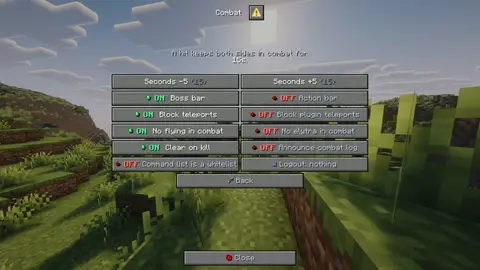
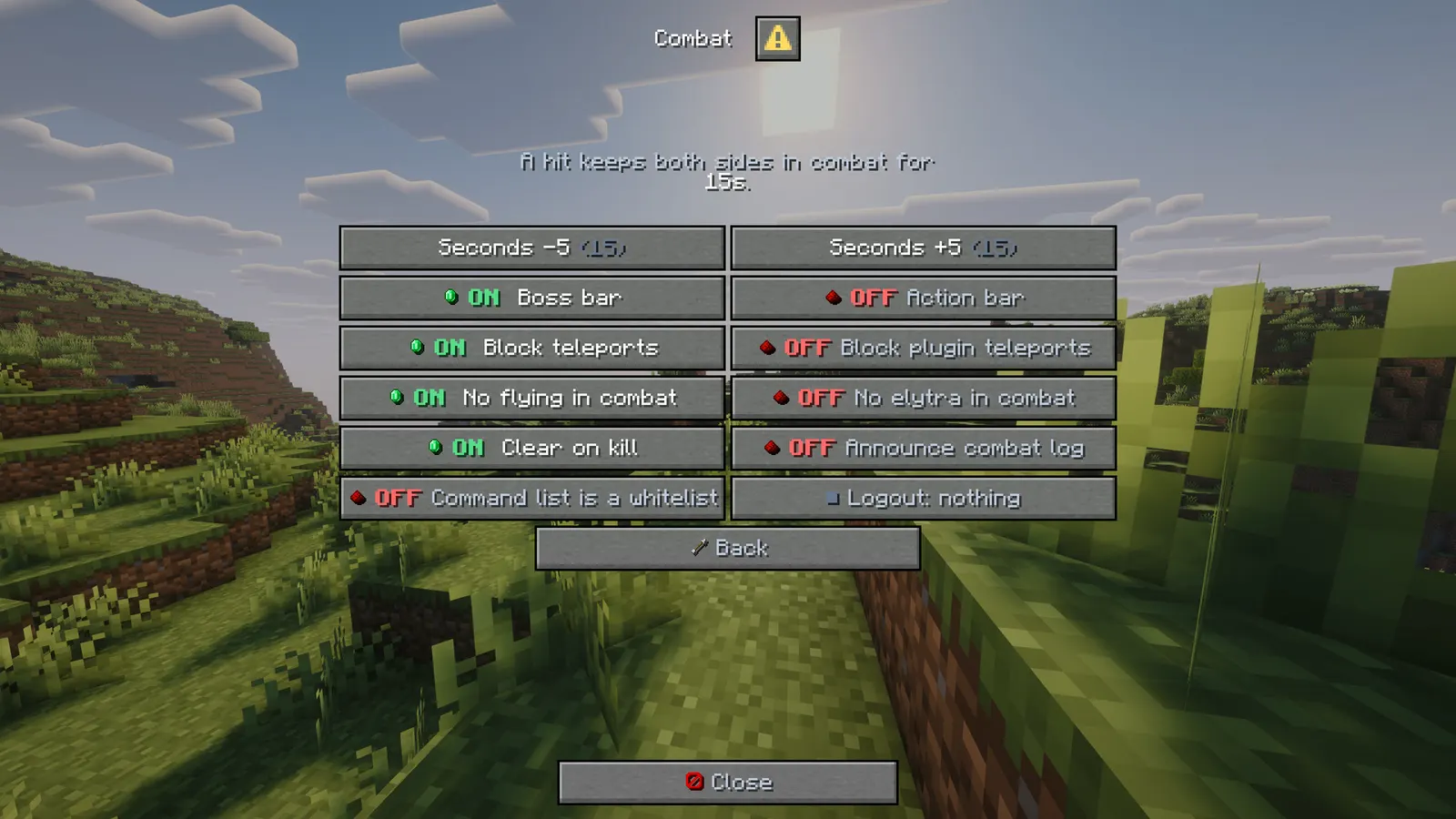
- Both switches are also in the Combat screen of the /standoff panel. standoff.bypass keeps flight and elytra.
- PlaceholderAPI support (optional): %standoff_tagged%, %standoff_seconds%, %standoff_opponent%, %standoff_protected%, %standoff_protection_minutes%, %standoff_in_safezone%, %standoff_zone% and %standoff_fighting%, for scoreboards, tab lists and holograms.
- The new settings and messages work without touching your config.yml. Flight blocking is on for existing servers too after this update; set combat.disable-flight: false to keep the old behaviour.
Features
01What makes it different
- Safe zones are Standoff's own: no WorldGuard or other region plugin needed
- Combat tag, safe zones and new-player protection in one plugin that knows about all three
- Tagged players lose /fly and double jump and cannot teleport away, while ender pearls still work, because that is the fight
02What you get: combat tagging
- New in v1.3.0: No flying in combat: a tagged player loses /fly and double jump until the tag ends, and gets it back after
- New in v1.3.0: No elytra in combat (optional): stop gliding while tagged, off by default
- New in v1.3.0: PlaceholderAPI (optional): tag, opponent, protection and safe zone placeholders
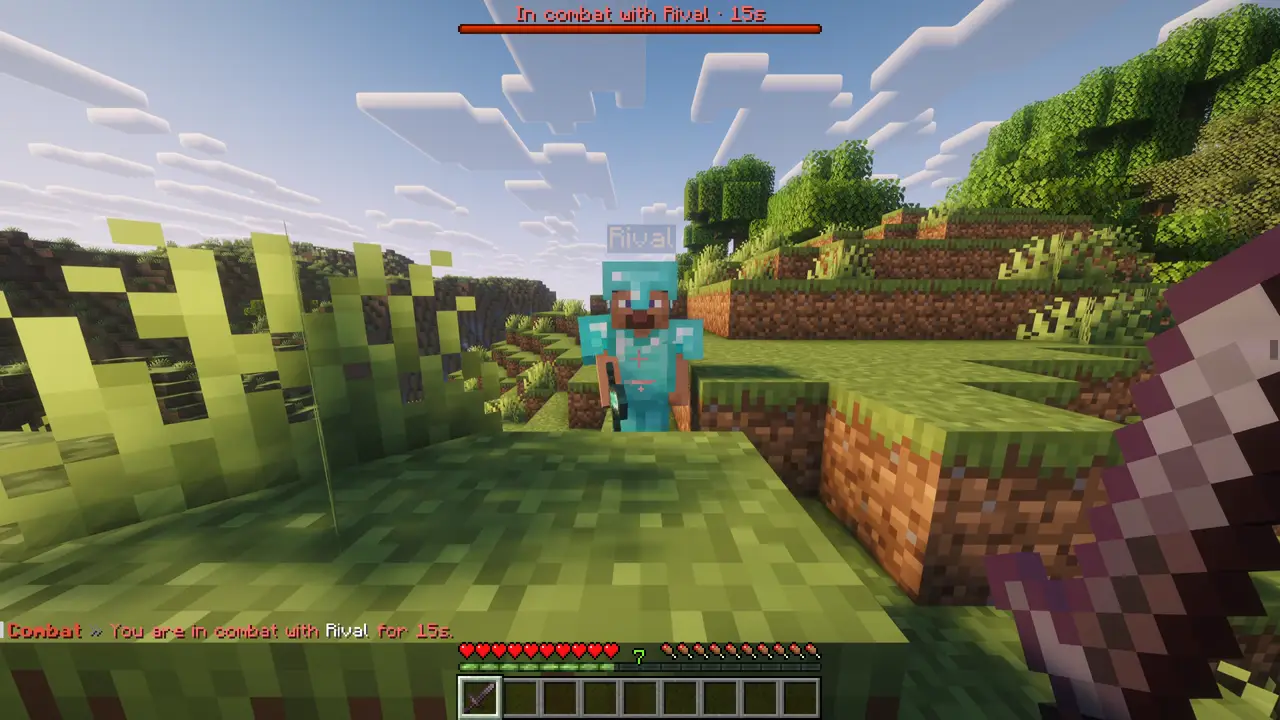
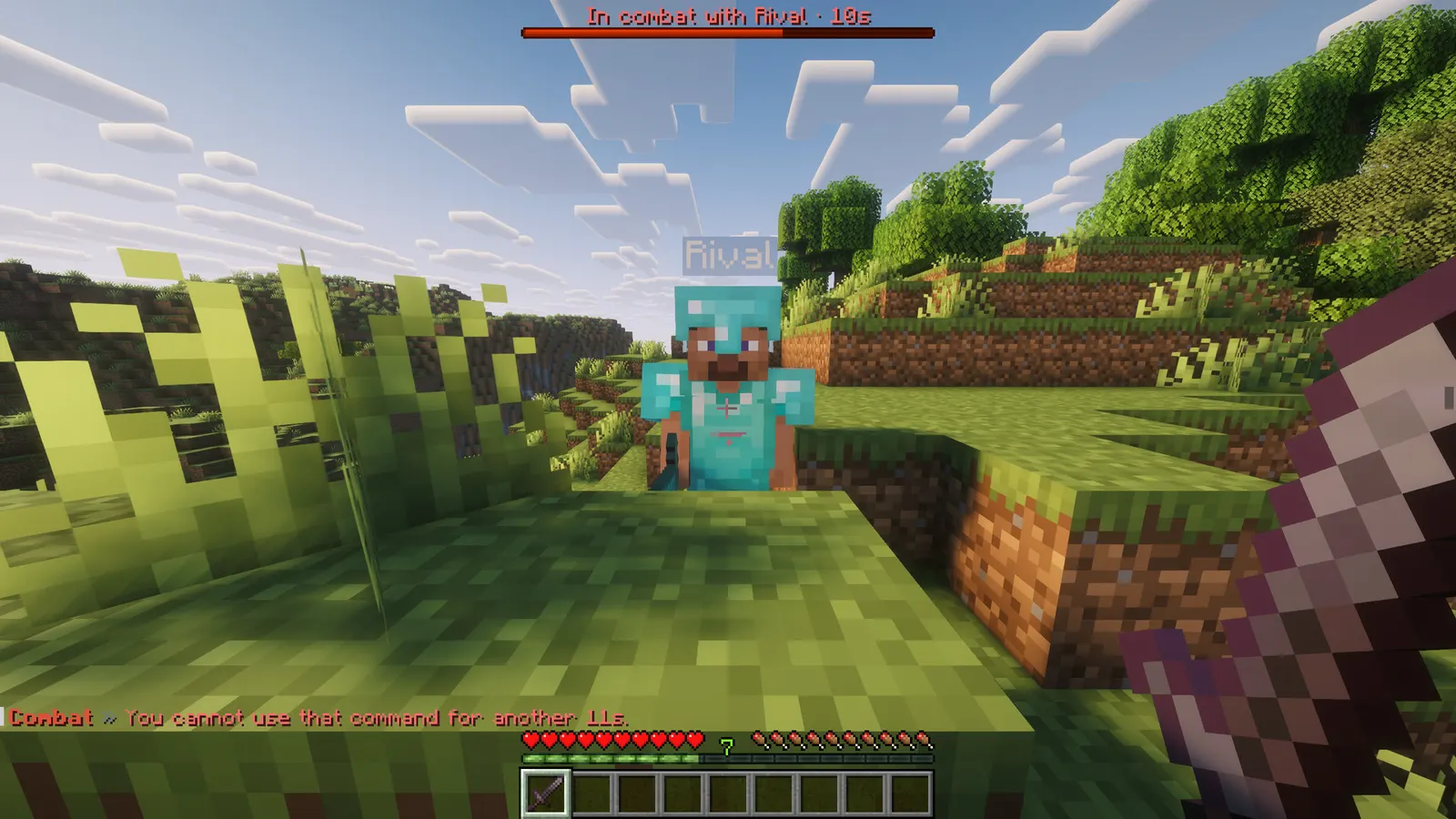
- Hit someone and you are both tagged, with a boss bar counting the seconds down (or the action bar, or neither)
- Teleports blocked while tagged: no /home, no /spawn, no warps. Ender pearls still work, because that is the fight.
- A command list you control, as a blacklist or a whitelist
- Logging out while tagged kills the player, runs your own commands, and announces it
- Killing your opponent clears your own tag at once
- The bar names who you are fighting, so a crowd fight stays readable
03Safe zones
- Make one with a command: /standoff zone create spawn 40
- PvP is off inside, for melee, projectiles and splash potions alike
- A tagged player cannot walk in, so nobody escapes a fight by sprinting to spawn, but they can always walk out
- As many as you want, any size, per world
04New-player protection
- A first-time player cannot be hit for a configurable number of minutes
- Attacking somebody drops their own protection at once, so it cannot be abused
- /pvp lets them drop it early when they want the fight
- Survives restarts and shows the time left on /combat
05Potion bans
Ban any potion effect by name. Drinking and throwing are both blocked, base potions and custom ones alike, with a message rather than a silent cancel.
06The staff panel
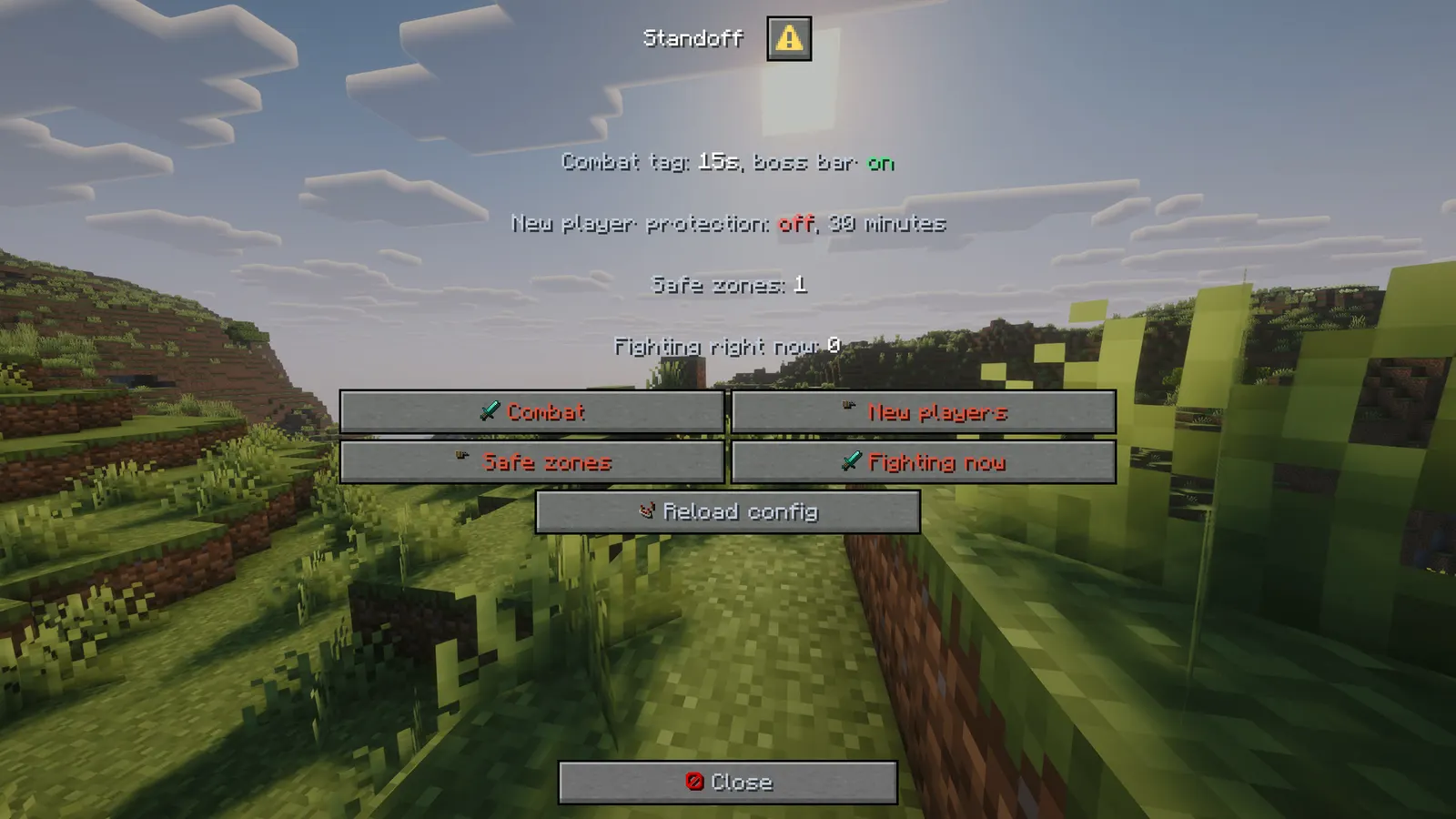
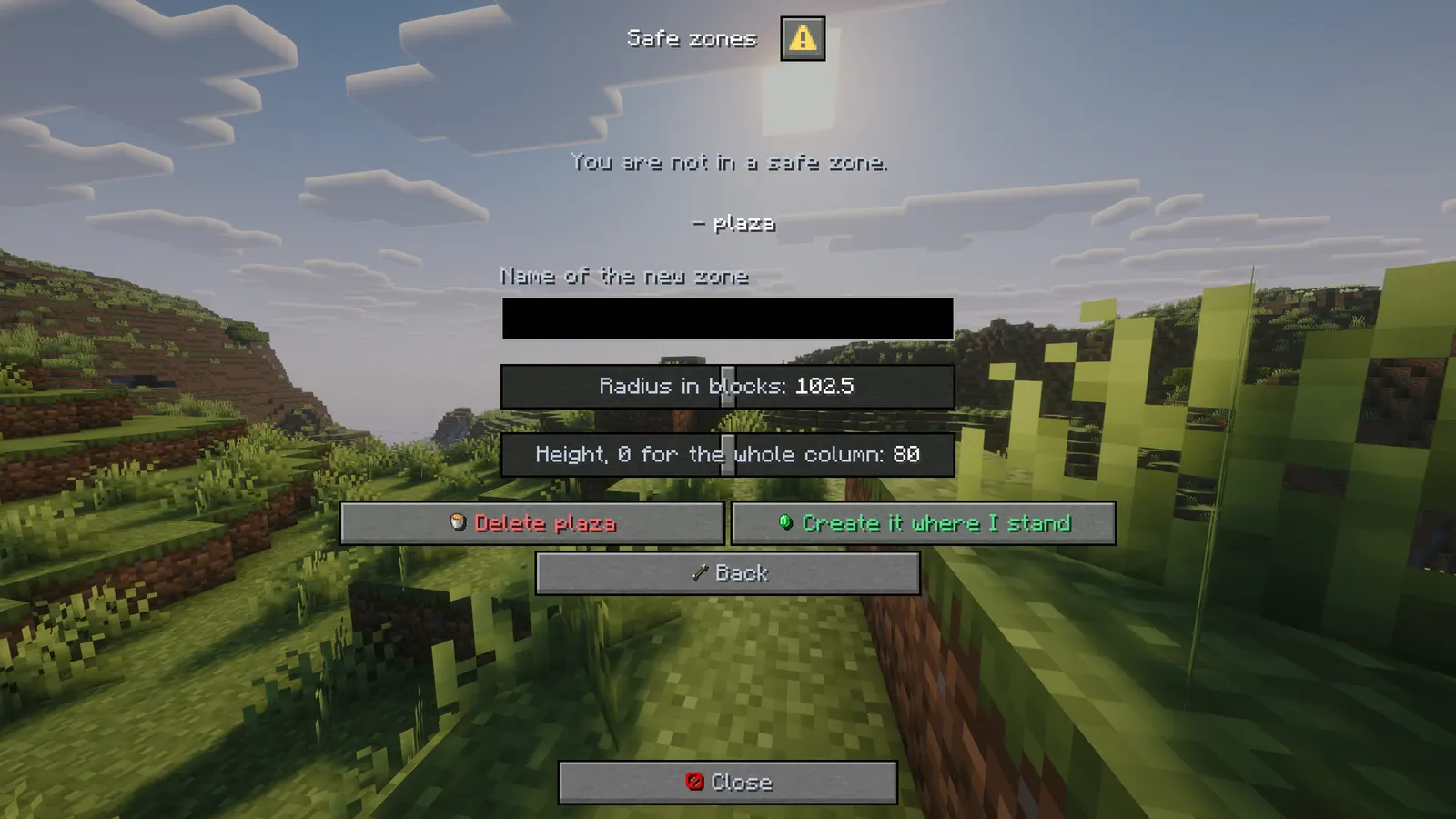
- /standoff on its own opens a real Minecraft dialog window with four screens: combat, new players, safe zones and everybody fighting right now
- Every switch flips in place and is written straight to config.yml: tag length, boss bar, action bar, blocked teleports, clear on kill, the logout punishment, the command list mode
- Safe zones are made from the panel: type a name, set the radius and the height with sliders, and it is created where you stand
- The fighting screen lists everybody with a live tag and unties any of them with one click
- Nothing needs a reload: the plugin reads those numbers as it runs
menu: falseputs the plain help line back
Installation
Requirements
- Server
- Paper, or a Paper fork such as Purpur. Spigot and CraftBukkit won't work, because it uses Paper-only APIs.
- Minecraft
- 1.21.11; plugin.yml api-version 1.21; built against Paper API 1.21.11
- Java
- 21 or newer
- Needs
- No other plugin
- Works with
PlaceholderAPI, when installed
The listing also says:
- The staff panel is a dialog window and needs a 1.21.6 or newer client
- No other plugins required. The safe zones are Standoff's own and do not use WorldGuard or any other region plugin.
- No DRM, no licence key and no licence server; the code is not obfuscated
Steps
- Download
Standoff.jarfrom BuiltByBit. There's no licence key to enter. - Stop the server and put the jar in the
pluginsfolder. - Start the server. The plugin writes
plugins/Standoff/config.ymlwith the defaults listed under Configuration. - Change
config.ymlto fit your server. - Run
/standoff reload(reload the config) to apply your changes, or restart the server.
Setup guide
- Drop Standoff.jar into /plugins and restart.
- Stand in the middle of spawn and run /standoff zone create spawn 40.
- Set combat.seconds to taste (15 for a fast server, 30 for a serious one).
- Decide what logging out costs: on-logout: kill, or a ban command in logout-commands.
Lifesteal and hardcore: longer tag, kill on logout, no teleports, and a small spawn zone so the gate is not a farm.
SMP: 15 second tag, generous new-player protection, one safe zone at spawn and one at the shop.
KitPvP and FFA: short tag, no safe zone in the arena, bypass for staff in spectator.
Commands
Straight from plugin.yml. Where the permission column says "not set", plugin.yml puts no permission on the command itself; the nodes the plugin checks are under Permissions.
| Command | Aliases | Usage | What it does | Permission |
|---|---|---|---|---|
/standoff | /sto | /standoff zone|tag|untag|newbie|reload | Standoff admin. | not set |
/combat | /ct | /combat | Your combat state. | not set |
/pvp | none | /pvp | Drop your new player protection. | not set |
Every subcommand
/combat                              Your combat state and protection time.
/pvp                                 Drop your new-player protection.
/standoff zone create <id> <radius> [height]   Make a safe zone here.
/standoff zone delete <id>           Remove one.
/standoff zone list                  List them.
/standoff zone here                  Which zone you are standing in.
/standoff tag <player>               Put somebody in combat.
/standoff untag <player>             Take them out of it.
/standoff newbie <player>            Give or remove new-player protection.
/standoff reload                     Reload the config.
Permissions
From plugin.yml.
| Node | Default | What it allows | Includes |
|---|---|---|---|
standoff.admin | operators | Manage zones and combat state. | none |
standoff.bypass | nobody until granted | Never tagged, never blocked, keeps flight and elytra in a fight. | none |
Placeholders
Registered with PlaceholderAPI as standoff. You need PlaceholderAPI installed for these to work.
| Placeholder | Shows |
|---|---|
%standoff_tagged% | yes or no |
%standoff_seconds% | seconds of combat left, 0 when not tagged |
%standoff_opponent% | who they are fighting, empty when not tagged |
%standoff_protected% | yes or no: new player protection |
%standoff_protection_minutes% | minutes of protection left |
%standoff_in_safezone% | yes or no |
%standoff_zone% | the safe zone they stand in, empty outside one |
%standoff_fighting% | how many players are in combat right now |
Configuration
The default files exactly as they ship in the jar, comments included. The plugin writes them to plugins/Standoff/ the first time it starts.
config.yml
| Key | Default | The comment above it |
|---|---|---|
menu | true | bare /standoff opens the staff panel instead of printing the help |
combat | section, 14 keys | none |
newbie | section, 3 keys | none |
banned-potions | [] (empty list) | e.g. [strength, invisibility] - blocks drinking and throwing them |
theme | section, 11 keys | Every message below is written against these names, not against hex codes: <accent>Open</accent> rather than <#e0533d>Open</#e0533d>. Change a colour here and it changes on every screen at once. Ordinary MiniMessage still works, so <gradient:#a:#b> and... |
messages | section, 113 keys | none |
review-reminder | true | One thank-you line with the BuiltByBit review link: once in the console after install and once in chat for the first operator who joins. It never repeats and sends nothing anywhere. false turns it off. |
plugins/Standoff/config.yml179 lines
# Standoff - combat tagging, safe zones and new-player protection.

menu: true                  # bare /standoff opens the staff panel instead of printing the help

combat:
  seconds: 15               # how long a hit keeps both sides in combat
  boss-bar: true
  boss-bar-colour: RED      # PINK, BLUE, RED, GREEN, YELLOW, PURPLE, WHITE
  action-bar: false
  block-teleport: true      # no /home, /spawn or warps while tagged
  block-plugin-teleport: true
  # No flying while tagged (/fly, double jump). Flight that was allowed before comes back when the tag ends.
  # Creative and spectator are never touched.
  disable-flight: true
  # No elytra gliding while tagged. Off by default, because elytra and mace fights are a fight too.
  disable-elytra: false
  clear-on-kill: true      # killing your opponent ends your own tag
  on-logout: kill           # kill, or none
  announce-logout: true
  logout-commands: []       # e.g. ["ban {player} 1h combat log"]
  commands-are-whitelist: false   # true = only the listed commands are allowed while tagged
  blocked-commands: [spawn, home, homes, tp, tpa, tpahere, warp, back, hub, lobby, shop, enderchest, ec]

newbie:
  enabled: true
  minutes: 30               # protection for a brand new player
  drop-on-attack: true      # attacking someone ends your own protection

banned-potions: []          # e.g. [strength, invisibility] - blocks drinking and throwing them

# ------------------------------------------------------------------------------------------------
# THEME
# ------------------------------------------------------------------------------------------------
# Every message below is written against these names, not against hex codes: <accent>Open</accent>
# rather than <#e0533d>Open</#e0533d>. Change a colour here and it changes on every screen at
# once. Ordinary MiniMessage still works, so <gradient:#a:#b> and <#ff0000> are fine anywhere.
theme:
  accent: "#e0533d"     # your colour: headings and anything the player is meant to click
  accent2: "#eea094"    # a lighter accent, for a second level of emphasis
  title: "#f4f7ff"      # screen titles
  text: "#c2ccdd"       # ordinary prose
  muted: "#6b7a94"      # hints, separators, anything the eye should skip
  value: "#ffffff"      # the numbers and names the player opened the screen to read
  good: "#57e08a"
  warn: "#ffc857"
  bad: "#ff6b6b"
  small-caps: false     # ᴇхᴀᴍᴘʟᴇ - a garnish; whole menus in it read badly
  # Real Minecraft item pictures beside the buttons and in the chest screens. Drawn from the
  # client's own textures, so there is nothing to install and no resource pack: it needs a
  # 1.21.9 or newer client, and older ones simply see the buttons as words.
  item-icons: true

messages:
  prefix: "<accent><bold>Combat</bold></accent> <muted>»</muted> "
  no-permission: "<bad>You cannot do that.</bad>"
  players-only: "<text>Players only.</text>"
  unknown-player: "<bad>Unknown player: </bad><value>{name}</value>"
  reloaded: "<value>Config reloaded.</value>"
  someone: "someone"
  help: "<text>/standoff zone create|delete|list|here · tag <player> · untag <player> · newbie <player> · reload</text>"

  combat-start: "<bad>You are in combat with </bad><value>{player}</value><bad> for {seconds}s.</bad>"
  combat-end: "<good>You are out of combat.</good>"
  combat-bar: "<bad>In combat with {player} · {seconds}s</bad>"
  combat-actionbar: "<bad>Combat: {seconds}s</bad>"
  combat-status-on: "<text>In combat for another </text><value>{seconds}s</value><text>.</text>"
  combat-status-off: "<text>You are not in combat.</text>"
  combat-no-teleport: "<bad>You cannot teleport for another {seconds}s.</bad>"
  combat-no-command: "<bad>You cannot use that command for another {seconds}s.</bad>"
  combat-no-flight: "<bad>You cannot fly while you are in combat.</bad>"
  combat-no-elytra: "<bad>You cannot glide while you are in combat.</bad>"
  combat-logged: "<bad>{player} logged out in combat.</bad>"
  opponent-logged: "<text>{player} logged out on you.</text>"

  zone-no-pvp: "<bad>No PvP in a safe zone.</bad>"
  zone-locked-out: "<bad>You cannot enter a safe zone for another {seconds}s.</bad>"
  zone-help: "<text>/standoff zone create <id> <radius> [height] · delete <id> · list · here</text>"
  zone-created: "<text>Safe zone </text><value>{zone}</value><text> created with radius {radius}.</text>"
  zone-deleted: "<text>Safe zone </text><value>{zone}</value><text> deleted.</text>"
  zone-unknown: "<bad>No safe zone called </bad><value>{zone}</value>"
  zone-list: "<text>Safe zones: </text><value>{list}</value>"
  zone-here: "<text>You are in safe zone </text><value>{zone}</value><text>.</text>"
  zone-here-none: "<text>You are not in a safe zone.</text>"

  newbie-granted: "<good>You are protected from PvP for {minutes} minutes.</good> <text>/pvp to drop it.</text>"
  newbie-protected: "<bad>{player} is a new player and is protected for another {minutes} minute(s).</bad>"
  newbie-you-are-protected: "<bad>You cannot attack while you are protected. /pvp to drop it.</bad>"
  newbie-dropped: "<text>Your new player protection is gone. Good luck.</text>"
  newbie-status: "<text>New player protection: </text><value>{minutes} minute(s)</value>"
  newbie-none: "<text>You are not protected.</text>"
  newbie-removed: "<text>Protection of </text><value>{player}</value><text> removed.</text>"
  newbie-given: "<text>{player} is protected again.</text>"

  # The staff panel. Every line here is a screen title, a button label or a tooltip.
  # "on" and "off" stay in quotes: YAML reads a bare on or off as true or false.
  "on": "<good>on</good>"
  "off": "<bad>off</bad>"
  # What the PlaceholderAPI placeholders such as %standoff_tagged% print. Quoted for the same reason.
  "yes": "yes"
  "no": "no"
  menu-title: "<value>Standoff</value>"
  menu-close: "<white><icon:close></white><text>Close</text>"
  menu-back: "<white><icon:back></white><text>Back</text>"
  menu-back-tip: "<text>Back to the first screen.</text>"
  menu-empty: "<text>Fill the field in first.</text>"
  menu-home-combat: "<text>Combat tag: </text><value>{seconds}s</value><text>, boss bar {bar}</text>"
  menu-home-newbie: "<text>New player protection: </text>{state}<text>, {minutes} minutes</text>"
  menu-home-zones: "<text>Safe zones: </text><value>{count}</value>"
  menu-home-fighting: "<text>Fighting right now: </text><value>{count}</value>"
  menu-combat: "<white><icon:combat></white><accent>Combat</accent>"
  menu-combat-tip: "<text>Tag length, boss bar, blocked commands and logout punishment.</text>"
  menu-combat-title: "<value>Combat</value>"
  menu-combat-intro: "<text>A hit keeps both sides in combat for </text><value>{seconds}s</value><text>.</text>"
  menu-newbie: "<white><icon:shield></white><accent>New players</accent>"
  menu-newbie-tip: "<text>How long a fresh player is safe from PvP.</text>"
  menu-newbie-title: "<value>New players</value>"
  menu-newbie-intro: "<text>A new player is protected for </text><value>{minutes} minutes</value><text>.</text>"
  menu-zones: "<white><icon:shield></white><accent>Safe zones</accent>"
  menu-zones-tip: "<text>Create a zone where you stand, or delete one.</text>"
  menu-zones-title: "<value>Safe zones</value>"
  menu-zones-empty: "<text>No safe zones yet.</text>"
  menu-zone-line: "<text> - </text><value>{zone}</value>"
  menu-zone-field: "<text>Name of the new zone</text>"
  menu-zone-radius: "<text>Radius in blocks</text>"
  menu-zone-height: "<text>Height, 0 for the whole column</text>"
  menu-zone-create: "<white><icon:yes></white><good>Create it where I stand</good>"
  menu-zone-create-tip: "<text>Uses the name and the numbers above.</text>"
  menu-zone-delete: "<white><icon:delete></white><bad>Delete {zone}</bad>"
  menu-zone-delete-tip: "<text>Remove the safe zone {zone}.</text>"
  menu-fighting: "<white><icon:combat></white><accent>Fighting now</accent>"
  menu-fighting-tip: "<text>Everyone with a live combat tag.</text>"
  menu-fighting-title: "<value>Fighting now</value>"
  menu-fighting-line: "<text> - </text><value>{player}</value><text>, {seconds}s left</text>"
  menu-fighting-empty: "<text>Nobody is in combat.</text>"
  menu-untag: "<white><icon:delete></white><value>Untag {player}</value>"
  menu-untag-tip: "<text>End the combat tag of {player}.</text>"
  menu-reload: "<white><icon:reload></white><text>Reload config</text>"
  menu-reload-tip: "<text>Read config.yml and zones.yml again.</text>"

  switch-on: "<white><icon:yes></white><good><bold>ON</bold></good>  <value>{title}</value>"
  switch-off: "<white><icon:no></white><bad><bold>OFF</bold></bad> <text>{title}</text>"
  step-up: "<value>{title} +{by}</value> <muted>({value})</muted>"
  step-down: "<value>{title} -{by}</value> <muted>({value})</muted>"
  step-tip: "<text>Click to change the number.</text>"
  field-seconds: "Seconds"
  field-minutes: "Minutes"
  switch-boss-bar: "Boss bar"
  switch-boss-bar-tip: "<text>Show a red bar with the countdown while tagged.</text>"
  switch-action-bar: "Action bar"
  switch-action-bar-tip: "<text>Show the countdown above the hotbar as well.</text>"
  switch-block-teleport: "Block teleports"
  switch-block-teleport-tip: "<text>No /home, /spawn or warps while tagged.</text>"
  switch-block-plugin-teleport: "Block plugin teleports"
  switch-block-plugin-teleport-tip: "<text>Also stop teleports other plugins start.</text>"
  switch-disable-flight: "No flying in combat"
  switch-disable-flight-tip: "<text>Takes flight away while tagged and gives it back after.</text>"
  switch-disable-elytra: "No elytra in combat"
  switch-disable-elytra-tip: "<text>Stops gliding while tagged.</text>"
  switch-clear-on-kill: "Clear on kill"
  switch-clear-on-kill-tip: "<text>Killing your opponent ends your own tag.</text>"
  switch-announce-logout: "Announce combat log"
  switch-announce-logout-tip: "<text>Tell the server when somebody logs out in combat.</text>"
  switch-command-whitelist: "Command list is a whitelist"
  switch-command-whitelist-tip: "<text>On: only the listed commands work while tagged.</text>"
  switch-logout-kill: "<good>■</good> <value>Logout: kill</value>"
  switch-logout-none: "<muted>■</muted> <text>Logout: nothing</text>"
  switch-logout-tip: "<text>What happens to somebody who logs out in combat.</text>"
  switch-newbie-enabled: "Protection on"
  switch-newbie-enabled-tip: "<text>New players cannot be hit until it runs out.</text>"
  switch-newbie-drop: "Attacking drops it"
  switch-newbie-drop-tip: "<text>Hitting someone ends your own protection.</text>"

  potion-banned: "<bad>That potion is banned on this server.</bad>"
  tagged: "<text>{player} is now in combat.</text>"
  untagged: "<text>{player} is out of combat.</text>"

# One thank-you line with the BuiltByBit review link: once in the console after install and once
# in chat for the first operator who joins. It never repeats and sends nothing anywhere. false turns it off.
review-reminder: true
Config guide
The short annotated version from the listing. If it and the files above disagree, the files are what actually ships.
combat:
  seconds: 15
  boss-bar: true
  boss-bar-colour: RED
  block-teleport: true
  clear-on-kill: true
  on-logout: kill            kill, or none
  logout-commands: []        e.g. ["ban {player} 1h combat log"]
  commands-are-whitelist: false
  blocked-commands: [spawn, home, tp, warp, back, hub, ...]
newbie:
  enabled: true
  minutes: 30
  drop-on-attack: true
banned-potions: []           e.g. [strength, invisibility]
FAQ
Which servers and versions does it run on?
It needs Paper or a Paper fork like Purpur, because it uses Paper-only APIs (the dialog API for its menus, Adventure text components). Spigot and CraftBukkit won't work. The listing says Minecraft 1.21.11. plugin.yml declares api-version 1.21, the jar is built against Paper API 1.21.11, and it needs Java 21 or newer.
Does it need other plugins?
No, it runs without any other plugin (plugin.yml has no hard dependencies). Optional: PlaceholderAPI (softdepend), used when it's there. The listing adds: No other plugins required. The safe zones are Standoff's own and do not use WorldGuard or any other region plugin.
How do I apply config changes?
Edit plugins/Standoff/config.yml and run /standoff reload (reload the config). Restarting works too.
Does it run on Folia, or for Bedrock players?
I haven't tested it on Folia, and plugin.yml doesn't declare folia-supported. I haven't tested Bedrock players through Geyser either.
Is there DRM or a licence key?
No. There is nothing to activate and no licence server to reach, and the code is not obfuscated.
How long does setup take?
Drop the jar into /plugins and restart. The setup guide above has 4 short steps.
Can tagged players fly away?
No. Flight is blocked while tagged (combat.disable-flight), and elytra can be blocked too (combat.disable-elytra).
Links
- BuiltByBit
- Standoff
- Support
- discord.gg/KG4ubAZEuw
- Everything
- The Complete Collection on BuiltByBit
- More plugins
- All my plugins
- Custom work
- Commissions
Support
Questions, bugs or ideas: the active support Discord or the discussion tab on BuiltByBit. When something breaks, include your server version and the error from the console.